Hello,
I am facing the following error when launching the zed_isaac_ros_april_tag example :
[ERROR] [launch_ros.actions.load_composable_nodes]: Failed to load node 'zed_image_converter' of type 'nvidia::isaac_ros::image_proc::ImageFormatConverterNode' in container 'zed_isaac/zed_container': Component constructor threw an exception: Failed to create CUDA stream, cuda_error: cudaErrorNoDevice, error_str: no CUDA-capable device is detected
[component_container_mt-1] [INFO] [1790083143.171520005] [zed_isaac.zed_container]: Instantiate class: rclcpp_components::NodeFactoryTemplate<nvidia::isaac_ros::image_proc::ImageFormatConverterNode>
[component_container_mt-1] [INFO] [1790083143.178402142] [zed_isaac.zed_image_converter]: [ImageFormatConverterNode] Pool sized from image_width=960, image_height=600, encoding=bgr8: block_size=1728000 bytes (40 blocks)
[component_container_mt-1] [ERROR] [1790083143.185652409] [zed_isaac.zed_container]: Component constructor threw an exception: Failed to create CUDA stream, cuda_error: cudaErrorNoDevice, error_str: no CUDA-capable device is detected

....

[component_container_mt-1] [INFO] [1790074776.816714469] [zed_isaac.zed]: === CAMERA OPENING ===
[component_container_mt-1] in void sl::Mat::alloc(size_t, size_t, sl::MAT_TYPE, sl::MEM) : Err [100]: no CUDA-capable device is detected.
[component_container_mt-1] in void sl::Mat::alloc(size_t, size_t, sl::MAT_TYPE, sl::MEM) : Err [100]: no CUDA-capable device is detected.
[component_container_mt-1] in void sl::Mat::alloc(size_t, size_t, sl::MAT_TYPE, sl::MEM) : Err [100]: no CUDA-capable device is detected.
[component_container_mt-1] in void sl::Mat::alloc(size_t, size_t, sl::MAT_TYPE, sl::MEM) : Err [100]: no CUDA-capable device is detected.
[component_container_mt-1] [2026-09-22 12:59:37 UTC][ZED][INFO] Logging level INFO
[component_container_mt-1] in void sl::Mat::alloc(size_t, size_t, sl::MAT_TYPE, sl::MEM) : Err [100]: no CUDA-capable device is detected.
[component_container_mt-1] in void sl::Mat::alloc(size_t, size_t, sl::MAT_TYPE, sl::MEM) : Err [100]: no CUDA-capable device is detected.
[component_container_mt-1] in void sl::Mat::alloc(size_t, size_t, sl::MAT_TYPE, sl::MEM) : Err [100]: no CUDA-capable device is detected.
[component_container_mt-1] in void sl::Mat::alloc(size_t, size_t, sl::MAT_TYPE, sl::MEM) : Err [100]: no CUDA-capable device is detected.
[component_container_mt-1] in void sl::Mat::alloc(size_t, size_t, sl::MAT_TYPE, sl::MEM) : Err [100]: no CUDA-capable device is detected.
[component_container_mt-1] in void sl::Mat::alloc(size_t, size_t, sl::MAT_TYPE, sl::MEM) : Err [100]: no CUDA-capable device is detected.
[component_container_mt-1] [2026-09-22 12:59:38 UTC][ZED][ERROR] No NVIDIA graphics card detected. Install an NVIDIA GPU, CUDA and restart your computer after completing installation.
[component_container_mt-1] [2026-09-22 12:59:38 UTC][ZED][ERROR] NO GPU DETECTED in sl::ERROR_CODE sl::Camera::open(sl::InitParameters)
[component_container_mt-1] [WARN] [1790074778.201018427] [zed_isaac.zed]: Error opening camera: NO GPU DETECTED
[component_container_mt-1] [INFO] [1790074778.201146847] [zed_isaac.zed]: Please verify the camera connection
My system is :
- NVidia Jetson Orin with Jetpack 7.2
- Isaac ROS 4.6.0.0
- ZED Driver v1.4.3
- ZED SDK v5.2.0
- ZED wrapper v5.2.0
- ZED X Camera plugged to the Jetson using the ZED Link Mono capture card
Isaac ROS and the ZED environment are all running inside a Docker container, based on a Dockerfile and installation script included in the NVidia Jetpack OS (see below).
Dockerfile.zed :
# Copyright (c) 2025, NVIDIA CORPORATION.  All rights reserved.
#
# NVIDIA CORPORATION and its licensors retain all intellectual property
# and proprietary rights in and to this software, related documentation
# and any modifications thereto.  Any use, reproduction, disclosure or
# distribution of this software and related documentation without an express
# license agreement from NVIDIA CORPORATION is strictly prohibited.

# Dockerfile for setting up ZED SDK
ARG BASE_IMAGE=ubuntu:24.04
FROM ${BASE_IMAGE}

# Use bash for RUN commands (needed for `source`)
SHELL ["/bin/bash", "-c"]

COPY scripts/install-zed-x86_64.sh /opt/zed/install-zed-x86_64.sh
COPY scripts/install-zed-aarch64.sh /opt/zed/install-zed-aarch64.sh

# Install ZED SDK based on architecture
RUN chmod +x /opt/zed/install-zed-x86_64.sh /opt/zed/install-zed-aarch64.sh && \
    arch="$(uname -m)" && \
    if [[ "${arch}" == "x86_64" ]]; then \
        /opt/zed/install-zed-x86_64.sh; \
    elif [[ "${arch}" == "aarch64" ]]; then \
        /opt/zed/install-zed-aarch64.sh; \
    else \
        echo "Unsupported architecture: ${arch}"; \
        exit 1; \
    fi

# ------------------------------------------------------------------------------
# Install zed-ros2-wrapper into a workspace and build it
# Expects:
#   - ROS 2 Jazzy already installed in the base image at /opt/ros/${ROS_DISTRO}
#   - rosdep initialized (as in our isaac_ros base)
# -------------------------------------------------------------------------------
ARG ROS_DISTRO=jazzy
ENV ROS_DISTRO=${ROS_DISTRO}
ENV ROS_ROOT=/opt/ros/${ROS_DISTRO}

ARG ISAAC_ROS_WS=/opt/ros_ws
ENV ISAAC_ROS_WS=${ISAAC_ROS_WS}

# Clone zed-ros2-wrapper (with submodules)
RUN --mount=type=cache,sharing=locked,target=/var/cache/apt --mount=type=cache,sharing=locked,target=/var/lib/apt/lists \
    mkdir -p ${ISAAC_ROS_WS}/src && cd ${ISAAC_ROS_WS}/src \
    && git clone --recurse-submodules https://github.com/stereolabs/zed-ros2-wrapper -b v5.2.0

# Disable ZED SDK AI features by default in zed-ros2-wrapper config.
# We install the ZED SDK with `skip_od_module`, so Neural Depth / Object Detection / Body Tracking
# must not be requested at runtime (avoids TensorRT dependency and SDK "corrupted installation" errors).
RUN python3 - <<'PY'
from __future__ import annotations

from pathlib import Path

cfg_dir = Path("/opt/ros_ws/src/zed-ros2-wrapper/zed_wrapper/config")
if not cfg_dir.is_dir():
    raise SystemExit(f"Expected config directory not found: {cfg_dir}")

def patch_text(text: str) -> str:
    # SDK5-style config (strings)
    text = text.replace("depth_mode: 'NEURAL_LIGHT'", "depth_mode: 'NONE'")
    text = text.replace("depth_mode: 'NEURAL'", "depth_mode: 'NONE'")
    text = text.replace("depth_mode: 'NEURAL_PLUS'", "depth_mode: 'NONE'")
    # Older-style config (numeric quality: 0 == NONE)
    text = text.replace("quality: 1", "quality: 0")
    text = text.replace("quality: 2", "quality: 0")
    text = text.replace("quality: 3", "quality: 0")
    # Explicitly disable detection/tracking toggles if present
    text = text.replace("od_enabled: true", "od_enabled: false")
    text = text.replace("bt_enabled: true", "bt_enabled: false")
    return text

patched_any = False
for path in sorted(cfg_dir.glob("common*.yaml")):
    original = path.read_text(encoding="utf-8")
    patched = patch_text(original)
    if patched != original:
        path.write_text(patched, encoding="utf-8")
        patched_any = True

if not patched_any:
    raise SystemExit(
        f"No common*.yaml files were modified under {cfg_dir}. "
        "Wrapper config format may have changed."
    )
PY

# Install dependencies and build only up to zed_wrapper
RUN --mount=type=cache,target=/var/cache/apt,sharing=locked \
    cd ${ISAAC_ROS_WS} \
    && apt-get update \
    && if [[ -f "${ROS_ROOT}/setup.bash" ]]; then source "${ROS_ROOT}/setup.bash"; else echo "Missing ROS setup: ${ROS_ROOT}/setup.bash" && exit 1; fi \
    && rosdep update \
    # zed-ros2-wrapper's build expects CUDA toolchain to be available.
    # Install CUDA via rosdep (matches isaac_ros_zed's `cuda-toolkit` dependency).
    && mkdir -p /tmp/isaac_ros_zed_deps \
    && printf '%s\n' \
        '<?xml version="1.0"?>' \
        '<package format="3">' \
        '  <name>isaac_ros_zed_deps</name>' \
        '  <version>0.0.0</version>' \
        '  <description>Dependency shim for ZED image build</description>' \
        '  <maintainer email="isaac-ros-maintainers@nvidia.com">Isaac ROS Maintainers</maintainer>' \
        '  <license>Apache-2.0</license>' \
        '  <depend>cuda-toolkit</depend>' \
        '</package>' \
      > /tmp/isaac_ros_zed_deps/package.xml \
    && rosdep install --from-paths /tmp/isaac_ros_zed_deps --ignore-src -r -y \
    && rosdep install --from-paths src/zed-ros2-wrapper --ignore-src -r -y \
    && colcon build --symlink-install --packages-up-to zed_wrapper \
    && echo "source ${ISAAC_ROS_WS}/install/setup.bash" | tee --append /etc/bash.bashrc
Installation script (install-zed-aarch64.sh) :
# Based on https://github.com/stereolabs/zed-docker

# Download dependencies for zed SDK installation RUN file
sudo apt-get update -y || true
sudo apt-get install --no-install-recommends lsb-release wget less zstd udev sudo apt-transport-https -y

# Download zed SDK installation RUN file to /tmp directory
cd /tmp

wget -q -O ZED_SDK_Linux.run https://stereolabs.sfo2.cdn.digitaloceanspaces.com/zedsdk/5.2/ZED_SDK_Tegra_L4T38.4_v5.2.0.zstd.run

chmod +x ./ZED_SDK_Linux.run
echo "Installing ZED SDK"
sudo ./ZED_SDK_Linux.run silent skip_od_module skip_python skip_drivers

# Cleanup
rm ZED_SDK_Linux.run
sudo rm -rf /var/lib/apt/lists/*
This works fine for a while but sometimes I get this error to pop up after a reboot of the Jetson board. Once the error has occurred once, it will come back after every successive reboot of the Jetson or the docker container.
I think I somehow made it work again by:
- Turning everything off
- Unplugging the power supply cable and GSML cable from the ZED Link Mono
- Plugging the cables back
- Turning the camera ON
- Wait a few seconds
- Turn the Jetson ON
It worked for some time, but then I had to restart the whole system. The error came back and now I’m stuck because the plugging / unplugging workaround does not work anymore.
Sometimes I get a different message telling me a library is missing (not sure if both issues are linked though):
[component_container_mt-1] [INFO] [1790080556.764427415] [zed_isaac.zed_container]: Load Library: /opt/ros/jazzy/lib/libimage_format_converter_node.so
[ERROR] [launch_ros.actions.load_composable_nodes]: Failed to load node 'zed_image_converter' of type 'nvidia::isaac_ros::image_proc::ImageFormatConverterNode' in container 'zed_isaac/zed_container': Failed to load library: Could not load library dlopen error: libnvbufsurface_nvsci.so.1.0.0: cannot open shared object file: No such file or directory, at ./src/shared_library.c:99
However, this file does exist inside the /usr/lib/aarch64-linux-gnu/tegra folder inside the Docker container.
I tested the GPU detection with the nvidia-smi command outside of Docker and got this result :
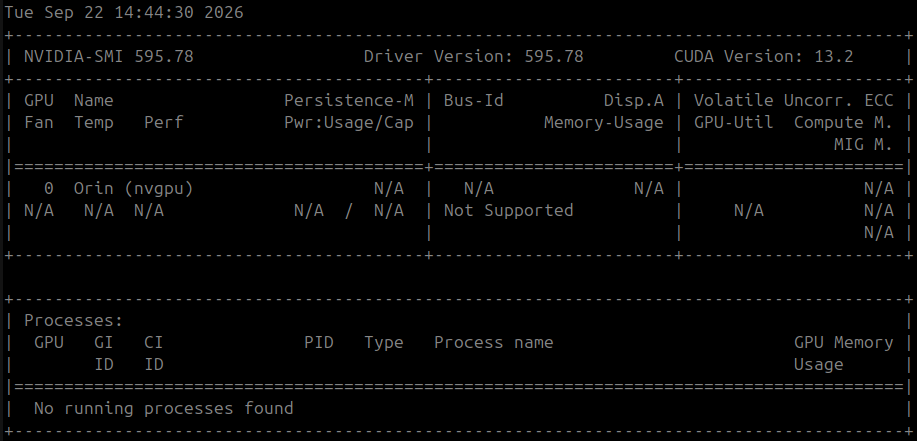
It looks like it detects the GPU just fine ?
After turning everything off for about 1h, it works again now, but I don’t know for how much longer… What could cause this issue and how could I fix it ?
Thank you for your support,
BR
