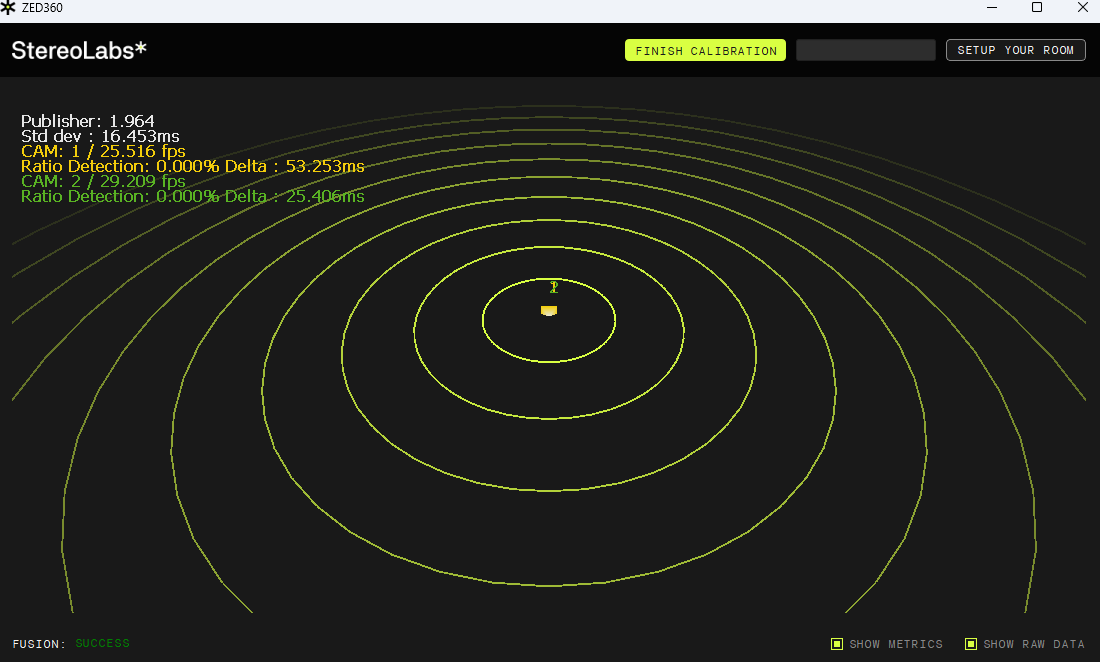
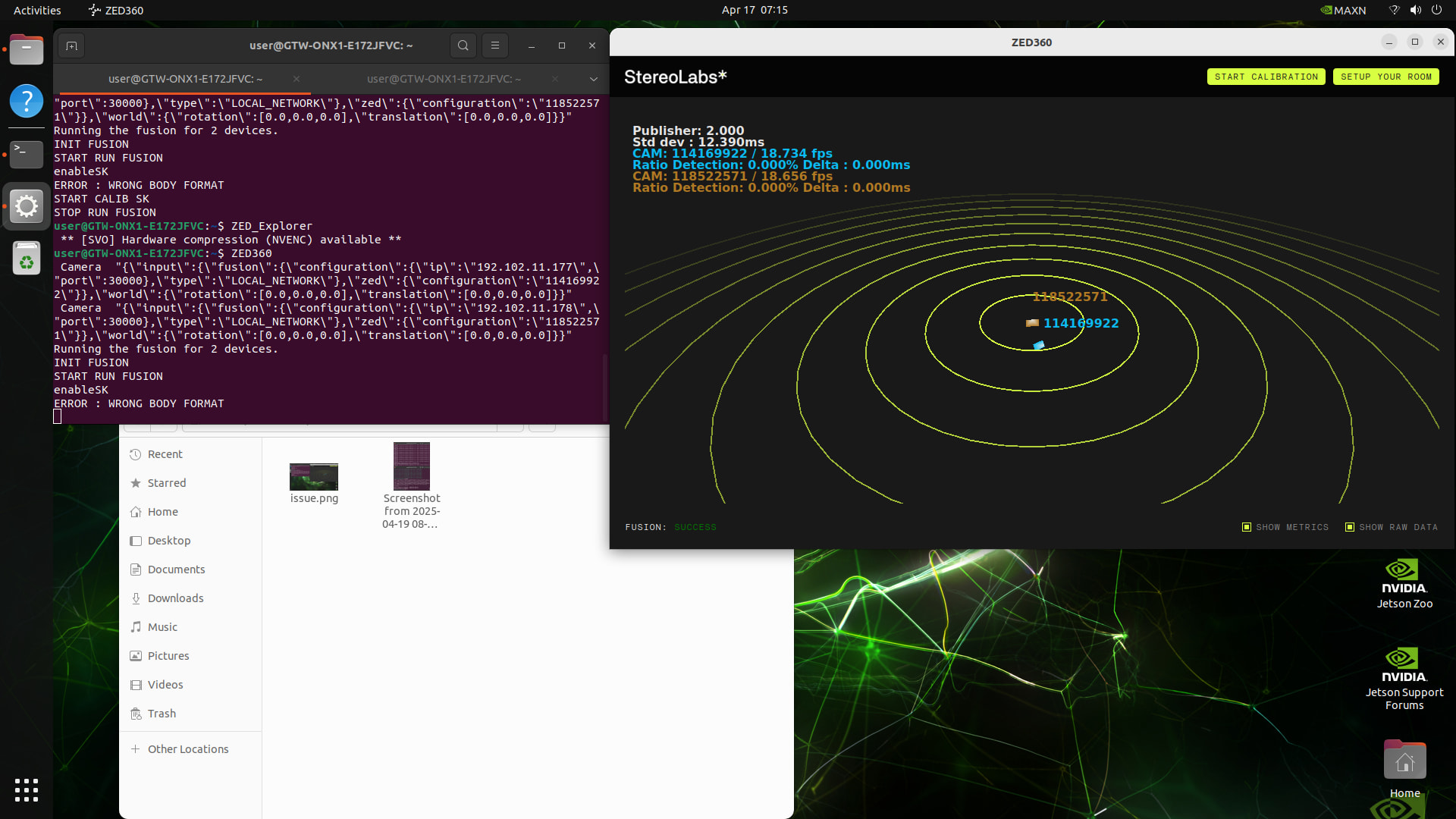
Hi, adding a third reproduction of this bug so it doesn’t look like a one-off. Same ERROR : WRONG BODY FORMAT in ZED360 as @Hedgehog and @ZavierL, with identical body formats on both senders.
Machine and camera setup
Two publisher hosts, each a ZED Box Orin NX running JetPack 6.0, on the same LAN as the receiver.
- Publisher A: two ZED X One monos used as a virtual stereo rig. Using the new SDK for local virtual cam setup without streaming.
- Publisher B: same rig type, same Python sender code.
- Receiver: separate host on the same LAN, running ZED360 on Linux and, for cross-checking, a minimal Python
sl.Fusion subscriber.
SDK version
ZED SDK 5.2.2 on both ZED Box Orin NX publishers and on the receiver host.
Sender-side code (publisher)
Identical Python on both boxes, only the serial / input type differs.
"""
Minimal headless body tracking sender for ZED Fusion.

This sender is designed to behave like a virtual sensor:
- it publishes raw body detections for Fusion over the local network,
- it keeps virtual stereo support for ZED X One left/right pairs,
- it keeps depth-related init settings from the existing headless sender,
- and uses body tracking/runtime parameters from the Fusion C++ reference.
"""

import argparse
import os
import signal

import pyzed.sl as sl


def _setup_virtual_stereo(init, left_serial, right_serial):
    stereo_serial = sl.generate_virtual_stereo_serial_number(left_serial, right_serial)
    if stereo_serial == 0:
        raise RuntimeError(
            "Failed to generate a virtual stereo serial number. "
            "Check that left/right serials are different and valid."
        )

    input_type = sl.InputType()
    if not hasattr(input_type, "set_virtual_stereo_from_serial_numbers"):
        raise RuntimeError(
            "This pyzed runtime does not support virtual stereo APIs on InputType. "
            "Please upgrade the installed ZED SDK Python package."
        )

    err = input_type.set_virtual_stereo_from_serial_numbers(left_serial, right_serial, stereo_serial)
    if err:
        raise RuntimeError(
            "set_virtual_stereo_from_serial_numbers failed for left={}, right={}, virtual={}".format(
                left_serial,
                right_serial,
                stereo_serial,
            )
        )

    init.input = input_type
    print(
        "[Sample] Using virtual stereo from ZED X One pair: left={}, right={}, virtual={}".format(
            left_serial,
            right_serial,
            stereo_serial,
        )
    )


def _parse_source_args(init, opt):
    if opt.leftsn is not None and opt.rightsn is not None:
        _setup_virtual_stereo(init, opt.leftsn, opt.rightsn)

    if len(opt.input_svo_file) > 0 and opt.input_svo_file.endswith((".svo", ".svo2")):
        init.set_from_svo_file(opt.input_svo_file)
        print("[Sample] Using SVO File input: {}".format(opt.input_svo_file))
    elif len(opt.ip_address) > 0:
        ip_str = opt.ip_address
        if ip_str.replace(":", "").replace(".", "").isdigit() and len(ip_str.split(".")) == 4 and len(ip_str.split(":")) == 2:
            init.set_from_stream(ip_str.split(":")[0], int(ip_str.split(":")[1]))
            print("[Sample] Using Stream input, IP : {}".format(ip_str))
        elif ip_str.replace(":", "").replace(".", "").isdigit() and len(ip_str.split(".")) == 4:
            init.set_from_stream(ip_str)
            print("[Sample] Using Stream input, IP : {}".format(ip_str))
        else:
            print("Invalid IP format. Using live stream")

    init.camera_resolution = sl.RESOLUTION.HD1080
    print("[Sample] Forcing Camera resolution HD1080")


def _is_jetson_platform():
    return os.path.exists("/etc/nv_tegra_release")


def main(opt):
    print("Running Body Tracking Fusion Sender (headless) ... Press Ctrl+C to quit")

    zed = sl.Camera()

    init_params = sl.InitParameters()
    init_params.camera_resolution = sl.RESOLUTION.HD1080
    init_params.camera_fps = 30
    init_params.coordinate_units = sl.UNIT.METER
    init_params.depth_mode = sl.DEPTH_MODE.NEURAL
    init_params.coordinate_system = sl.COORDINATE_SYSTEM.RIGHT_HANDED_Y_UP
    init_params.depth_maximum_distance = 15.0
    init_params.depth_minimum_distance = 1.5
    init_params.depth_stabilization = 40

    _parse_source_args(init_params, opt)

    err = zed.open(init_params)
    if err != sl.ERROR_CODE.SUCCESS:
        print("Camera open failed: {}".format(err))
        zed.close()
        return 1

    camera_info = zed.get_camera_information()
    actual_res = camera_info.camera_configuration.resolution
    if actual_res.width != 1920 or actual_res.height != 1080:
        print(
            "[Camera] ERROR: Forced HD1080 but SDK opened {}x{}. "
            "Stopping to avoid FOV mismatch.".format(actual_res.width, actual_res.height)
        )
        zed.close()
        return 1

    positional_tracking_parameters = sl.PositionalTrackingParameters()
    err = zed.enable_positional_tracking(positional_tracking_parameters)
    if err != sl.ERROR_CODE.SUCCESS:
        print("Positional tracking failed: {}".format(err))
        zed.close()
        return 1

    body_param = sl.BodyTrackingParameters()
    body_param.enable_tracking = False
    body_param.enable_body_fitting = False
    body_param.body_format = sl.BODY_FORMAT.BODY_18
    body_param.detection_model = sl.BODY_TRACKING_MODEL.HUMAN_BODY_ACCURATE

    err = zed.enable_body_tracking(body_param)
    if err != sl.ERROR_CODE.SUCCESS:
        print("Body tracking failed: {}".format(err))
        zed.disable_positional_tracking()
        zed.close()
        return 1

    body_runtime_param = sl.BodyTrackingRuntimeParameters()
    body_runtime_param.detection_confidence_threshold = 40
    body_runtime_param.skeleton_smoothing = 0.7

    communication_parameters = sl.CommunicationParameters()
    communication_parameters.set_for_local_network(30000)
    err = zed.start_publishing(communication_parameters)
    if err != sl.ERROR_CODE.SUCCESS:
        print("Fusion publishing start failed on port 30000: {}".format(err))
        zed.disable_body_tracking()
        zed.disable_positional_tracking()
        zed.close()
        return 1
    print("[Fusion] Publishing started on local network (port 30000)")

    running = True

    def signal_handler(_sig, _frame):
        nonlocal running
        running = False

    signal.signal(signal.SIGINT, signal_handler)

    bodies = sl.Bodies()
    frame_count = 0
    while running:
        if zed.grab() == sl.ERROR_CODE.SUCCESS:
            zed.retrieve_bodies(bodies, body_runtime_param)
            frame_count += 1
            if frame_count % 30 == 0:
                print("[Frame {:>6d}] Bodies detected: {}".format(frame_count, len(bodies.body_list)))
                print("Sample body skeleton keypoints (first body, if any):", bodies.body_list[0].keypoint if len(bodies.body_list) > 0 else "N/A")

    print("\nShutting down...")
    zed.disable_body_tracking()
    zed.disable_positional_tracking()
    zed.close()
    print("Done.")
    return 0


if __name__ == "__main__":
    parser = argparse.ArgumentParser()
    parser.add_argument(
        "--input_svo_file",
        type=str,
        help="Path to an .svo/.svo2 file to replay",
        default="",
    )
    parser.add_argument(
        "--ip_address",
        type=str,
        help="Stream source IP in format a.b.c.d:port or a.b.c.d",
        default="",
    )
    parser.add_argument(
        "--leftsn",
        type=int,
        help="Serial number of the left ZED X One camera",
        default=None,
    )
    parser.add_argument(
        "--rightsn",
        type=int,
        help="Serial number of the right ZED X One camera",
        default=None,
    )
    opt = parser.parse_args()

    has_svo = len(opt.input_svo_file) > 0
    has_ip = len(opt.ip_address) > 0
    has_stereo = opt.leftsn is not None or opt.rightsn is not None

    if sum([has_svo, has_ip, has_stereo]) > 1:
        print("Specify only one of: --input_svo_file, --ip_address, or --leftsn/--rightsn. Exit.")
        raise SystemExit(1)

    if (opt.leftsn is None) != (opt.rightsn is None):
        print("Both --leftsn and --rightsn must be specified together. Exit.")
        raise SystemExit(1)

    raise SystemExit(main(opt))
Extra evidence it is not a sender-side mismatch
We also wrote a minimal Python subscriber using sl.Fusion.subscribe + retrieve_bodies(bodies, rt, uuid) per camera. That subscriber does receive valid per-camera skeletons from both publishers, with synchronised timestamps and SENDER_ERROR_CODE.SUCCESS from get_sender_state.
Would appreciate any ETA or workaround for SDK 5.2.x, since downgrading to 5.0 seems to be not an option for our project (we need the virtual cams, 5.0.x ZED360 is also not compatible with 5.2 senders, based on our experiments). Happy to share full logs or run a reproducer on request.
Thanks.