we are currently investigating the use of two “ZED X One 4K” cameras as a virtual stereo camera.
The setup is a Syslogic RPC RS A4NA (Orin Nano 16GB) with L4T 36.4.4/JP 6.2.1 and the official drivers provided by Syslogic. The ZED SDK is 5.2.3.
We also tried SDK 5.2.2 but this failed with segmentation faults using the zed_opencv_calibration tool.
With the newer SDK the tool works but we are currently waiting for better calibration targets since the accuracy of smaller printed A4 targets was not good enough.
In the meantime I am looking into streaming the camera feed which we want to use later for accessing the virtual stereo camera.
But until now I was not able to even stream a single camera. I tried ZED_Studio, the CPP/Python samples but to no avail.
The sender opens ports 30000/30001 by default and the receivers uses 30002/30003. Using tcpdump I can see that the receiver sends packets to sender but nothing ever comes back.
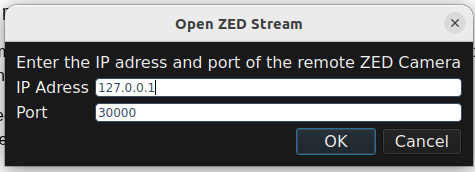
Is there anything else that should be done to start a stream apart from just starting the sender and receiver apps with default settings. I use 127.0.0.1 as host ip.
Also is there a reason why no odd port numbers are allowed? Even the README for the sender contains an error because in a CLI example it states 30001 as an alternative port which is not accepted by the application.
This was indeed a bug in v5.2.2, fixed with v5.2.3.
Normally, the receiver should connect to the same even port of the sender.
You cannot use odd ports because they are used for “internal communication”.
More information on the Streaming parameters:
Can you send me the link of this wrong README file. We will fix it.
Should streaming only on localhost work regardless? So 30000/30001 for sender and 30002/30003 for receiver? The receiver is still started with 127.0.0.1:30000 but falls back to the higher ports because the sender occupies the lower ones already.
Sadly my work laptop does not have a Nvidia GPU so I cannot run ZED Explorer on a second machine currently.
I tried ZED_Explorer but nothing is being streamed there, either. These are the logs of sender and receiver:
Sender:
nvidia@r3001:~$ ZED_Explorer
 ** [SVO] Hardware compression (NVENC) available **
[Streaming] Use Transport layer mode : 0
Receiver:
nvidia@r3001:~$ ZED_Explorer
 ** [SVO] Hardware compression (NVENC) available **
[ZED][Streaming] No SHM-boost topic found for port 30000. Using UDP backend input.
[Streaming] Warning : receiving port 30000 is not available (already used)... switching to port 30002. Retrying...
[Streaming] Warning: Failed to retrieve camera settings from sender
[Streaming] Error: Stream Opening returned TIMEOUT (350)
The video playback in the sender instance runs without any issues while the whole UI of the receiver becomes unresponsive and it just shows “WAITING FOR CAMERA..” at the top.
I also noticed that leaving ZED_Explorer active with streaming enabled uses up more and more memory and the process gets killed eventually.
nvidia@r3001:~$ ZED_Explorer
 ** [SVO] Hardware compression (NVENC) available **
[Streaming] Use Transport layer mode : 0
[Streaming] Use Transport layer mode : 0
[Streaming] Use Transport layer mode : 0
double free or corruption (out)
Stack trace (most recent call last) in thread 3482:
#12   Object "[0xffffffffffffffff]", at 0xffffffffffffffff, in
#11   Object "/lib/aarch64-linux-gnu/libc.so.6", at 0xffffb0239e9b, in
#10   Object "/lib/aarch64-linux-gnu/libc.so.6", at 0xffffb01d0397, in
#9    Object "/lib/aarch64-linux-gnu/libstdc++.so.6", at 0xffffb04a29cb, in
#8    Object "ZED_Explorer", at 0x5a39bb, in
#7    Object "ZED_Explorer", at 0x5a1c23, in
#6    Object "/lib/aarch64-linux-gnu/libc.so.6", at 0xffffb01e0ba3, in free
#5    Object "/lib/aarch64-linux-gnu/libc.so.6", at 0xffffb01de5c3, in
#4    Object "/lib/aarch64-linux-gnu/libc.so.6", at 0xffffb01dc48b, in
#3    Object "/lib/aarch64-linux-gnu/libc.so.6", at 0xffffb01c5fff, in
#2    Object "/lib/aarch64-linux-gnu/libc.so.6", at 0xffffb0177133, in abort
#1    Object "/lib/aarch64-linux-gnu/libc.so.6", at 0xffffb018a83b, in raise
#0    Object "/lib/aarch64-linux-gnu/libc.so.6", at 0xffffb01d2008, in
Aborted (Signal sent by tkill() 3377 1000)
Killed
dmesg:
[ 5403.244540] Out of memory: Killed process 3377 (ZED_Explorer) total-vm:7588400kB, anon-rss:2877008kB, file-rss:20512kB, shmem-rss:92kB, UID:1000 pgtables:12392kB oom_score_adj:0
both files are attached. One thing I noticed is that the Dpgk list says syslogic-zedx 1.3.2-L4T36.4.3 and we are running L4T 36.4.4. This seems to be an issue with the Syslogic .deb since it is called syslogic-zedx_1.3.2-L4T36.4.4_arm64.deb but the control file still states 36.4.3. Not sure if there is a potential issue if it actually is for 36.4.3. I will also open an issue ticket with them regarding this.