Hello. I am using multiple ZED2i cameras.
Recently, after updating the ZED SDK from 5.1.2 to 5.2.0, oen of the camera is not being detected and working in ZED Tools.
The GPU and CUDA version are as stated in the message below, and the other cameras are functioning correctly.
OS: Ubuntu 22.04
- After updating the ZED SDK, I performed calibration using ZED360. (This was successful.)
- I recall that launching Depth Viewer and Explorer worked without issues. (Maybe, because the cam0 was not the crashed camera, but pretty sure)
- The camera index seemed to have changed from before, so I unplugged and replugged the USB port several times.
- When attempting to recalibrate using ZED360 to match the changed camera index, one camera persistently failed to be detected.
- Running diagnostic tool produced the following message:
ZED Diagnostic Tool

Running ZED SDK Diagnostic : OK
ZED SDK version: 5.2.0
CUDA version: V12.2.140
CUDA version: V12.1.105

Running Processor Diagnostic : OK
Processor:   AMD Ryzen 9 7950X 16-Core Processor
Motherboard:  ProArt B650-CREATOR, ASUSTeK COMPUTER INC.

Running Graphics Card Diagnostic : OK
Graphics card:  NVIDIA GeForce RTX 4090

Running CUDA Operations Diagnostic : OK
GPU 0 (NVIDIA GeForce RTX 4090): CUDA operations working correctly

Running AI Models Diagnostic : OK
MULTI CLASS DETECTION is optimized
MULTI CLASS MEDIUM DETECTION is optimized
MULTI CLASS ACCURATE DETECTION is optimized
HUMAN BODY FAST DETECTION is optimized
HUMAN BODY MEDIUM DETECTION is optimized
HUMAN BODY ACCURATE DETECTION is optimized
HUMAN BODY 38 FAST DETECTION is optimized
HUMAN BODY 38 MEDIUM DETECTION is optimized
HUMAN BODY 38 ACCURATE DETECTION is optimized
PERSON HEAD DETECTION is optimized
PERSON HEAD ACCURATE DETECTION is optimized
REID ASSOCIATION is optimized
NEURAL LIGHT DEPTH is optimized
NEURAL DEPTH is optimized
NEURAL PLUS DEPTH is optimized

Running USB Camera Diagnostic : Failed
Specific resolutions are not available  Replug your device or connect the camera to another USB 3.0 port.
Stack trace (most recent call last) in thread 27119:
#4    Object “[0xffffffffffffffff]”, at 0xffffffffffffffff, in
#3    Object “/usr/lib/x86_64-linux-gnu/libc.so.6”, at 0x72fc0d5268cf, in
#2    Object “/usr/lib/x86_64-linux-gnu/libc.so.6”, at 0x72fc0d494ac2, in
#1    Object “ZED_Diagnostic”, at 0x529f5f, in
#0    Object “/usr/lib/x86_64-linux-gnu/libc.so.6”, at 0x72fc0d4a53fe, in free
Segmentation fault (Signal sent by the kernel [(nil)])
Segmentation fault (core dumped)
ZED_Studio 실행시
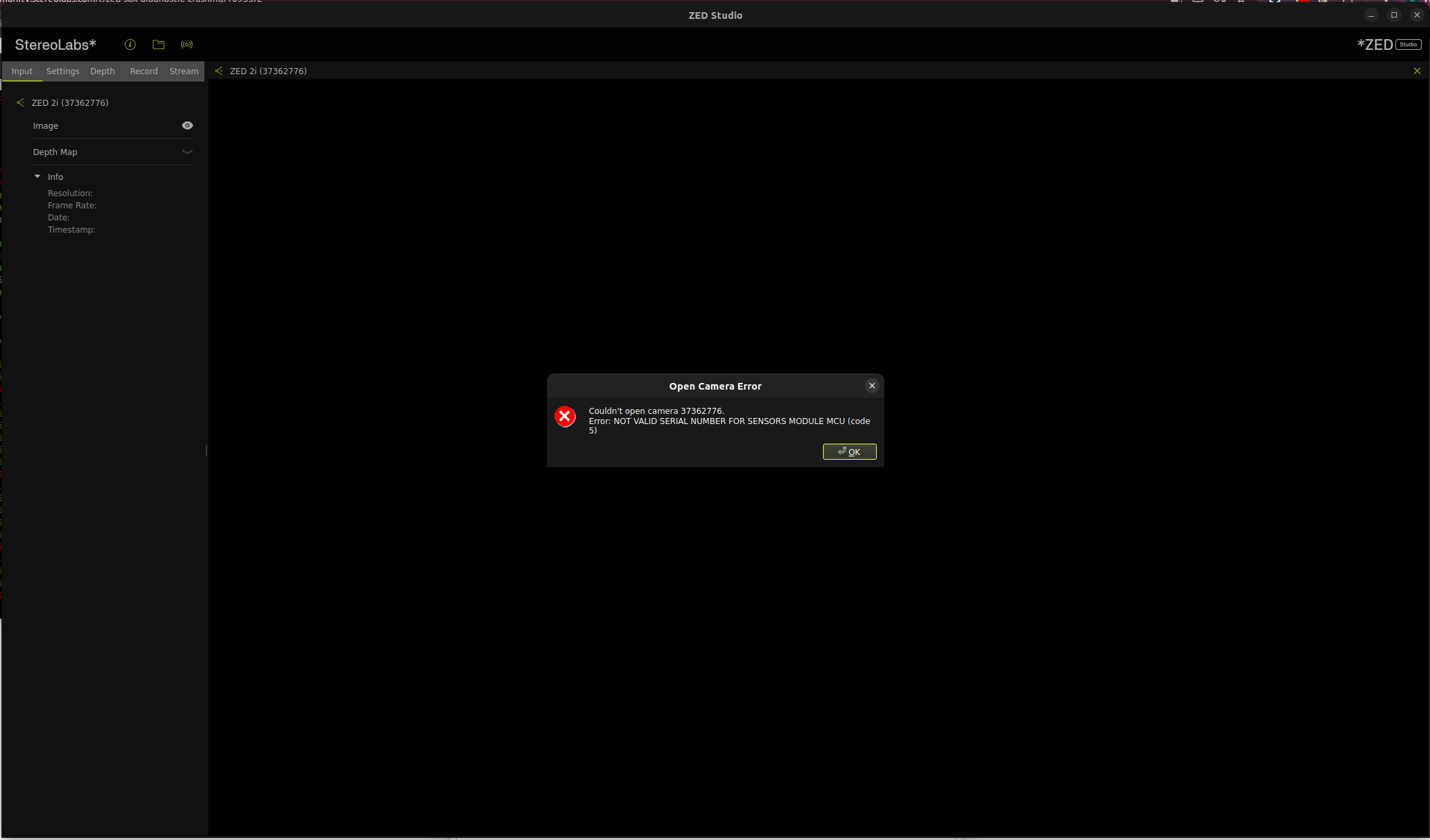
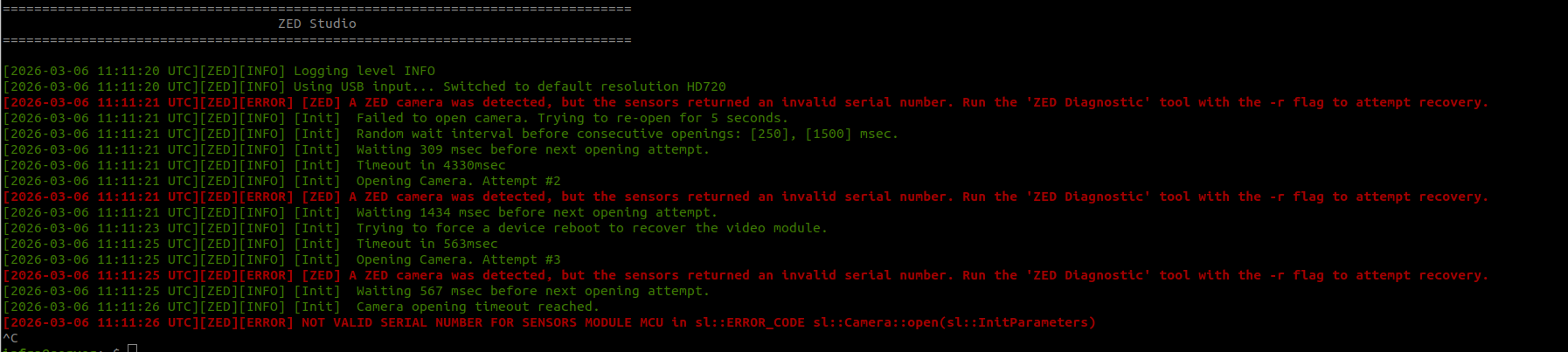
ZED_Explorer 실행시 - Opening camera0에서 변화없이 유지됨
ZED_Diagnostic -r
-
Running Recover MCU Serial Number Diagnostic : Failed
MCU not opened. Please contact Stereolabs support writing an email to support@stereolabs.com  to get assistance. Error code: 3

Running ZED SDK Diagnostic : OK
ZED SDK version: 5.2.0
CUDA version: V12.2.140
CUDA version: V12.1.105

Running Processor Diagnostic : OK
Processor:   AMD Ryzen 9 7950X 16-Core Processor
Motherboard:  ProArt B650-CREATOR, ASUSTeK COMPUTER INC.

Running Graphics Card Diagnostic : OK
Graphics card:  NVIDIA GeForce RTX 4090

Running CUDA Operations Diagnostic : OK
GPU 0 (NVIDIA GeForce RTX 4090): CUDA operations working correctly

Running AI Models Diagnostic : OK
MULTI CLASS DETECTION is optimized
MULTI CLASS MEDIUM DETECTION is optimized
MULTI CLASS ACCURATE DETECTION is optimized
HUMAN BODY FAST DETECTION is optimized
HUMAN BODY MEDIUM DETECTION is optimized
HUMAN BODY ACCURATE DETECTION is optimized
HUMAN BODY 38 FAST DETECTION is optimized
HUMAN BODY 38 MEDIUM DETECTION is optimized
HUMAN BODY 38 ACCURATE DETECTION is optimized
PERSON HEAD DETECTION is optimized
PERSON HEAD ACCURATE DETECTION is optimized
REID ASSOCIATION is optimized
NEURAL LIGHT DEPTH is optimized
NEURAL DEPTH is optimized
NEURAL PLUS DEPTH is optimized

Running USB Camera Diagnostic : Failed
Specific resolutions are not available  Replug your device or connect the camera to another USB 3.0 port.
Stack trace (most recent call last) in thread 51030:
#4    Object “[0xffffffffffffffff]”, at 0xffffffffffffffff, in
#3    Object “/usr/lib/x86_64-linux-gnu/libc.so.6”, at 0x738abcf268cf, in
#2    Object “/usr/lib/x86_64-linux-gnu/libc.so.6”, at 0x738abce94ac2, in
#1    Object “ZED_Diagnostic”, at 0x529f5f, in
#0    Object “/usr/lib/x86_64-linux-gnu/libc.so.6”, at 0x738abcea53fe, in free
Segmentation fault (Signal sent by the kernel [(nil)])
Segmentation fault (core dumped)
** 수행해본 조치: reboot, USB port 변경, ZED SDK update 5.2.1, ZED SDK Downgrade 5.1., etc **
Still not work
문제가 뭔지 알려주시면 감사하겠습니다.
저희가 취할 수 있는 빠른 조치는 ZED SDK를 올바르게 Downgrade 하는 것일 겁니다.
저는 낮은 버전의 SDK 파일(5.1.2)을 설치 방법에 따라 실행하였고, 이전 usr/local/zed 를 삭제하고 진행하지는 않았습니다.
조속히 해결되길 기대합니다.
- 유사 리포트