Hi @NielsPointFWD,
thank you for the detailed report, and for the kind words about the SDK and the ZED 2i.
No need to close it on your side, we are happy to help you rule out the camera and the SDK first; it takes only a few checks.
Bandwidth saturation is a reasonable suspicion, but the two errors you posted point somewhere slightly different:
[Grab] Recovery failed: unable to communicate with the camera.
CAMERA MOTION SENSORS NOT DETECTED
Pure isochronous bandwidth starvation normally shows up as dropped or corrupted frames and reduced FPS, not as a complete loss of communication. The ZED 2i exposes the video stream and the 9-DoF sensors as two separate USB interfaces; losing both means the device is no longer correctly enumerated or claimed at the USB level. The two most frequent root causes in this exact scenario are:
1. usbfs memory exhausted by the USB3 Vision driver
Allied Vision’s Vimba X installer raises usbcore.usbfs_memory_mb (typically to 1000) to reserve buffers for its own streaming. On Jetson kernels this can starve the buffers the ZED 2i needs, and the symptom survives reboots because the setting is persistent. Please check, on the host:
bash
cat /sys/module/usbcore/parameters/usbfs_memory_mb
If it was modified, try a moderate value (for example 256) by editing the APPEND line in /boot/extlinux/extlinux.conf on your AGX Orin, then reboot.
2. USB topology and power on the AGX Orin Developer Kit
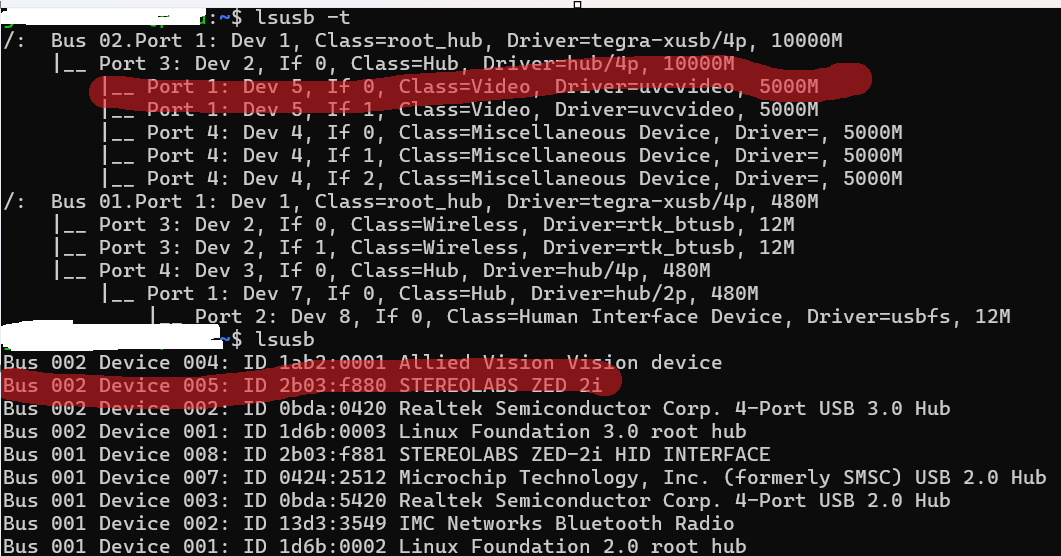
The Type-C ports of the devkit share an xHCI controller. Please move the Alvium to a Type-A port (or to a powered external hub) so that the ZED 2i has its own root port, and confirm the camera is negotiating SuperSpeed:
bash
lsusb -d 2b03:                # ZED 2i must be listed
lsusb -t | grep -A2 xhci      # the ZED 2i port must report 5000M, not 480M
sudo dmesg | grep -iE "usb|xhci" | tail -50
Messages such as device not accepting address, -71, or repeated resets confirm a port, cable, or power problem rather than an SDK one.
Additional checks worth doing, in this order
- Disconnect the Alvium, and run
ZED_Diagnostic and ZED Explorer on the host (outside Docker). This isolates the camera from both the container and the second camera.
- Verify that the host L4T version really is r36.4, matching your
5.3.1-py-runtime-l4t-r36.4 image, as documented in the Docker install guide for NVIDIA Jetson.
- Make sure the container is started with
--privileged and --runtime nvidia. If the camera re-enumerates while the container is running, the new /dev/bus/usb node is not propagated inside it, so the container must be restarted, not just the application. This is often why the error looks like it “survives reboots”.
- Set the Jetson to full power mode before testing:
sudo nvpmodel -m 0 && sudo jetson_clocks.
If the issue persists after these checks, please attach the ZED_Diagnostic report and the relevant dmesg excerpt here, or send them to support@stereolabs.com, and we will look at it with you.
One last note for your architecture: if the final system is meant to run several cameras permanently on the same Jetson, USB will always remain the weak link in terms of arbitration and cable robustness. Our ZED X series uses GMSL2 instead of USB, with power over coax, cable runs up to 15 m, and hardware frame synchronization across cameras, so bandwidth is deterministic and fully independent from your USB3 Vision device. You can find it here: ZED X Stereo Camera. It would also let you keep the ZED 2i in the system without the two devices competing for the same controller.
Best regards,
Walter