Nvargus-daemon use so much CPU resource

Hi,

I have problem when using zed_ros2_wrapper with 3 zed x mini camera. The nvargus-daemon use a lot of CPU resource

The nvargus-daemon process use ~100% ( 1 CPU core)

Environment:

  • Jetson Orin AGX

  • ZED link duo with 1.4.1 driver

  • ROS2

  • zed-ros2-wrapper run in docker with zedsdk 5.2.3

  • Multiple ZED cameras

  • Each camera runs with a separate ros2 launch command in separate ros2 container with separate config file

  • Each camera uses its own ROS2 launch process with the bellow config

      grab_resolution: SVGA
      grab_frame_rate: 30
      grab_compute_capping_fps: 30.0
      pub_frame_rate: 30.0

Another problem, I sometimes catch this problem in the image. When I restart the process, it works

Hi @vietlh

I recommend you install the latest ZED SDK v5.3, ZED X Driver v1.4.2, and the latest ZED ROS2 Wrapper for improved performance.

It is expected that 1 CPU core can be busy processing the data stream of 3 cameras.
What version of Jetson Linux (NVIDIA Jetpack) are you using?

I’m currently using Jetpack 6.2.1 (r36.4) and zed-ros2-wrapper 5.2.2 (lastest tag on github)

~90% 1 CPU core for nvargus-daemon.

~35% 1 CPU core for each camera also
Totally, it consumes ~200% CPU for all the cameras

Hi @vietlh,
Thanks for the detailed follow-up and for confirming your Jetpack and wrapper versions.

The nvargus-daemon CPU usage you’re seeing with multiple ZED X Mini cameras is a known area we’re actively working on.

Our ZED SDK and Embedded teams are currently collaborating directly with NVIDIA to jointly improve this behavior, so you can expect refinements in upcoming releases.

In the meantime, moving to ZED SDK v5.3, ZED X Driver v1.4.2, and the latest ROS 2 Wrapper should already give you a noticeable improvement.

Hi @Myzhar,

I have another problem with the daemon

I’m now using ZED SDK 5.4 and Zedlink dou driver 1.4.2

I run 3 ZEDX mini camera in docker with zed-ros2-wrapper, I have mounted the following folders

- /var/nvidia/nvcam/settings/:/var/nvidia/nvcam/settings/
- /etc/systemd/system/zed_x_daemon.service:/etc/systemd/system/zed_x_daemon.service
- /usr/local/zed/resources:/usr/local/zed/resources/
- /usr/local/zed/settings:/usr/local/zed/settings/

After operating for about 15 minutes, all my cameras reported an error at the same time. I restarted the zed_x_daemon.service, but they still didn’t start working again and I need to restart my board.

[component_container_isolated-1] [2026-07-10 17:57:24 UTC][ZED][INFO] Logging level INFO
[component_container_isolated-1] [2026-07-10 17:57:27 UTC][ZED][ERROR] Failed to connect to daemon socket: Connection refused
[component_container_isolated-1] [2026-07-10 17:57:27 UTC][ZED][ERROR] Failed to set frequency for device 2
[component_container_isolated-1] [2026-07-10 17:57:27 UTC][ZED][ERROR] Failed to configure device 2
[component_container_isolated-1] [2026-07-10 17:57:27 UTC][ZED][ERROR] Failed to initialize SPSC consumer
[component_container_isolated-1] [2026-07-10 17:57:28 UTC][ZED][ERROR] [ZED] A ZED camera was detected, but the sensor device failed to open. Try unplugging and reconnecting the camera.
[component_container_isolated-1] [2026-07-10 17:57:28 UTC][ZED][ERROR] CAMERA MOTION SENSORS NOT DETECTED in sl::ERROR_CODE sl::Camera::open(sl::InitParameters)
[component_container_isolated-1] e[33m[2026-07-10 17:57:28.497] [WARN] [camera.head_front_zed_onboard] : Error opening camera: CAMERA MOTION SENSORS NOT DETECTEDe[0m
[component_container_isolated-1] e[0m[2026-07-10 17:57:28.497] [INFO] [camera.head_front_zed_onboard] : Please verify the camera connectione[0m
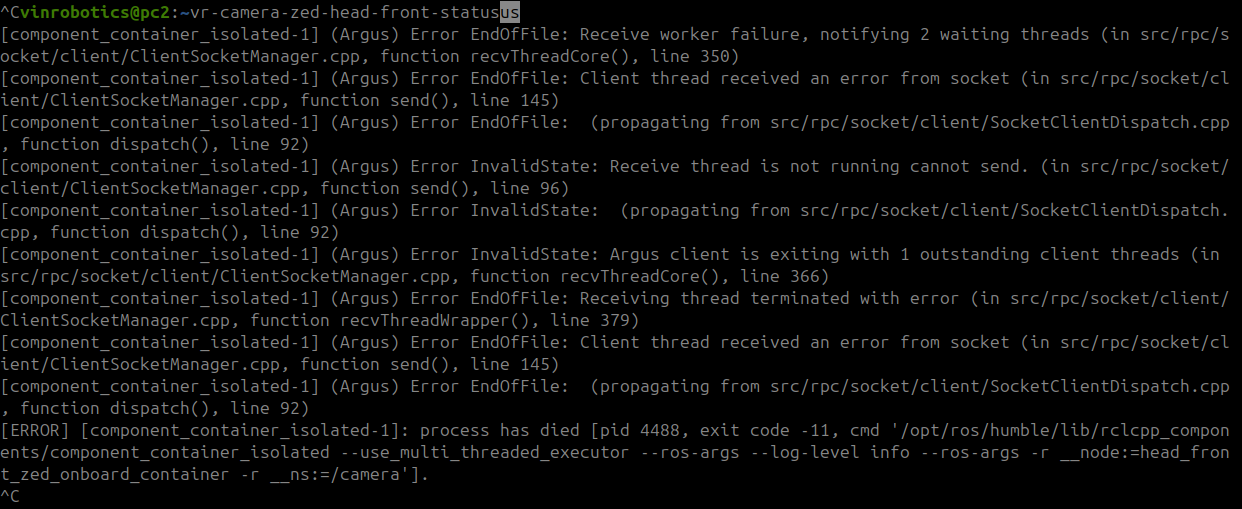
I have replace the nvargus’s libs following this topic Getting nvargus-daemon crashed with SIGSEGV on Orin NX 16GB with JetPack 6.2 - Jetson Orin NX - NVIDIA Developer Forums . But it is seem to be not better.