Hi Stereolabs Community,
I would like to ask for help updating my ZED Mini Box from ZED SDK 5.0.3 to the latest ZED SDK version.
My current setup is:
Device: ZED Mini Box
Camera: ZED 2i
Current ZED SDK version: 5.0.3
CUDA version: 12.6.68
System: Ubuntu 22.04.5 LTS, Jammy
Detected platform: Tegra_L4T36.4
Could you please advise the correct steps to update the SDK safely?
I would like to know:
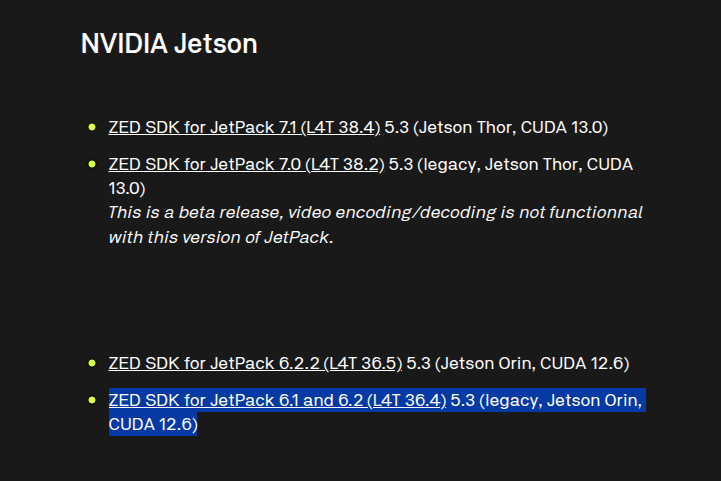
- Which installer should I use for my ZED Mini Box?
- Should I uninstall SDK 5.0.3 first before installing the latest SDK?
- What terminal commands should I use for the update?
- How can I verify after installation that the ZED 2i, CUDA, TensorRT, and SDK are working correctly?
If possible, could you please provide the command lines or installation steps?
Thank you very much for your help.
Best regards,
Hong Wei
Noted: below is my ZED_Diagnostic_results and also the error when trying to install the SDK
ZED_Diagnostic_Results.json (18.6 KB)
(user@GTW-ONX2-D2R7BTXF:~$ cd ~/Downloads
user@GTW-ONX2-D2R7BTXF:~/Downloads$ ls
arduino-1.8.19-linuxaarch64.tar.xz ‘Robot Client Flow before change to Tails.json’ zedoutdoor17092025test
flows.json ‘robot env and pos node-red flow.json’ zedoutdoor17092025test.zip
‘foxglove-studio-latest-linux-arm64 (1).deb’ zed17092025 ZED_SDK_Ubuntu22_cuda12.8_tensorrt10.9_v5.3.0.zstd.run
nomachine_9.1.24_6_x86_64.rpm zed17092025.zip
nomachine_9.1.24_6_x86_64.tar.gz ZED_Diagnostic_Results.json
user@GTW-ONX2-D2R7BTXF:~/Downloads$ sudo apt update
sudo apt install zstd
[sudo] password for user:
Get:1 https://download.docker.com/linux/ubuntu jammy InRelease [48.5 kB]
Hit:2 https://repo.download.nvidia.com/jetson/common r36.4 InRelease
Hit:3 https://ppa.launchpadcontent.net/mozillateam/ppa/ubuntu jammy InRelease
Get:4 https://pkgs.tailscale.com/stable/ubuntu jammy InRelease
Hit:5 https://ppa.launchpadcontent.net/saiarcot895/chromium-dev/ubuntu jammy InRelease
Hit:6 https://apt.foxglove.dev/studio stable InRelease
Get:7 https://repo.download.nvidia.com/jetson/t234 r36.4 InRelease [2,553 B]
Hit:8 https://repo.download.nvidia.com/jetson/ffmpeg r36.4 InRelease
Hit:9 http://packages.ros.org/ros2/ubuntu jammy InRelease
Get:10 https://pkgs.tailscale.com/stable/ubuntu jammy/main arm64 Packages [14.5 kB]
Hit:11 http://ports.ubuntu.com/ubuntu-ports jammy InRelease
Get:12 http://ports.ubuntu.com/ubuntu-ports jammy-updates InRelease [128 kB]
Get:13 http://ports.ubuntu.com/ubuntu-ports jammy-backports InRelease [127 kB]
Get:14 http://ports.ubuntu.com/ubuntu-ports jammy-security InRelease [129 kB]
Get:15 http://ports.ubuntu.com/ubuntu-ports jammy-updates/main arm64 Packages [3,378 kB]
Get:16 http://ports.ubuntu.com/ubuntu-ports jammy-updates/main Translation-en [528 kB]
Get:17 http://ports.ubuntu.com/ubuntu-ports jammy-updates/main arm64 DEP-11 Metadata [114 kB]
Get:18 http://ports.ubuntu.com/ubuntu-ports jammy-updates/restricted arm64 Packages [6,071 kB]
Get:19 http://ports.ubuntu.com/ubuntu-ports jammy-updates/restricted Translation-en [1,140 kB]
Get:20 http://ports.ubuntu.com/ubuntu-ports jammy-updates/universe arm64 DEP-11 Metadata [357 kB]
Get:21 http://ports.ubuntu.com/ubuntu-ports jammy-updates/multiverse arm64 DEP-11 Metadata [212 B]
Get:22 http://ports.ubuntu.com/ubuntu-ports jammy-backports/main arm64 DEP-11 Metadata [3,580 B]
Get:23 http://ports.ubuntu.com/ubuntu-ports jammy-backports/universe arm64 DEP-11 Metadata [12.0 kB]
Get:24 http://ports.ubuntu.com/ubuntu-ports jammy-security/main arm64 DEP-11 Metadata [54.5 kB]
Get:25 http://ports.ubuntu.com/ubuntu-ports jammy-security/universe arm64 DEP-11 Metadata [125 kB]
Fetched 12.2 MB in 22s (566 kB/s)
Reading package lists… Done
Building dependency tree… Done
Reading state information… Done
267 packages can be upgraded. Run ‘apt list --upgradable’ to see them.
E: dpkg was interrupted, you must manually run ‘sudo dpkg --configure -a’ to correct the problem.
user@GTW-ONX2-D2R7BTXF:~/Downloads$ chmod +x ZED_SDK_Ubuntu22*.zstd.run
user@GTW-ONX2-D2R7BTXF:~/Downloads$ ./ZED_SDK_Ubuntu22*.zstd.run
Verifying archive integrity… 100% MD5 checksums are OK. All good.
Uncompressing ‘ZED camera SDK by Stereolabs (Use ‘sudo apt install zstd’ if zstd is not found)’ 100%
Detected Tegra_L4T36.4, required exact Ubuntu22
WARNING : possibly unsupported Linux 4 Tegra version, Continue [Y/n] ?y
Installing…
This installer is not compatible with ARM processor, for the Jetson Tegra check the special installers available at stereolabs.com/developers
user@GTW-ONX2-D2R7BTXF:~/Downloads$)