Hi everyone,
I am currently working on attaching a ZED Mini camera to the end-effector (last joint) of my robot arm. I used the example from this link: zed_robot_integration.
When running RViz, everything looks correct and the camera is successfully attached. I then converted the robot_with_zed_mini Xacro file into a URDF and imported it into NVIDIA Isaac Sim.
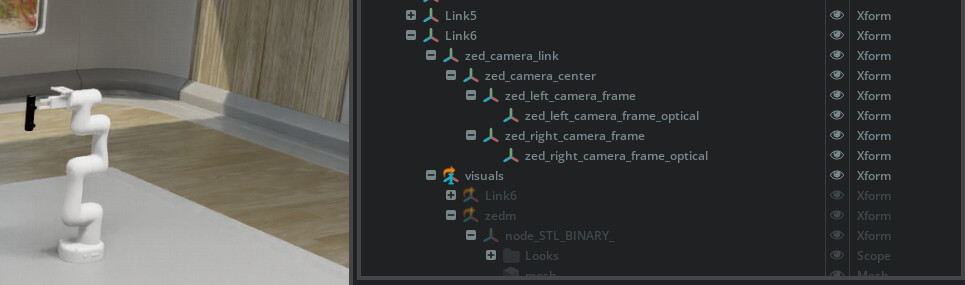
However, as you can see in the attached screenshot, the camera only imports as a structural Link (under Link6 → zed_camera_link and its sub-frames) along with the visual meshes. It does not contain an actual functional camera sensor component.
How can I add an active camera sensor to this setup?
-
If I go to Create -> Camera, it just creates a generic Isaac Sim camera.
-
If I go to Create -> Isaac -> Sensors -> ZED_X (just to test), it spawns a completely standalone camera that I cannot seem to attach or merge with the existing ZED camera link in my robot’s hierarchy.
If anyone has experience with this workflow (URDF to Isaac Sim with a ZED camera), please help me out or point me in the right direction.
Thank you in advance!
Hi @edogawaconan0111,
The ZED_X camera model USD available in Isaac Sim has been configured to have the USD’s “base_link” Xform match the zed_camera_link frame from the URDF, so you can safely align those in your system.
Hi again, thank you for the clarification! I have a quick follow-up question:
I noticed that there is a zed_x_mini model available in Isaac Sim. Is it functionally equivalent to the standard zed mini in the context of the simulation?
Also, if I add the zed_x_mini into my Isaac Sim environment, do I still need to run the zed-ros2-wrapper package on the ROS 2 side to subscribe to the image topics published by Isaac Sim in order to process the visual data?
Thank you again for your support!
Hi @edogawaconan0111,
As the ZED X Mini and ZED Mini have different baselines (50mm and 63mm respectively), they would not be functionally equivalent.
You can either retrieve the stream using our tools or the C++/Python API as described here: Setting up ZED Camera in Isaac™ Sim - Stereolabs
Or if you wish to publish the topics in ROS2, yes you would need to run the zed-ros2-wrapper node, here are the docs: Using ZED with ROS 2 and Isaac™ Sim - Stereolabs
Don’t forget to specify in the ROS2 options: camera_model:=zedxm to load the correct urdf of the ZED X Mini 
Hi @mattrouss
So just to confirm, if I want to publish these topics in ROS 2, I should load the zedxm model instead of zedm, right? This will ensure that the camera models are synchronized between both sides (Isaac Sim and ROS 2). Is my understanding correct?
Once again, thank you so much for your help!
I have an additional question regarding this. My current real-world hardware setup actually uses a ZED Mini. Because of this, I would really like to simulate the ZED Mini itself using Isaac Sim and ROS 2. Is this possible at all?