Hi @Enekopb
Welcome to the StereoLabs community.
This workflow is still possible in SDK 5.x. The Fusion API still operates on the same Publish/Subscribe architecture, and SVO2 files are treated as transparent camera substitutes; the SDK behaves as if a live camera is connected. The key is to configure the Fusion JSON correctly so each camera entry points to an SVO2 file instead of a live device.
How it works in practice:
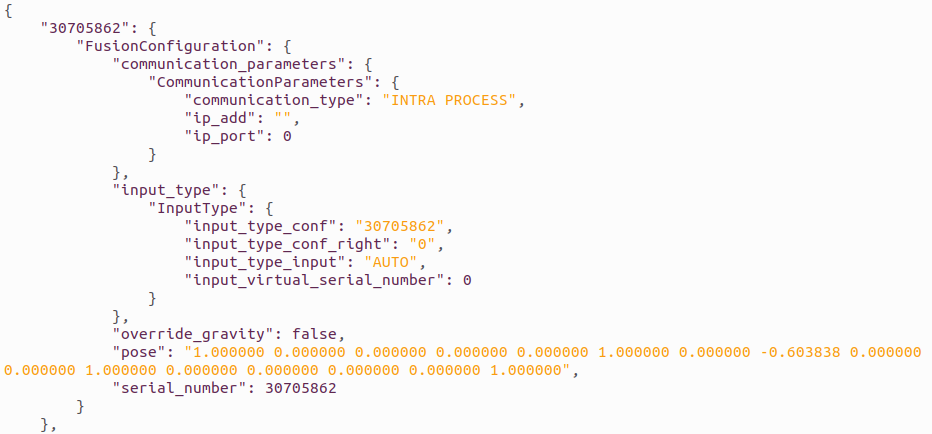
The Fusion configuration JSON (generated by ZED360) contains per-camera entries identified by serial number. Each entry has an input section describing how the publisher opens the camera. In SDK 5.x, the input_type structure uses the sl::InputType API — you need to set type to SVO_FILE and configuration to the path of your .svo2 file.
So your ZED360 JSON should have entries looking something like this for each camera:
{
    "input": {
        "zed": {
            "type": "SVO_FILE",
            "configuration": "/path/to/camera_SERIAL.svo2"
        },
        "fusion": {
            "type": "INTRA_PROCESS"
        }
    },
    "world": {
        "pose": { ... }
    }
}
You can take the calibration JSON that ZED360 generated (with camera poses) and manually edit each camera’s input.zed section to switch from USB/GMSL input to SVO file input. The world.pose (extrinsics) should be kept as-is from the calibration.
Regarding the JSON format difference between SDK 4 and SDK 5:
You’re right that the JSON structure changed. In SDK 5.x, use the sl::read_fusion_configuration_file() helper to parse the config; it returns a vector of FusionConfiguration structs, which include the input_type field. The multi-camera body tracking sample (body tracking/multi-camera/ in the zed-sdk repo) already uses this approach. Looking at the sample code, the critical line is:
init_params.input = conf.input_type;
This means whatever you set in the JSON input.zed section gets picked up automatically. If you set it to an SVO2 path, each sl::Camera instance will open that file instead of a live device.
Practical steps:
- Record your SVO2 files with synchronized timestamps (using
zed-multi-camera or ZED Studio).
- Calibrate your setup with ZED360 while cameras are live, and save the JSON.
- Edit the JSON: for each camera entry, change the
input.zed.type to SVO_FILE and set configuration to the corresponding .svo2 path. Keep input.fusion.type as INTRA_PROCESS since you’re running everything locally.
- Use the multi-camera body tracking sample as your starting point — it already handles the full Fusion pipeline (open cameras → enable positional tracking → enable body tracking → start publishing → subscribe in Fusion → process loop).
One important caveat: since SVO playback runs as fast as possible (not real-time gated), you may need to manage frame synchronization yourself. Each sl::Camera::grab() will advance its SVO independently. The Fusion module handles temporal alignment via timestamps embedded in the SVO2 files, but make sure your recordings were made with properly synchronized clocks (SVO2 records high-frequency sensor data and timestamps, so this should be fine if all cameras were connected to the same machine during recording).