I’ve noticed a crash in nvinfer_10.dll with an “access violation reading location” error when calling Camera::open in my application. It happens consistently with SDK 5.4-5.5 and I’ve had it crash once in 5.3.1. Previous SDK versions work fine for me.
Rough steps to reproduce:
Set depth mode to NEURAL in sl::InitParameters. I am also setting the cuda context and gpu index.
Call sl::checkAIModelStatus with the respective neural AI mode. If the model isn’t downloaded or optimized, also call sl::optimizeAIModel.
Call Camera::open
If I don’t call sl::checkAIModelStatus and sl::optimizeAIModel, Camera::open doesn’t crash for me. The depth mode should also be one of the neural modes. Performance, quality, and ultra don’t cause problems.
Other things I’ve tested:
ZED Depth Viewer 5.5.0 seems to work fine for me. I tried setting to neural and neural plus and was able to get the viewer working.
ZED SDK 5.5.0 depth sensing C++ sample code. I tried to reproduce with the same InitParameters but was not able to. Although, I didn’t set the cuda context in the sample code since the context is attached to our application.
Hi @dko,
welcome to the StereoLabs community, and thank you for the detailed report.
This is a very useful clue. sl::checkAIModelStatus and sl::optimizeAIModel take a gpu_id parameter that defaults to 0, and they run outside the camera’s CUDA context. When the camera is then opened with a custom CUDA context and a specific GPU index, the TensorRT engine may be loaded with a different device/context setup than the one used to optimize it. That would explain both the crash inside nvinfer_10.dll and why the official sample and ZED Depth Viewer work, since neither uses an external context.
Please check the following:
Pass the same GPU index used in InitParameters::sdk_gpu_id to both sl::checkAIModelStatus and sl::optimizeAIModel.
After sl::optimizeAIModel returns, make your application’s CUDA context current again on the calling thread (cuCtxSetCurrent) before calling Camera::open.
As a test, run the optimization once with ZED Depth Viewer (NEURAL / NEURAL PLUS), then only call sl::checkAIModelStatus in your application. Does Camera::open still crash when the model is already optimized and sl::optimizeAIModel is never called?
If the problem persists, please share:
the GPU index you use and how many GPUs are installed;
whether the AI model calls and Camera::open run on the same thread;
a minimal code snippet showing how you create and pass the CUDA context, so we can try to reproduce the issue internally.
The same GPU index (0) is passed to all model API calls
Tried to set cuCtxSetCurrent between sl::optimizeAIModel and Camera::open but that didn’t resolve the crash.
I deleted the /Stereolabs folder from my computer and used the Depth Viewer to download and optimize the NEURAL model. I then called sl::checkAIModelStatus only in my application but Camera::open still crashes.
Since the problem persists:
The GPU index I’m using is 0. I have two GPUs installed on my computer. GPU 0 is my dedicated NVIDIA one using CUDA, and GPU 1 is my integrated one which isn’t used here.
The AI model calls and Camera::open run on the same thread.
The report shows that two different CUDA Toolkit versions are installed on your machine:
CUDA Toolkit version: V12.8.61, located in C:/Program Files/NVIDIA GPU Computing Toolkit/CUDA/v12.8
[Warning] Other cuda version: V11.8.89, located in C:/Program Files/NVIDIA GPU Computing Toolkit/CUDA/v11.8
Multiple version of CUDA has been detected. It is recommended to uninstall other versions than 12.
Multiple CUDA versions on the same system can cause the wrong runtime libraries to be loaded by your application, leading to conflicts with TensorRT. This can explain the crash in nvinfer_10.dll that occurs only in your application, while ZED Depth Viewer and the official samples work correctly.
Please try the following procedure:
Uninstall the ZED SDK.
Uninstall all the CUDA Toolkit versions currently installed (both v11.8 and v12.8).
Reboot the machine.
Launch the ZED SDK 5.5 installer again; it will install only the required CUDA libraries.
Rebuild your application and test it again with the NEURAL depth modes.
Please let us know if the crash persists after this clean installation.
thank you for testing the clean installation and for the additional details; they are the key to this issue.
This is the most likely root cause. sl_ai64.dll is built against the specific TensorRT version distributed with the ZED SDK installer, and TensorRT does not guarantee binary compatibility across minor versions; the serialized engines are also tied to the exact TensorRT version that generated them.
Windows searches the application folder first when loading DLLs, so your process loads your TensorRT 10.9 libraries instead of the ones the ZED SDK expects. The result is undefined behavior, which matches the access violation inside nvinfer_10.dll that occurs only in your application, while ZED Depth Viewer and the samples work correctly. It also explains why your setup worked with ZED SDK 5.0.4 and started failing after the upgrade.
Replacing only nvinfer_10.dll creates a mixed TensorRT set, because the other libraries (nvinfer_plugin_10.dll, nvonnxparser_10.dll, nvinfer_builder_resource_10.dll, etc.) remain at version 10.9; this can crash as well.
Please try the following test:
Remove all the TensorRT DLLs bundled with your application from its folder, so that only the libraries in C:\Program Files (x86)\ZED SDK\bin are used.
Delete the C:\ProgramData\Stereolabs folder again to remove the engines optimized with the wrong TensorRT version.
Run your application and let sl::optimizeAIModel regenerate the NEURAL model.
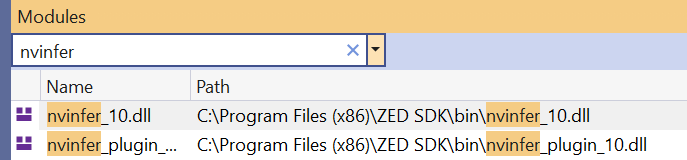
To confirm which libraries are really loaded, you can check the Visual Studio Modules window (Debug > Windows > Modules) when the crash happens; it shows the full path and version of each nvinfer_* DLL.
If your other TensorRT models require a specific version, the solution is to align the TensorRT version packaged with your application with the one used by the ZED SDK release you are integrating. You can read it in the DLL properties (right click on nvinfer_10.dll in the ZED SDK bin folder > Properties > Details).
I removed the TensorRT DLLs from my application and deleted the C:\ProgramData\Stereolabs folder again. I am still seeing the same crash in my application.
When I removed the TensorRT DLLs from my application, the Visual Studio Modules window is showing that the TensorRT DLLs are being loaded from C:\Program Files (x86)\ZED SDK\bin.
In my earlier comment, I meant that I manually copied over all the TensorRT DLLs bundled in the ZED SDK to our application, not only nvinfer_10.dll. I tried copying all TensorRT DLLs once more and the crash is reproducible.
Our application is using 10.9.0.34 TensorRT DLLs because that’s the verison that ZED SDK previously required. It seems like from ZED SDK 5.5.0 onwards, any TensorRT versions 10.9+ will be compatible for the CUDA 12.8+ version according to the release notes.
I also tried comparing the file hashes of our TensorRT DLLs with ZED SDK’s, and they are all identical.
Hi @dko
Thank you for all the useful details that you provided.
I’ve just forwarded them to the ZED SDK team.
They will analyze them to understand what’s the cause of this problem and they will fix it if it’s a bug.