I have recently been using a ZED X One S camera + Mono Capture board on a NVIDIA Jetson Orin Nano Dev Kit on Jetpack version 6.2.1. I installed the mono board driver, and launched the camera using GStreamer from CSI(didn’t use the SDK as I only need basic vision).
Initially it worked great, all the FPS modes worked and the camera functioned. However, after a few hours of use, it suddenly stopped working. I checked all the CSI and Fakra connections, as well as verifying the integrity of the power supply for the mono board(19.6V, should be within reason). The camera is connected from a 1 foot female to male cable, then a 15 feet female to female connected together.
At the time of failure, there was no stress on any of the components, as well as no human contact with them as everything was sealed away. We were testing video, then went to test capturing images, and the camera suddenly stopped being detected and any attempt to launch the camera failed. The camera isn’t recognized at /dev/video*. Below is the portion of the code used when the camera failed ‘‘‘
#!/bin/bash
HEIGHT=1080
WIDTH=1920
IP=0
OUTPUT_PATH=“/tmp/test_image.jpg”
# parse arguments
while [[ “$#” -gt 0 ]]; do
case $1 in

    --height) HEIGHT="$2"; shift ;;

    --width) WIDTH="$2"; shift ;;

    --ip) IP="$2"; shift ;;

    --path) OUTPUT_PATH="$2"; shift ;;

    \*) echo "Unknown parameter passed: $1"; exit 1 ;;

esac

shift
done
if [ “$IP” != “0” ]; then
ssh host@192.168.128.$IP "gst-launch-1.0 nvarguscamerasrc num-buffers=1 ! nvvidconv top=280 bottom=920 left=460 right=1460 ! 'video/x-raw(memory:NVMM), width=1920, height=1200' ! nvjpegenc ! filesink location=/tmp/test_image.jpg"

mkdir -p $(dirname $OUTPUT_PATH)

scp host@192.168.128.$IP:/tmp/test_image.jpg $OUTPUT_PATH
else
gst-launch-1.0 nvarguscamerasrc num-buffers=1 ! nvvidconv ! "video/x-raw(memory:NVMM),width=$WIDTH,height=$HEIGHT" ! nvjpegenc ! filesink location=/tmp/test_image.jpg

\[ "$OUTPUT_PATH" != "/tmp/test_image.jpg" \] && mv /tmp/test_image.jpg "$OUTPUT_PATH"
‘‘‘
Here is the output from when it was working, as well as when it failed: ‘‘‘
Successful:
Capture Image Output: Setting pipeline to PAUSED …
Pipeline is live and does not need PREROLL …
Pipeline is PREROLLED …
Setting pipeline to PLAYING …
New clock: GstSystemClock
GST_ARGUS: Creating output stream
CONSUMER: Waiting until producer is connected…
GST_ARGUS: Available Sensor modes :
GST_ARGUS: 1920 x 1200 FR = 59.999999 fps Duration = 16666667 ; Analog Gain range min 1.000000, max 16.000000; Exposure Range min 28000, max 66000000;
GST_ARGUS: 960 x 600 FR = 120.000005 fps Duration = 8333333 ; Analog Gain range min 1.000000, max 16.000000; Exposure Range min 28000, max 66000000;
GST_ARGUS: 1920 x 1080 FR = 59.999999 fps Duration = 16666667 ; Analog Gain range min 1.000000, max 16.000000; Exposure Range min 28000, max 66000000;
GST_ARGUS: Running with following settings:
Camera index = 0
Camera mode = 0
Output Stream W = 1920 H = 1200
seconds to Run = 0
Frame Rate = 59.999999
GST_ARGUS: Setup Complete, Starting captures for 0 seconds
GST_ARGUS: Starting repeat capture requests.
CONSUMER: Producer has connected; continuing.
Redistribute latency…
Got EOS from element “pipeline0”.
Execution ended after 0:00:00.998867648
Setting pipeline to NULL …
GST_ARGUS: Cleaning up
CONSUMER: Done Success
GST_ARGUS: Done Success
Freeing pipeline …
Unsuccessful:
Capture Image Output: Setting pipeline to PAUSED …
Pipeline is live and does not need PREROLL …
Pipeline is PREROLLED …
Setting pipeline to PLAYING …
New clock: GstSystemClock
Redistribute latency…
Got EOS from element “pipeline0”.
Execution ended after 0:00:00.015442816
Setting pipeline to NULL …
Freeing pipeline …
‘‘‘
Upon inspecting the deseralizer board itself, i noticed some browning around the L2 component.
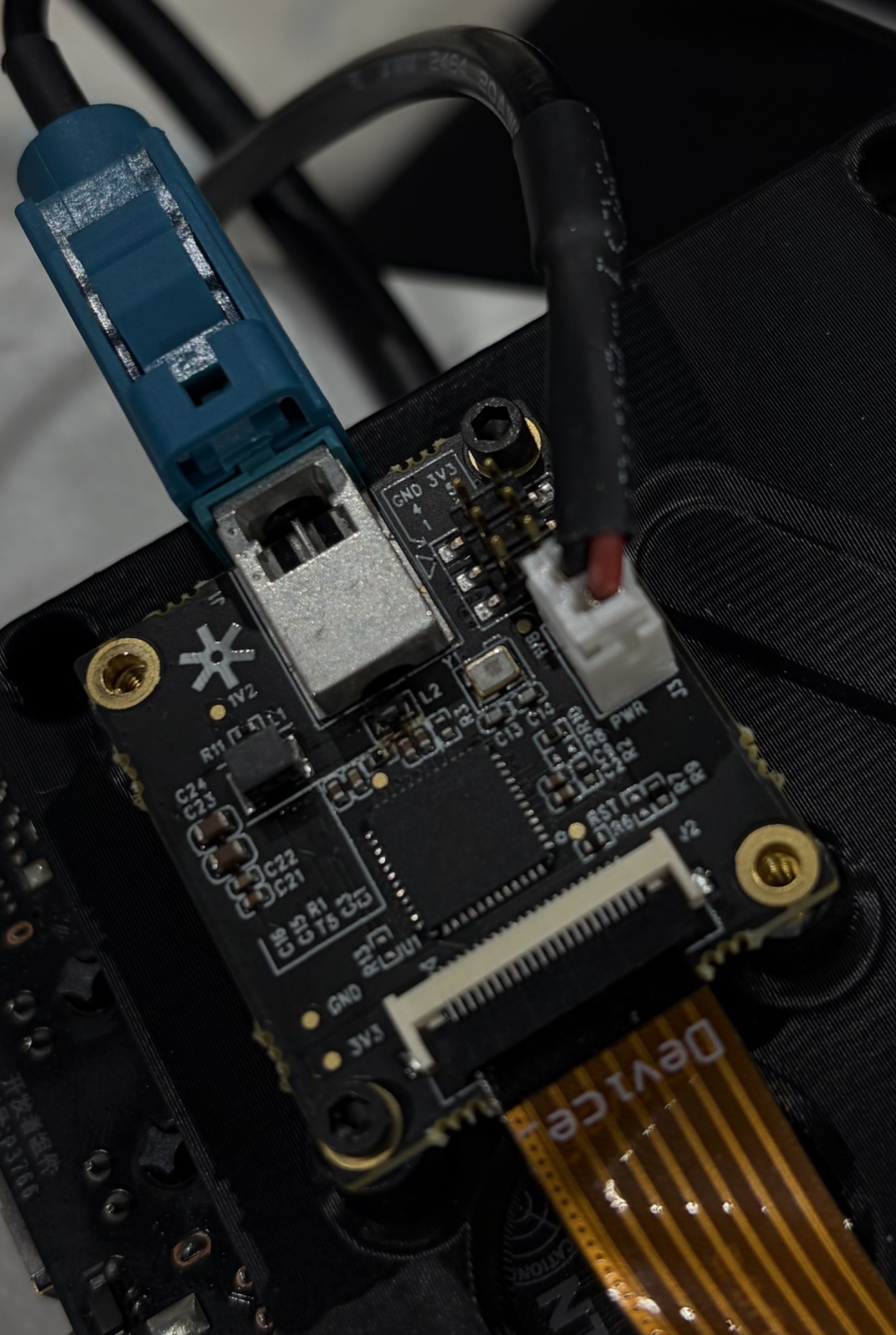
There are no indicator lights on the mono board or camera for me to verify if the Fakra is delivering 12v power. I’ve used several other cheap GMSL solutions, but I had issues with those breaking so I hoped something more expensive would be more robust. Does anyone have an idea of what could have caused the failure? Or the best way to verify if it’s a hardware or software failure. Also if this kind of problem has been discovered before, and how to fix/avoid causing it in the future.
Thanks