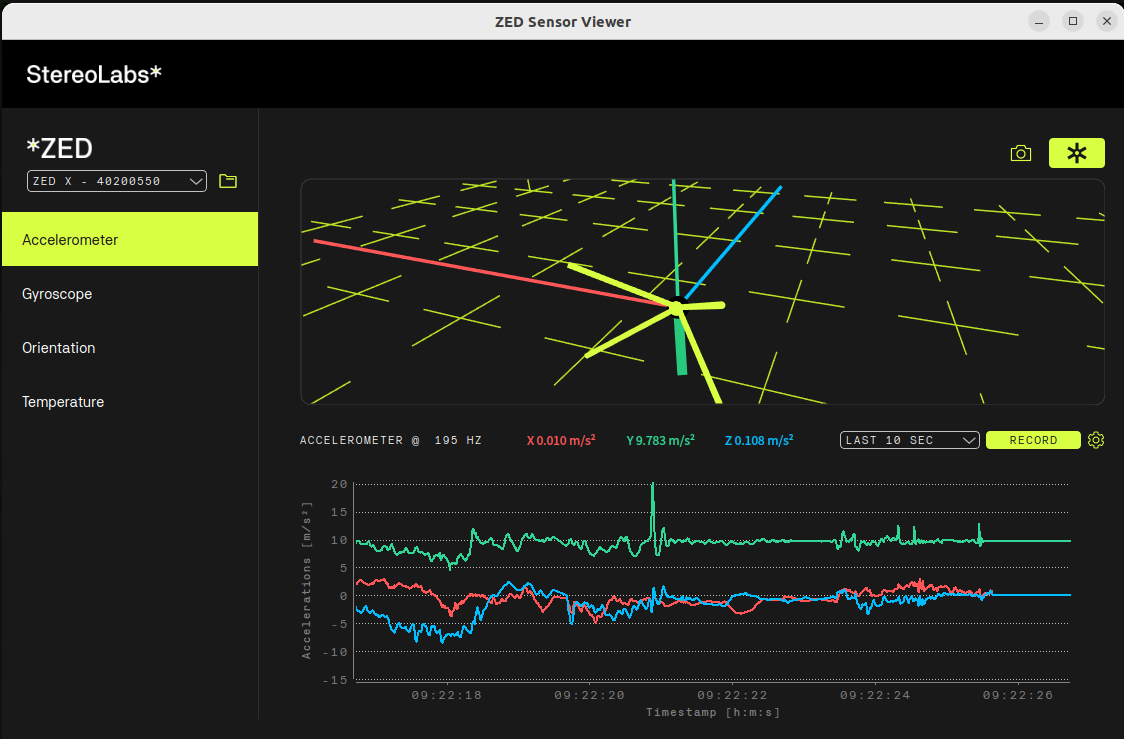
According to the official datasheet, the ZED X accelerometer should run at 400Hz. However, we are observing a consistent ~195–200Hz fluctuation (when using ZED X S/N: 40200550 & ZED Box) in two separate scenarios:
Real-time monitoring – ZED Sensor Viewer shows the accelerometer running at ~195Hz
SVO2 playback – After recording with ZED Studio and exporting sensor data via SDK’s export sensor functions, the IMU frequency calculated from timestamps is also ~195–200Hz
Questions:
Is 400Hz achievable on ZED BOX, or is there a platform-level limitation?
Is this a known issue with a workaround or firmware fix?
Are the SVO2 IMU timestamps reliable despite the reduced rate?
Thanks for your observation. The behavior you’re seeing is expected — the current SDK and ZED X drivers limit the IMU data rate to around 200 Hz.
That said, IMU timestamps remain accurate and consistent, ensuring reliable performance at this rate.
We’re working on aligning the documentation to better reflect this behavior.
Does the underlying IMU get sampled with 400Hz or also with 200Hz? If it is sampled with 400Hz, can we assume that you use a correct low-pass filter to prevent aliasing for the 200Hz samples?
Starting with ZED SDK v5.2 and ZED X Driver v1.4, the IMU of the ZED X is configured to run natively at 200 Hz. It is not sampled at 400 Hz and then downsampled by the driver or by the ZED SDK. We reduced the rate from 400 Hz to 200 Hz on all cameras to support multi-camera setups and to improve the stability of the IMU data stream. With this change, the rate spread dropped from about 11 Hz (185-197 Hz) to less than 1 Hz (199.5-200 Hz).
No decimation happens, so the anti-aliasing filtering is done by the IMU’s internal digital low-pass filter. The filter is configured to match the selected 200 Hz output data rate.
We are also looking into a 400 Hz mode for setups that use fewer cameras.