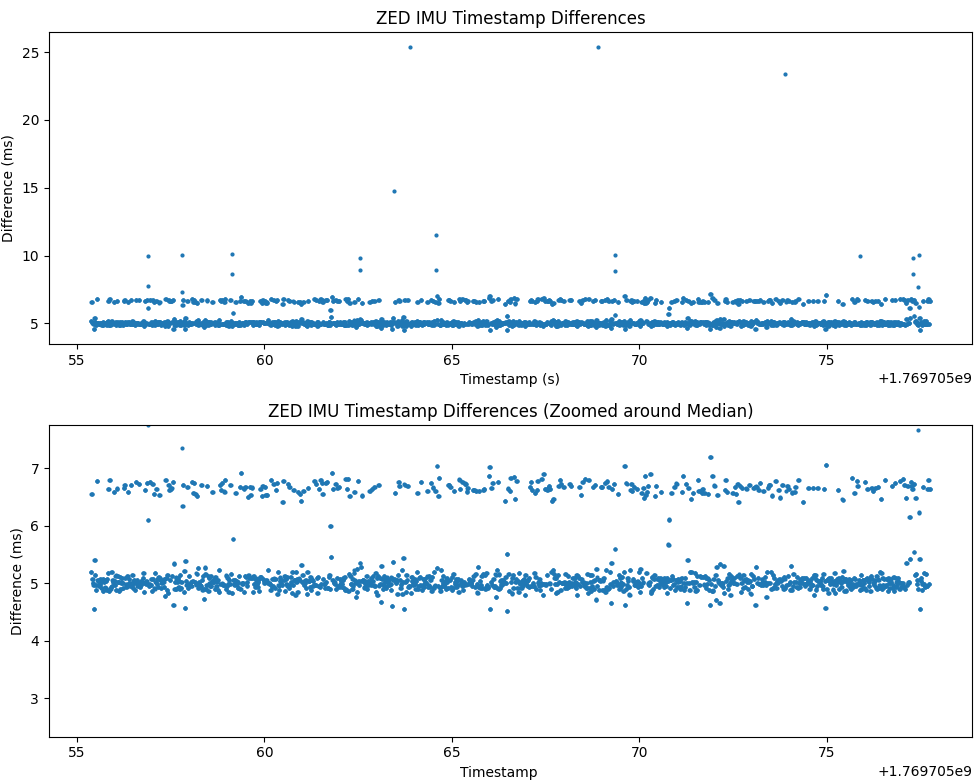
I’ve been collecting some camera + IMU data on the Zed X and I noticed I am getting ~186Hz against the advertised 400Hz. I am using your APIs directly, no ROS. But, as the ROS2 implementation, I have two separate threads for getting camera images and sensors data. I tried on two different Zed X cameras and I get the same outcome. I’ve been using the Zed Box Orin mini NX 16gb.
I also get ~190Hz when dumping data with your Zed Sensor Viewer, although I am selecting 400Hz in the settings.
Lastly, the only setup where I can actually get ~400Hz is through Zed Explorer saving data into an .svo2
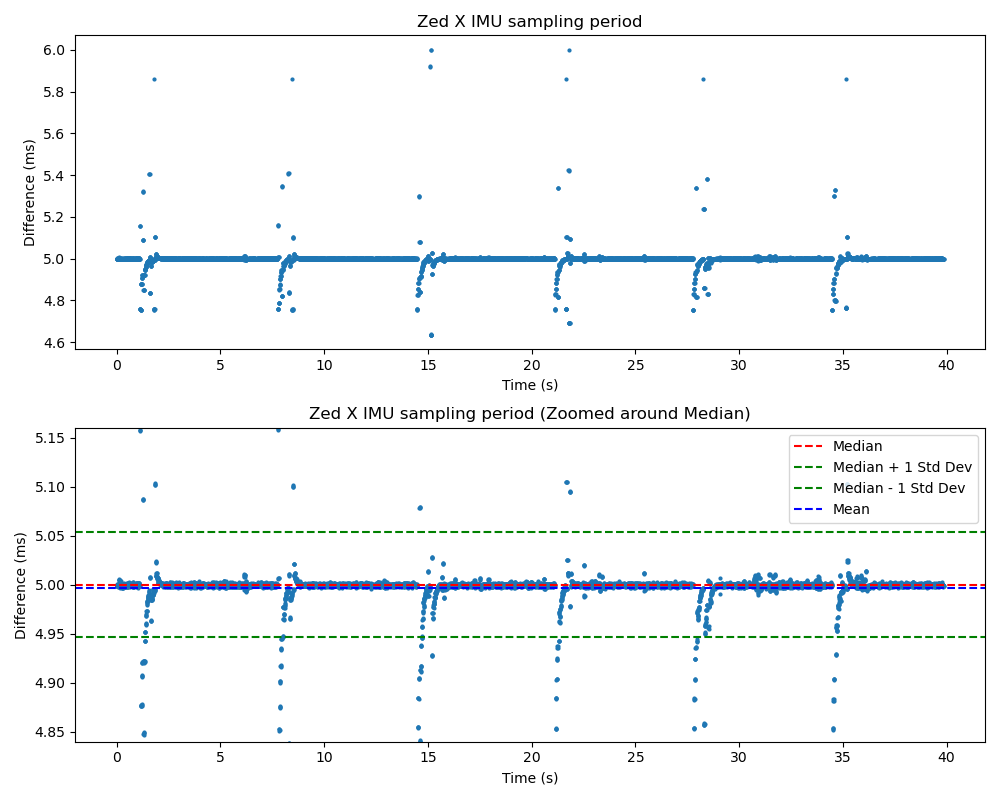
Moreover, I noticed that I am getting kind of two rate distributions in the data I collect. Here I am plotting the period between IMU samples. This is also visible in the data I collect using the Zed Explorer, or the sensor viewer. The only setup without this two distributions is using the Zed Explorer with 1080p 15Hz cameras.
I would like to know why I am able to get the desired frequency through the explorer but not through other tools and through the APIs, and why the odr is so unstable with seemingly two distributions and with big spikes. Is there any fundamental difference in how the data is collected when using the different tools and APIs? Is the Zed Box Mini not keeping up with the data coming from the camera?
We’ve recently released the ZED SDK 5.2 and ZED X Driver 1.4, which come with improvements in IMU stability where the IMU rate spread improved from ~11 Hz (185–197 Hz) to < 1 Hz (199.5–200 Hz) and fixed data drop issues in complex setups involving 8+ IMUs.
However, in order to support multi-camera setups, we have reduced the rate from 400Hz to 200Hz on all cameras. As 400Hz IMU has an impact on the overall performance, we are investigating to add a mode when using a reduced number of cameras.
We’re seeing the same issue on our setup — 3× ZED-X cameras on a Jetson AGX Orin (L4T R36.4.4), running ZED SDK 5.2.1 + ZED X Driver 1.4.0.
After adding deduplication to our getSensorsData(TIME_REFERENCE::CURRENT) polling loop (filtering out repeated samples with the same timestamp), the actual unique IMU sample rates we
observe are:
Camera 0: ~129 Hz
Camera 1: ~138 Hz
Camera 2: ~130 Hz
This is consistent with @picci’s observation of ~125 Hz via the APIs after the 5.2 update. The rate varies per camera, suggesting the issue may be related to GMSL2 deserialization
scheduling rather than the IMU hardware itself.
Our polling thread runs at ~400 Hz (well above the 200 Hz target), so we’re confident we’re not missing samples due to insufficient polling frequency. Before the dedup fix, the raw
callback rate appeared higher since getSensorsData returns the same sample multiple times between updates.
Thanks for the diagnostic tool and suggestions! We ran extensive testing on our 4-camera ZED-X setup (Jetson Orin, ZED SDK 5.x) and found the root cause of our IMU rate issues.
Root Cause
Our capture pipeline was using getSensorsData(sl::TIME_REFERENCE::CURRENT) in a dedicated polling thread running at ~400 Hz. Under multi-camera CPU load, this polling thread
couldn’t keep up and only retrieved the latest IMU sample each call, losing ~30% of data:
Config
Observed IMU Rate
Expected
Loss
1 camera
~195 Hz
200 Hz
~2%
3 cameras
130-138 Hz
200 Hz
~30%
4 cameras
130-135 Hz
200 Hz
~33%
Fix: getSensorsDataBatch()
Switching to getSensorsDataBatch() called inline after each grab() in the capture loop completely resolved the issue. This API returns all IMU samples accumulated since the
last grab() (~6-7 samples per frame at 200 Hz / 30 fps), which is the same mechanism the SDK uses internally for SVO recording.
Results after fix:
Config
IMU Rate
Image Rate
IMU/Frame
Loss
3 cameras
200-207 Hz
30.0 fps
6-7
0%
4 cameras
200-207 Hz
30.0 fps
6-7
0%
SVO Recording Validation
We also validated using your svo_diagnostic tool that SVO recordings capture the full 200 Hz IMU rate even under 4-camera load. The SVO encoder itself doesn’t drop IMU data — it
uses the batch mechanism internally.
Key Takeaway
getSensorsData(TIME_REFERENCE::CURRENT) should not be used for high-frequency IMU capture in multi-camera setups. It only returns the single latest sample and is subject to
thread scheduling jitter. getSensorsDataBatch() is the correct API for reliable IMU data retrieval.
It would be helpful if the SDK documentation more prominently recommended getSensorsDataBatch() for multi-camera or high-throughput use cases, as getSensorsData appears to be the
“default” API in most examples.
Thank you for the feedback. The recommendation would indeed be either to use getSensorsDataBatch(), which provides the batch of IMU data retrieved since the latest grab(), or to retrieve all of the IMU data in a separate thread than the grab() thread, at a higher rate (i.e. 200Hz for the ZED X).
We will update our samples to reflect this better.
This is indeed a behavior that is known, and due to the updated algorithm in 1.4.0 that tracks the drift between the host Jetson’s clock and the IMU’s internal clock. Unfortunately, to fix this behavior this would require a hardware change to the camera, which we are preparing for our future camera line.