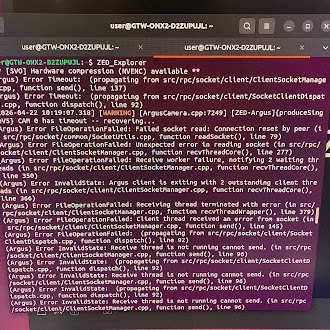
ZED X camera - Error CAMERA REBOOTING, (Argus) Error FileOperationFailed, InvalidState

Good afternoon,

Today I was scheduled to present an industrial robotics project to a client, and unfortunately, during the demonstration, errors appeared in the data reception from the ZED X camera. This situation was completely unexpected.

This problem had already occurred previously on other Jetson platforms using SDK 5.0. However, it is now recurring with SDK 5.1, which is particularly concerning. To reconnect the camera correctly, a complete Jetson reboot is required, which is impractical in an industrial environment and critical for the project’s continuity.

Because of this, this behavior calls into question the reliability of the ZED X camera for industrial applications, relegating it more to prototyping use.

My Jetson platform version and configuration are as follows:

Software part of jetson-stats 4.3.2 - (c) 2024, Raffaello Bonghi
Model: NVIDIA Jetson Orin NX Engineering Reference Developer Kit - Jetpack 6.2 [L4T 36.4.3]
NV Power Mode[0]: MAXN
Serial Number: [XXX Show with: jetson_release -s XXX]
Hardware:

  • P-Number: p3767-0000
  • Module: NVIDIA Jetson Orin NX (16GB ram)
    Platform:
  • Distribution: Ubuntu 22.04 Jammy Jellyfish
  • Release: 5.15.148-tegra
    jtop:
  • Version: 4.3.2
  • Service: Active
    Libraries:
  • CUDA: 12.6.68
  • cuDNN: 9.3.0.75
  • TensorRT: 10.3.0.30
  • VPI: 3.2.4
  • Vulkan: 1.3.204
  • OpenCV: 4.8.0 - with CUDA: NO

I would appreciate it if you could inform me what is causing these errors and how they can be resolved.

I have attached the corresponding error logs and the dmesg.log file for your review.

2025-12-22T12:14:57-0300 python[3617]: (Argus) Error FileOperationFailed: Failed socket read: Connection reset by peer (in src/rpc/socket/common/SocketUtils.cpp, function readSocket(), line 79)
2025-12-22T12:14:57-0300 python[3617]: (Argus) Error InvalidState: Argus client is exiting with 1 outstanding client threads (in src/rpc/socket/client/ClientSocketManager.cpp, function recvThreadCore(), line 366)
2025-12-22T12:14:57-0300 python[3617]: 2025-12-22 12:14:57,784 - WARNING - Error en grab: CAMERA REBOOTING
2025-12-22T12:14:57-0300 python[3617]: [2025-12-22 12:14:57 UTC][ZED][INFO] CAMERA REBOOTING in sl::ERROR_CODE sl::camera::grab(sl::RuntimeParameters)

I look forward to your comments.

Best regards,
Daniel Méndez
Hi @daniel.mirs
Welcome to the Stereolabs community.

Normally, this is not required. The command sudo service zed_x_daemon restart should be enough to recover a camera.

If it’s not working, it means that something weird is happening.

What carrier board and GMSL2 capture card are you using?

Hi Myzhar, thanks for your reply.

Unfortunately, the commands sudo service nvargus-daemon restart and sudo service zed_x_daemon restart almost never work in my experience. Therefore, if this happens, it’s necessary to completely restart the Jetson (ZED Box) (approximately 1-2 minutes).

My industrial machine vision system must operate 24/7 without interruption; otherwise, the production line stops, which is critical for my client. If 24/7 operation cannot be guaranteed, I will no longer be able to use this camera model in future industrial projects.

I am currently using SDK 5.1.2 and the zedbox-mini_1.3.2-SL-MAX9296 driver. However, several times a week, and in the worst cases once a day, the “Argus Error” associated with the NVIDIA driver appears. This problem occurs on all the ZED Boxes I have purchased and with the various ZED X cameras I use.

I suspect this is a GMSL driver issue, possibly due to NVIDIA resource blocking, such as nvbuf_utils: dmabuf_fd.

Have you tried connecting the ZED BOXES to ZED X cameras for a 24/7 period in continuous streaming or recording mode (30-minute recordings in a row)? I’d like to know if you’ve received any reports of this type of error associated with prolonged use.

Regarding my hardware, all my ZED BOXs are the Mini model, with a 16GB Orin NX graphics card.

I look forward to your reply.

Thank you very much.

Hi @daniel.mirs
Can you provide a brief description of how the camera is used?
If reloading the driver does not work, it’s possible that micro-disconnections can occur.

If this is the case, the ZED X Driver v1.4.0 promises to improve the behavior.
The new driver is currently in the QA phase, and it’s expected to be released before the end of the month if no unexpected issues arise.

Hi Myzhar, thank you for your response.

I use the cameras in different ways, mainly mounted on gantries to measure the load of vehicles or conveyor belts. However, regarding the Argus Error disconnections I mentioned, I have also tested them under controlled conditions, with the cameras placed on my desk, without any movement or external noise.

Specifically, I tested a setup with a ZED BOX Mini with a 16 GB Orin NX, connected to a single ZED X 4 mm camera. In addition, I tested different GMSL cable lengths on my desk (10 m, 5 m, and 1.5 m). It is worth mentioning that the CPU and GPU temperatures remain between 38 and 42 °C, as reported in the console using the jtop command.

In all the scenarios described, when the cameras are used continuously, Argus Error disconnections always appear within approximately 6 to 48 hours after the Jetson Box is powered on. However, this error occurs consistently, regardless of the hardware configuration being used.

Regarding the new driver version, I am looking forward to it so I can test it and provide feedback on whether it improves the stability issues.

Thank you and best regards.

What power mode are you using? Try to use MAXN if you are not using it.

That’s right, I’m using that power mode (‘MAXN’). The CPU and GPU temperatures aren’t high because the workload only involves recording or streaming from a single camera. Therefore, it’s not putting a heavy load on the CPU or GPU.