I am integrating a simulated ZED X inside Isaac Sim 5.1.0 using the ZED ROS 2 Wrapper on ROS 2 Jazzy.
I am experiencing an issue where the TF tree published by the wrapper does not align with the physical robot model in the simulation.
Environment
| Component | Version |
|---|---|
| Simulator | Isaac Sim 5.1.0 |
| ROS 2 | Jazzy |
| ZED ROS 2 Wrapper | Latest Jazzy branch |
| Camera model | ZED X |
Launch command
ros2 launch zed_wrapper zed_camera.launch.py \
  camera_model:=zedx \
  sim_mode:=true \
  use_sim_time:=true
Description
When running the ZED ROS 2 Wrapper in sim_mode, the wrapper publishes its own camera TF subtree even when both pos_tracking.publish_tf and pos_tracking.publish_map_tf are set to false.
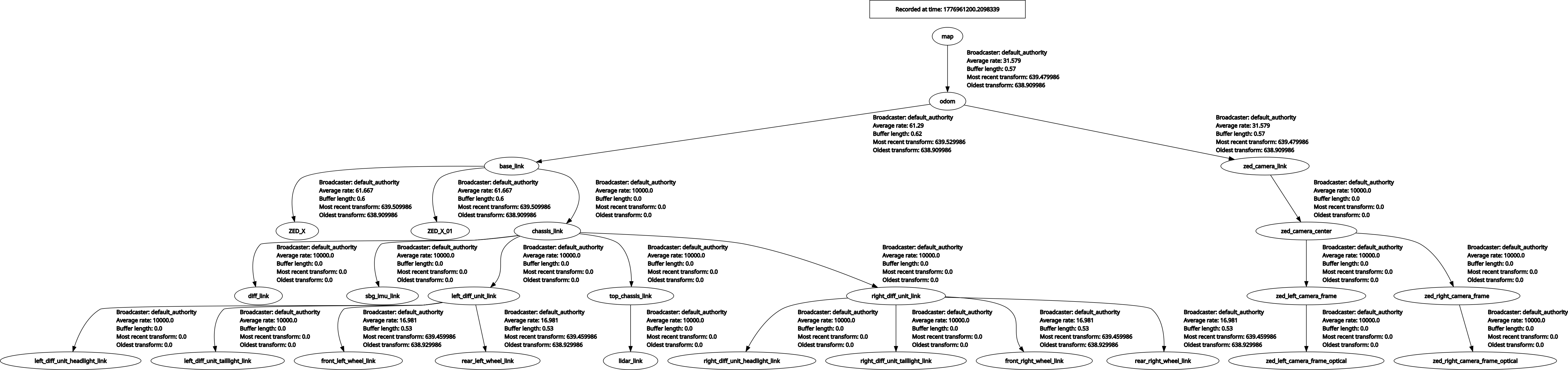
Both trees share the odom frame as a common root, so they are technically connected. However, the wrapper introduces its own frames (zed_camera_link, zed_camera_center, and all optical frames) that were never defined in Isaac Sim. The only camera prims added to the stage are ZED_X and ZED_X_01, both parented to base_link.
The result is a combined tree with two separate camera subtrees:
- Isaac Sim camera frames:
odom → base_link → ZED_X/ZED_X_01 - Wrapper-injected frames:
odom → zed_camera_link → zed_camera_center → zed_left_camera_frame / zed_right_camera_frame
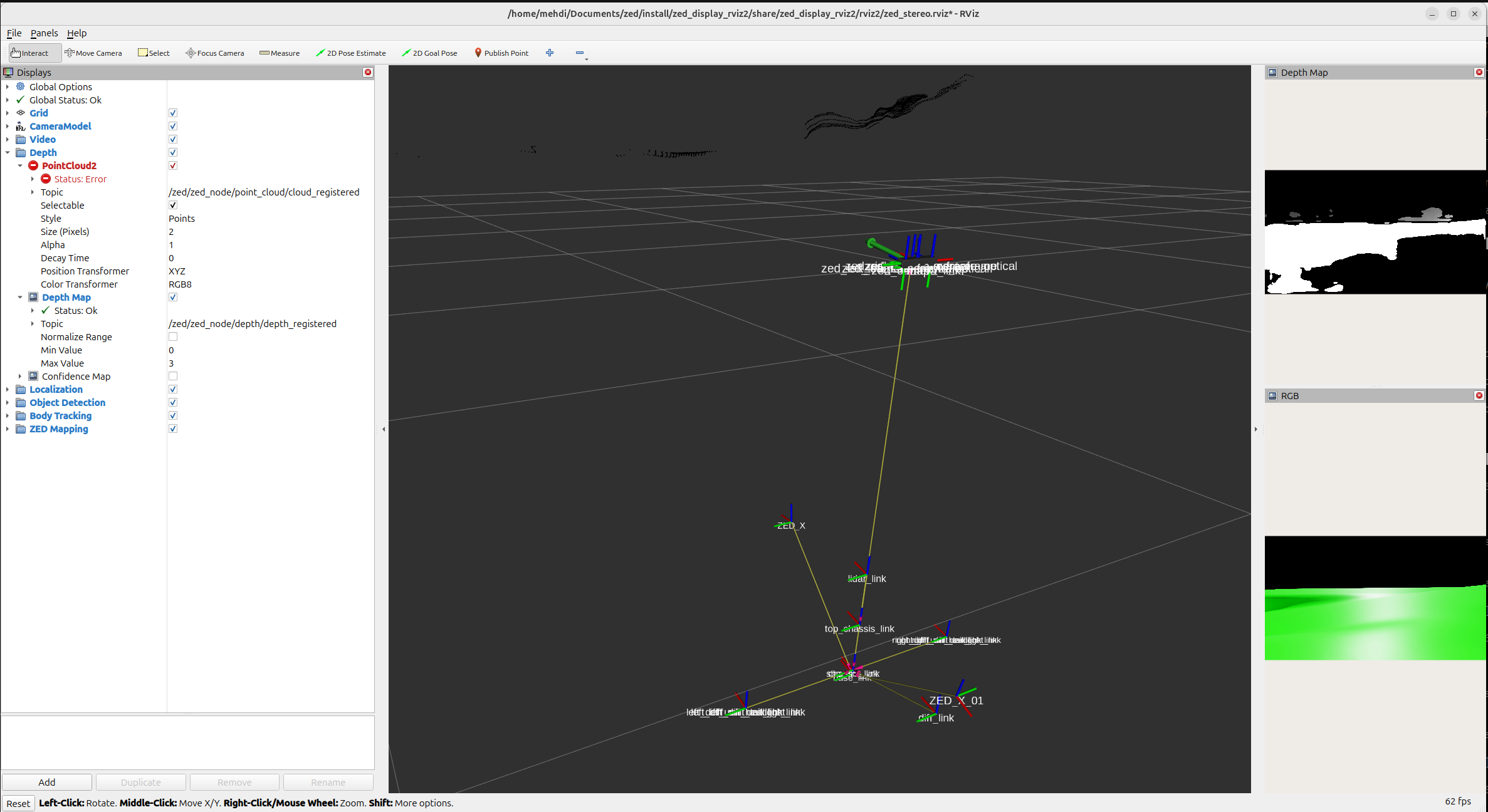
Because the wrapper’s zed_camera_center is not parented to base_link or to the simulator’s ZED_X prim, it appears spatially floating far above the robot in RViz — completely misaligned from the actual camera position in the simulation.
Expected behaviour
With sim_mode:=true and publish_tf: false, the wrapper should not publish any camera TF frames. The full TF tree should be managed by the simulator, and the wrapper should only consume /tf to look up the camera pose rather than broadcasting its own.
Actual behaviour
The wrapper still broadcasts zed_camera_link, zed_camera_center, and all child optical frames regardless of the publish_tf setting. The pos_tracking TF flags appear to have no effect in sim mode.
RViz : zed_camera_center floating above the robot
In RViz, the wrapper’s zed_camera_center frame appears far above the robot body (see screenshot). This also causes the registered point cloud topic (/zed/zed_node/point_cloud/cloud_registered) to report a Status: Error because the transform chain from the point cloud frame to the fixed frame is broken.
TF trees
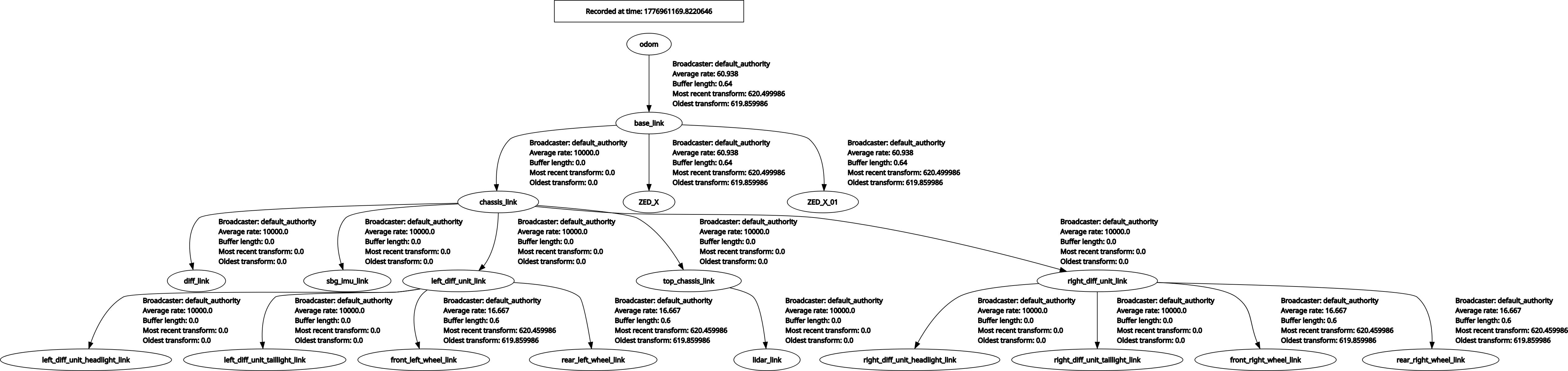
Isaac Sim only (before launching wrapper):
odom → base_link → ZED_X → chassis_link → [wheel/sensor links]
After launching wrapper:
The wrapper injects an additional subtree under odom:
odom → zed_camera_link → zed_camera_center → zed_left_camera_frame / zed_right_camera_frame
Both subtrees are reachable from odom, but the wrapper’s camera frames are not anchored to base_link and are spatially incorrect.
Questions
- Is it expected that the wrapper always publishes
zed_camera_centerand its child frames insim_mode, even whenpublish_tf: false? - If yes, what is the recommended way to ensure the wrapper’s internal frames (
zed_camera_center, optical frames) are correctly anchored to the simulator’s camera prim (ZED_X) so that they are spatially consistent? - Is there a parameter to tell the wrapper to use an existing TF frame (e.g.
ZED_X) as its camera root instead of publishing a newzed_camera_link?
Relevant config
pos_tracking:
  publish_tf: false
  publish_map_tf: false
Screenshots attached
isaac_sim_tf_tree.png— TF tree from Isaac Sim onlytf_tree.png— Full TF tree after launching the wrapper (wrapper’s camera subtree visible underodom)rviz.png— RViz showingzed_camera_centerfloating above the robot and PointCloud2 Status: Error