ZED SDK Spatial Mapping didn't generate mesh properly after applying texture

I tried the spatial mapping code from zed-sdk/spatial mapping/spatial mapping/cpp at master · stereolabs/zed-sdk · GitHub and added a

spatial_mapping_parameters.save_texture = true;
...
MeshFilterParameters filter_params;
filter_params.set(
MeshFilterParameters::MESH_FILTER::MEDIUM);
map.filter(filter_params, true);
map.applyTexture(sl::MESH_TEXTURE_FORMAT::RGB);

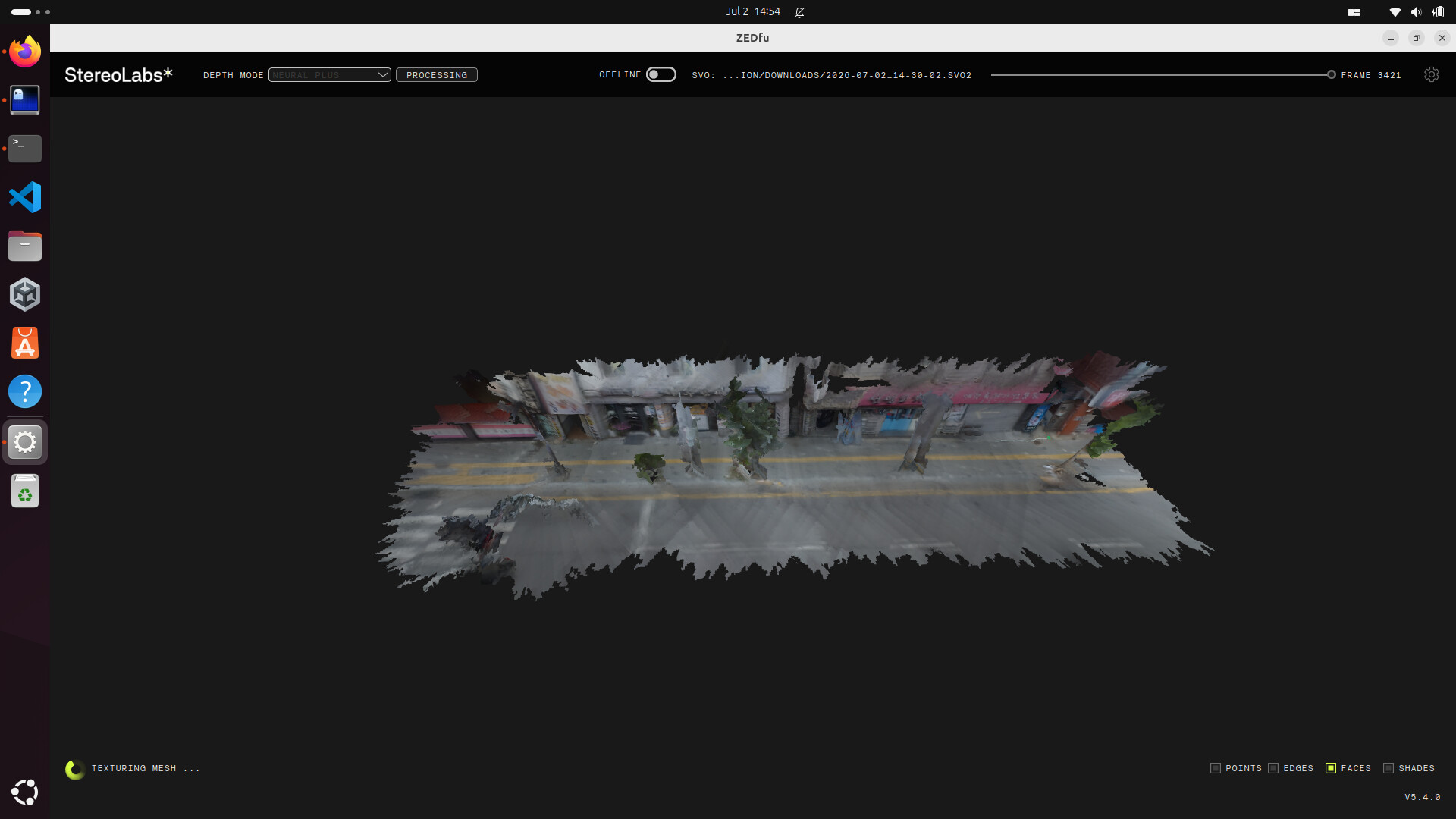
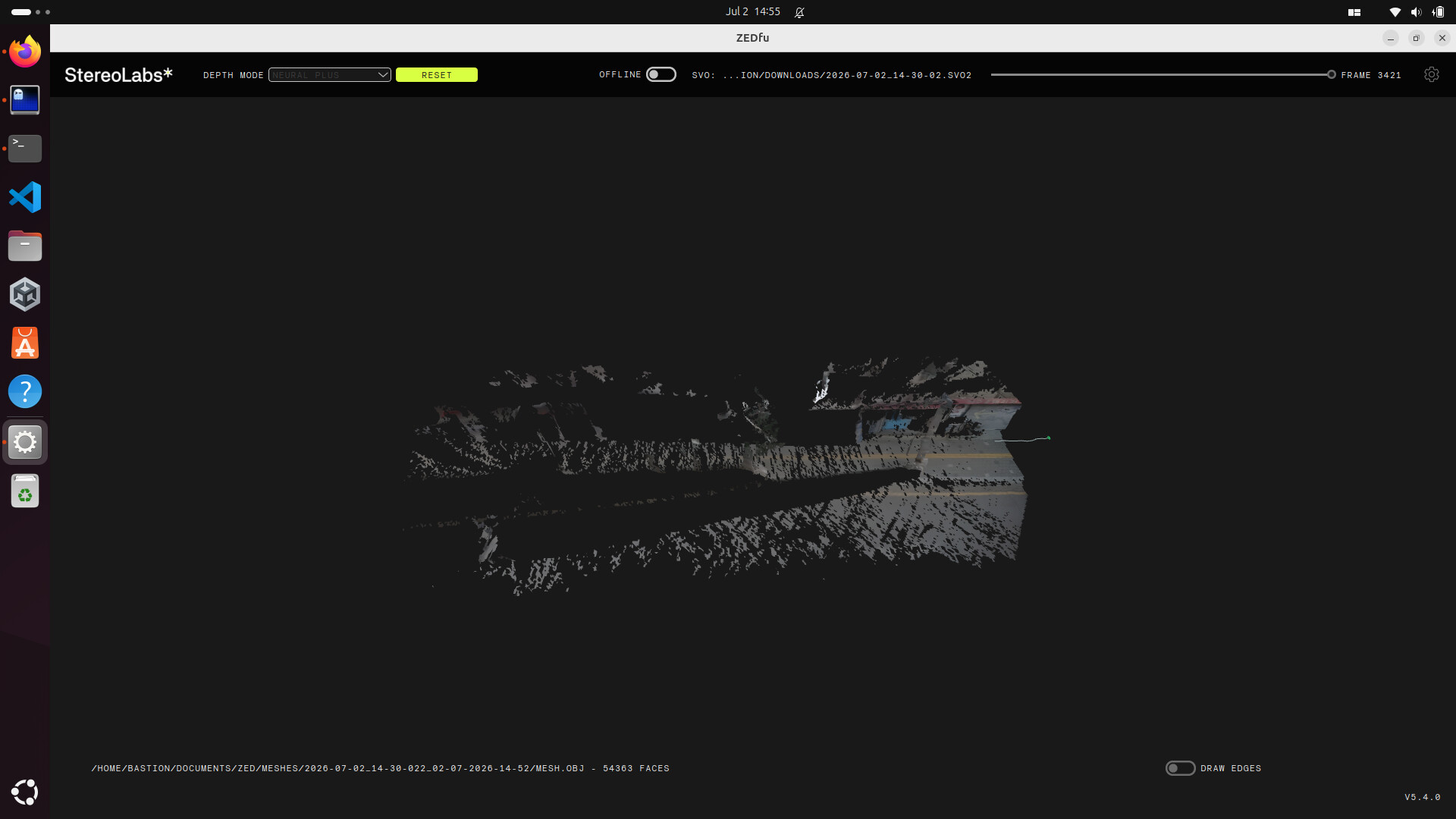
So I can get texture scans. but when I run it, I get a very patchy output. When I disabled the filter and the texture, the output obj is very complete but when I try to apply the filter, big parts of the scan ended up missing.

I used ZED X with a Jetson orin nano running on a battery to film an .svo2 file at SVGA resolution (the Jetson Orin Nano also is running at MAXN) and I run the spatial mapping program on my laptop with AMD Ryzen 7 260 and 32GB RAM. Both Jetson and laptop is running ZED SDK version I tried filming the svo longer, adjust the resolution, and using ZEDfu. Nothing seems to work and the result from ZEDfu ended up looking pretty simiilar to the one from the tutorial program. My ZED_Diagnostic is normal.

this is the picture of the mesh before applying texture from ZEDfu

this is the mesh after applying the texture from ZEDfu

I just want to piggyback on here with more information because I noticed very similar behavior in ZEDfu and also the python API, and was actually planning to create a forum post about this.

@punnlert When you run ZEDfu and try to create a textured mesh, could you try switching the tracking algorithm to GEN_1 instead of GEN_3? I’m not sure why this happens, but when I use GEN_1 the texturing seems to work correctly. The tracking in GEN_1 doesn’t work as well for certain types of environments, but it may be a good enough stop gap measure for you until a bug fix is in place.

I’ve spent a couple days so far troubleshooting this problem so hopefully some of this extra information will be helpful to the stereolabs team when trying to figure out the issue. Since I’ve been able to replicate the issue in both ZEDfu and the python API and I think it may be the same underlying issue affecting both, I’m just going to focus on how this issue arises in ZEDfu so that we can eliminate the variation of different people’s code. Here is what I discovered during troubleshooting:

Initially when I was looking at the textured mesh, it appeared that the mesh was only appearing in areas which were “seen” in the initial pose of the camera at the first frame. The obvious “cone” shape on the right of punnlert’s second image is what I was seeing as well and that cone usually looked somewhat similar to the FOV of the camera. But when I tried more scenes from other SVO files, it seems more complex than just only things in the first frame having texture. I did a test with two rooms in a building that share a common wall. In one room the wall is painted gray, and in the other room the other side of that same wall is painted light green and has a TV mounted on it. The SVO starts with the camera in the first room with the gray wall. The second room is not visible in the SVO until about halfway through the recording. But when a textured mesh is created in ZEDfu, both sides of the wall are present, the gray side and the green side with the TV visible. Obviously the green side and the TV weren’t “seen” in the first frame of the SVO, but they still appeared in the textured mesh. Note that this behavior of the back side of objects being present in the textured mesh seems to be some what random and difficult to consistently reproduce.

I thought this might be a case where the mapping module is just running out of memory and failing to provide a warning or error. I’ve recorded some extremely short SVO files and set the allowed memory at different steps between default and 8GB, but that seemed to make no difference. My system has 24GB of VRAM and 32GB of system RAM so there should be plenty.

Lastly, I have always had this issue with ZEDfu where the texture doesn’t apply properly, but the behavior when using the python API has changed slightly. I started using the ZED2i earlier this year and at the time the latest SDK was 5.2.3. I followed the spatial mapping tutorial here, and when I added the save_texture and .apply_texture() everything was working as intended. When I updated to 5.4.0 and ran the same code again, the textured mesh was only appearing in the places seen in the first pose and cutting out most of the scene.

The only thing that found was actually fixing the problem was switching the tracking from GEN_3 to GEN_1.

I tried to do my best and include all the information I have so hopefully this provides enough background for the team to be able to replicate this issue and get a bug fix in place.
1 Like

Yes, I tried using GEN_1 tracking both on the tutorial program and ZEDfu and both output usable results. Similarly, I also noticed that when using GEN_3 tracking it only uses area that are ‘seen’ in the initial image. Thank you for sharing this insight.

Hi,

Thanks for the detailed report — it let us reproduce the behavior on our side.

The missing regions come from the mesh filter strength, not the texturing step. Mesh::filter() doesn’t just decimate; at MEDIUM/HIGH it also
removes disconnected triangle clusters, and on a handheld/moving scan much of the geometry is fragmented into small disconnected islands that get
deleted. That’s why the raw mesh is complete but the filtered one loses large parts. applyTexture() only trims a few faces on top and is not the
cause. (The second argument to filter(), update_chunk_only, has no effect here either — you can leave it out.)

We verified this on several recordings.

Recommended fix: use MESH_FILTER::LOW:

MeshFilterParameters filter_params;
filter_params.set(MeshFilterParameters::MESH_FILTER::LOW);
map.filter(filter_params);
map.applyTexture(sl::MESH_TEXTURE_FORMAT::RGB);

For maximum completeness, also improve capture connectivity: scan more slowly with more overlap and stay at/above the ~1 m minimum range so the
surface reconstructs as one connected mesh rather than isolated patches. This is also why your pre-texture ZEDfu mesh already looked incomplete.

If LOW still isn’t sufficient for your scene, please send us the .svo2 and we’ll reproduce with your exact data.

Hi,

I understand that filtering and scanning speed can affect the completeness of the scan but why would only the area “seen” in the initial pose of the camera properly generated like how I and @sothos observed. I find it weird that there is a cone pattern of casted occlusions of holes in the filtering scan. Shouldn’t the incompleteness be more uniformly distributed if that is the case? It appears that no matter how long the .svo2 file is, only the initial area is properly filtered and textured. Also, why did changing the tracking algorithm from GEN_3 to GEN_1 produce a more complete result if the problem is MESH_FILTER::LOW ?

Hi,

You’re right, and thanks for pushing on this — those two observations are the key ones. A cone of coverage anchored to the initial camera pose, and GEN_3 → GEN_1 restoring completeness, both rule out mesh filtering as the primary cause. Filter strength does delete disconnected islands (so keeping MESH_FILTER::LOW is still worthwhile), but it can’t explain a pattern that’s tied to the starting pose or that changes with the tracking generation. So our earlier explanation only covered a secondary effect — apologies for that.

The real cause is on our side: the spatial mapping module is currently built and validated around GEN_1 positional tracking. With the newer generations (GEN_3), later camera poses aren’t integrated into the fused map as effectively, so coverage collapses back toward the initial reference frame — which is exactly the initial-pose cone you and @sothos are seeing, and why GEN_1 gives a far more complete result regardless of how long the recording is.

Recommendation for now:

  • Use GEN_1 positional tracking for spatial mapping — it’s the configuration the mapping pipeline is designed around and will give you the most complete, correctly textured result today.

  • Keep MESH_FILTER::LOW plus slower, higher-overlap capture at/above the ~1 m minimum range — those still help connectivity on top of GEN_1.

Longer term: we’ve logged this internally as an improvement to bring spatial mapping up to date with the newer tracking generations. I can’t give you a timeline yet, but your case is documented and feeds directly into that. If you can share the .svo2, we’ll attach it so any improvement is validated against your exact scene.