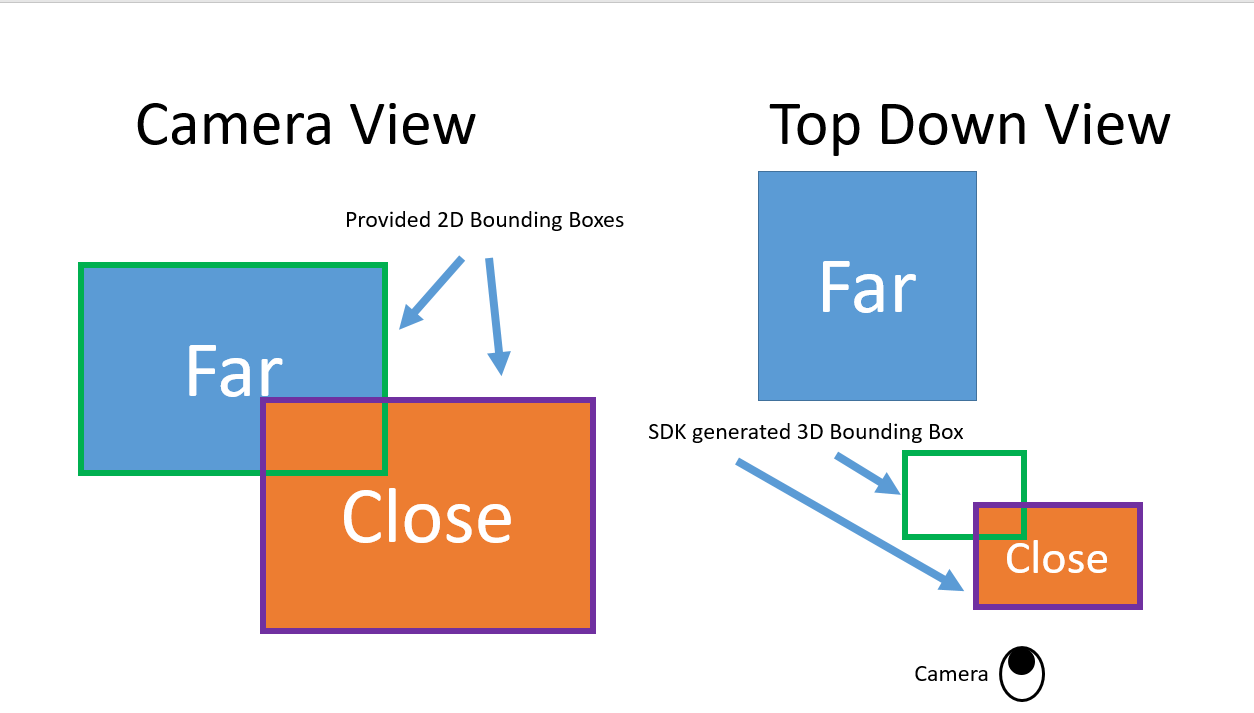
I’m testing the 3D Bounding boxes generated from the 2D bounding boxes I’m providing through my own model to the ZED SDK. I’m noticing that the 3D bounding boxes the SDK provides for objects that are partially by another object are often clipped to be the close object instead of the proper object behind it.
Are there plans to improve the SDKs 3D bounding box output to improve upon this? Could there be a “minimum range” setting to mask out these close pixels as I know this far object will always be at least 3 meters from the camera.
I’m noticing that the 3D bounding boxes the SDK provides for objects that are partially [occluded] by another object are often clipped to be the close object instead of the proper object behind it.
This is expected with the current pipeline: when you ingest a 2D bounding box with CustomBoxObjectData, the SDK estimates the 3D bounding box from the depth values falling inside that 2D ROI. If a foreground object overlaps the ROI, its depth pixels contaminate the statistics and the 3D box can “snap” to the occluder.
There are a few ways to mitigate this today:
Ingest a segmentation mask instead of a plain 2D box. Since ZED SDK 4.1 you can use CustomMaskObjectData to provide a 2D bounding box together with the instance mask of the object. The SDK then uses only the masked pixels for the 3D localization, which is the most robust solution for occlusion scenarios. If your model supports instance segmentation (e.g. YOLO-seg variants), this is the recommended path. See the Custom Object Detection documentation: Using the Object Detection API with a Custom Detector | StereoLabs
Set a global minimum depth. If you know that valid targets are always beyond 3 meters, you can set InitParameters::depth_minimum_distance = 3000 (mm, or 3.0 in meters according to your coordinate_units). Pixels closer than this value are invalidated in the depth map, so they are excluded from the 3D bounding box computation. Keep in mind this is a global setting affecting all depth outputs, not per-object: Depth Settings | StereoLabs
Use a Region of Interest mask. If the occluder is static in the image (e.g. a part of the vehicle or a fixed structure), Camera::setRegionOfInterest lets you mask out those pixels permanently, or you can use the automatic ROI detection module.
Are there plans to improve the SDKs 3D bounding box output to improve upon this?
The mask-based ingestion in point 1 was introduced precisely to address this class of problems; we are continuously improving the Object Detection module, so feedback like yours with example images is very valuable. I will forward it to the SDK team.
Let me know if the mask-based approach is applicable to your model; if not, please share more details about your setup (SDK version, camera model, detection framework) and I can suggest the best workaround.