Hi Team,
First of all, Thanks for the SDK 5.1. It is amazing in many ways.
I am working with ZED and Jetson Thor at the moment. I am able to install SDK 5.1 on the Host system and it work perfectly fine. But when I try to install it inside the docker container (Custom dockerfile script), it fails with the following error.
&& rm /tmp/zed_sdk_installer.zstd.run && [ -f /usr/local/bin/ZED_Sensor_Viewer ] || (echo “ZED install failed” && exit 1);:
0.390 /var/cache/downloads/zed_sdk_installer.zstd.run: OK
0.468 Verifying archive integrity… 100% MD5 checksums are OK. All good.
1.026 Uncompressing ‘ZED camera SDK by Stereolabs (Use ‘sudo apt install zstd’ if zstd is not found)’ 100%
1.684 Reading package lists…
1.704 Building dependency tree…
1.707 Reading state information…
1.710 E: Unable to locate package file
1.739 head: cannot open ‘/etc/nv_tegra_release’ for reading: No such file or directory
1.751 dpkg-query: no packages found matching nvidia-l4t-core
1.759 Unable to detect Tegra L4T version, required exact Tegra_L4T38.2
1.759 Installing…
1.761 ./linux_install_release.sh: line 549: file: command not found
1.761
1.761 This installer is not compatible with ARM processor, for the Jetson Tegra check the special installers available at stereolabs.com/developers
1.761
1.880 ZED install failed
Below is the Dockerfile snippet for this error.
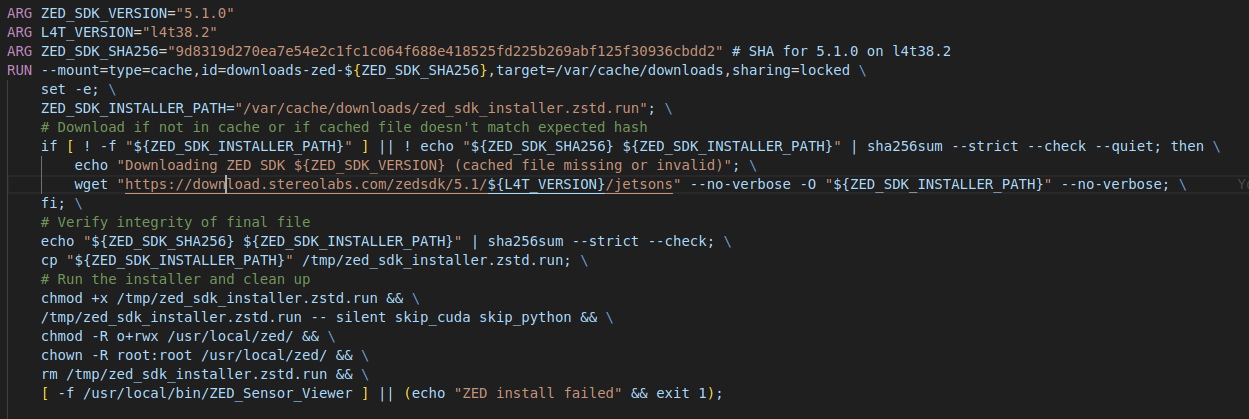
I built the base image from dusty-nv container.
robot/image:r38.4.arm64-sbsa-cu130-24.04-cuda
I understand that the installer looks for l4t inside the dockerfile, but in the Jetson orin AGX or other devices, I have never faced this problem. It never checked for it strictly. Only on runtime I am able to install the SDK and not in building stage. During runtime, it mounts /etc/nv_tegra_release and I am able to install it.
Let me know if there is a fix or workaround for it.