ZED 2i Stereo Image on Meta Quest 3 – Black Bars (Aspect Ratio / Scaling Issue) & Error After Adding ZED_Rig_Stereo

Hello,

I am currently trying to stream images captured from a ZED 2i stereo camera to a Meta Quest 3 headset using Unity.

Environment

  • Unity 6000.0.59f2

  • Meta XR All-in-One SDK 78.0.0

  • ZED Unity Plugin 4.2.5

  • ZED SDK 4.2.5

  • CUDA 11.8

Setup

  • I removed the default Main Camera from the sample scene.

  • I added the ZED_Rig_Stereo prefab from the ZED Unity plugin.

  • The screen settings are:

    • Aspect Ratio: 16:9

    • Scale: 1

Issue 1: Black bars (top and bottom)

When I run the scene on the Meta Quest 3,
the ZED camera image is correctly displayed, but there are black bars at the top and bottom of the view.

It seems that the prefab renders the image onto a screen (plane),
and the aspect ratio does not fully match the headset view.

Question:

  • Is there a recommended way to scale or adjust the screen so that the image fully fills the VR view without black bars?

  • Should I modify the screen plane scale, camera FOV, or another parameter?

Issue 2: Error after adding ZED_Rig_Stereo

After adding the ZED_Rig_Stereo prefab and running Unity with the VR headset connected,
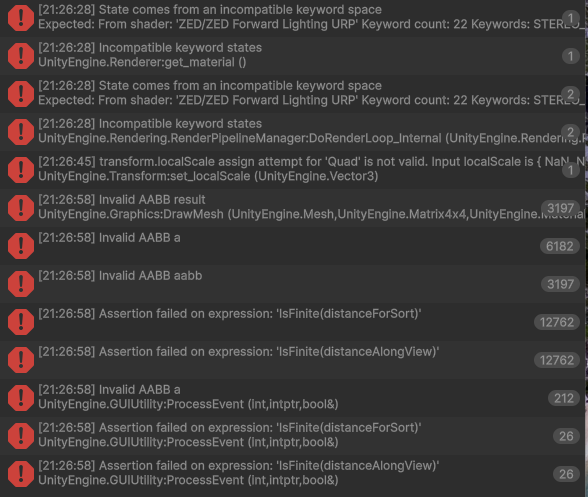
I encounter the error shown in the attached screenshot.

Question:

  • Is this error expected or safe to ignore?

  • Or is it related to a misconfiguration between the ZED plugin and Meta XR?

Additional Notes

  • The image streaming itself works correctly.

  • The main concern is removing the black bars and ensuring proper full-screen rendering in VR.

Any guidance would be greatly appreciated.
Thank you!
Hi,

  1. It’s not really possible since the FoV of the ZED-M and the Fov of the Quest are not the same (Quest is bigger).
    There is potentially a hack by changing the distance of the rendering plane, but that’s not really recommended since images will look distorded.
    You can change the parameter here :
    zed-unity/ZEDCamera/Assets/SDK/Helpers/Scripts/MR/ZEDMixedRealityPlugin.cs at master · stereolabs/zed-unity · GitHub
    Increase the value (default = 1.0f) or even increase the scaleFromZED value.

  2. Are you using URP ? if not you can ignore the first errors. Could you tell me where the "transform.localScale … " comes from ? If you click on the error, it should display the where the function is called.

1.

I modified the following line in:

zed-unity/ZEDCamera/Assets/SDK/Helpers/Scripts/MR/ZEDMixedRealityPlugin.cs

(at around line 157)

public Vector3 offset = new Vector3(0, 0, 6.0f);

After this change, the image in the VR headset became larger.


For reference, when I changed the f values below, there was no visible change in the VR headset.

Vector2 scaleFromZED;
halfBaselineOffset.x = zedCamera.Baseline / 2.0f;

float perception_distance = 1.0f;
float zed2eye_distance = 0.1f; //Estimating 10cm between your eye and physical location of the ZED Mini.
hasVRDevice = ZEDSupportFunctions.hasXRDevice();

if (hasVRDevice) {
	sl.CalibrationParameters parameters = zedCamera.CalibrationParametersRectified;
	scaleFromZED = ComputeSizePlaneWithGamma (new sl.Resolution (zedCamera.ImageWidth, zedCamera.ImageHeight),
		perception_distance, zed2eye_distance, offset.z,
		ComputeFocal (new sl.Resolution (XRSettings.eyeTextureWidth, XRSettings.eyeTextureHeight)),
		parameters.leftCam.fx);

	scale(quadCenter.gameObject, scaleFromZED);

Also, I would like to ask:

:backhand_index_pointing_right: Is it possible to use a ZED camera resolution closer to a square aspect ratio instead of 16:9?

2.

Yes, I am using URP.

I followed the official documentation:

https://www.stereolabs.com/docs/unity

and applied “Upgrade Materials”, which removed the previous 4 errors.


The detailed error log you mentioned is as follows:

transform.localScale assign attempt for 'Quad' is not valid. Input localScale is { NaN, NaN, 1.000000 }.
UnityEngine.Transform:set_localScale (UnityEngine.Vector3)
ZEDMixedRealityPlugin:scale (UnityEngine.GameObject,UnityEngine.Vector2) (at C:/Users/35_ROBOT/Downloads/zed-unity-5.2.1/ZEDCamera/Assets/SDK/Helpers/Scripts/MR/ZEDMixedRealityPlugin.cs:494)
ZEDMixedRealityPlugin:ZEDReady () (at C:/Users/35_ROBOT/Downloads/zed-unity-5.2.1/ZEDCamera/Assets/SDK/Helpers/Scripts/MR/ZEDMixedRealityPlugin.cs:410)
ZEDManager/<InitZED>d__352:MoveNext () (at C:/Users/35_ROBOT/Downloads/zed-unity-5.2.1/ZEDCamera/Assets/SDK/Helpers/Scripts/ZEDManager.cs:2293)
UnityEngine.SetupCoroutine:InvokeMoveNext (System.Collections.IEnumerator,intptr)

Hi,

No, it’s not possible to retrieve a square image from the zed camera, the only available aspect ratio is 16/9.0