Hello
I want get z-direction normal vector at each frame
I use retrieve_measure with MESURE.NORMALS but result is not what I expected.
Hello and thank you for reaching us out,
MEASURE.NORMALS give you a matrix containing X,Y,Z,0. So you’ll have to get the third item after that.
https://www.stereolabs.com/docs/api/python/classpyzed_1_1sl_1_1MEASURE.html
Also, depending with the librairies you’re in interface with, Z is not always the up vector, it can be Y. In the SDK we chose to let you configure that in the init_parameters coordinate_system
https://www.stereolabs.com/docs/api/python/classpyzed_1_1sl_1_1COORDINATE__SYSTEM.html
Best regards
Antoine
Antoine Lassagne
Senior Developer - ZED SDK
Stereolabs Support
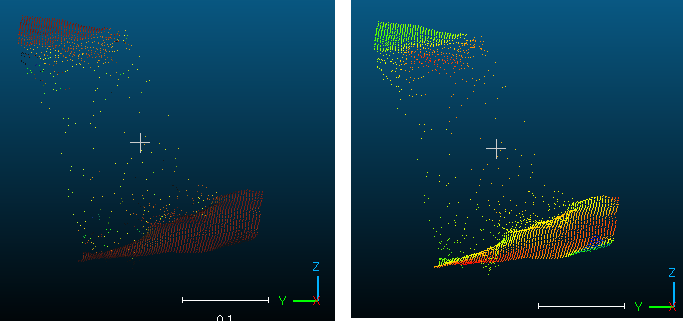
Hello again,
I don’t understand precisely what you are trying to obtain. You images show point clouds of different colors. I guess that the color represent the direction of the normal.
- Did you try to change the up vector ?
- How did you obtain the “right” image ?
Maybe, can you share a sample of code ?
Best regards
Antoine Lassagne
Senior Developer - ZED SDK
Stereolabs Support
Hello.
Sorry for lack of the information
The colors in the figure represent the size of z-normals.
The range of z-normal is different between the two figures.
I think z-normals between 2 planes will be far from 1.
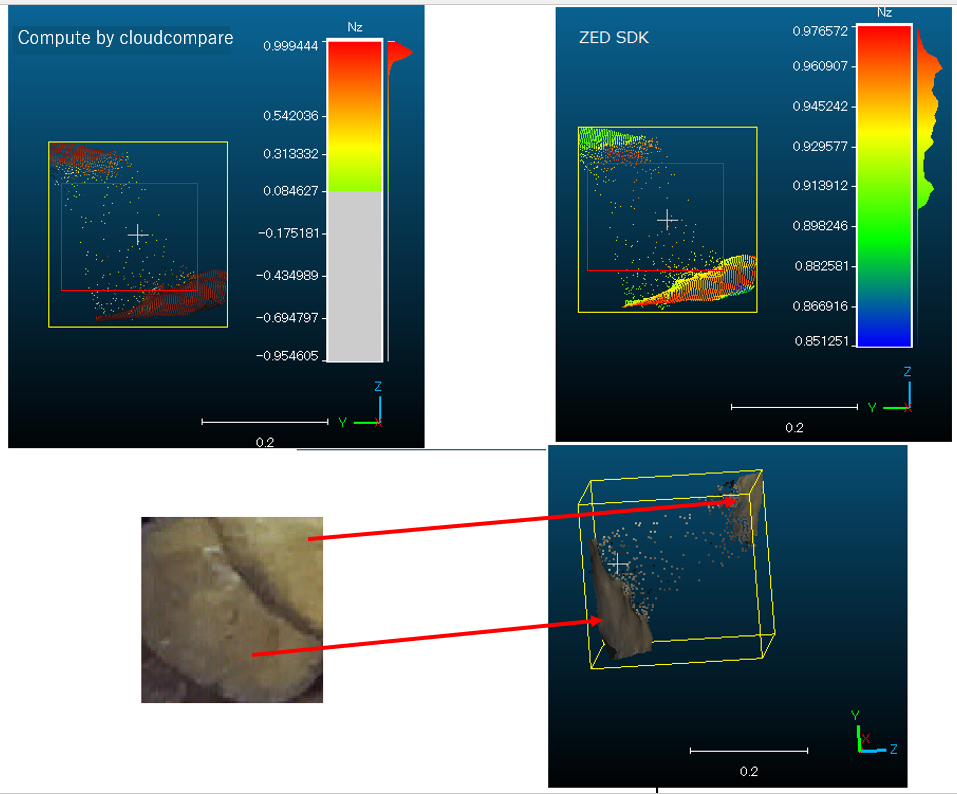
I couldn’t attach the file because I’m a new user, so I’ll show it here.
input_type = sl.InputType()
input_type.set_from_svo_file("test.svo")
init_params = sl.InitParameters(input_t=input_type, svo_real_time_mode=False)
init_params.depth_mode = sl.DEPTH_MODE.NEURAL
init_params.coordinate_system = sl.COORDINATE_SYSTEM.RIGHT_HANDED_Y_UP
init_params.coordinate_units = sl.UNIT.METER   # Set units in meters

err = zed.open(init_params)
if err != sl.ERROR_CODE.SUCCESS:
    exit(1)

resolution = zed.get_camera_information().camera_resolution
image_width=resolution.width
image_height=resolution.height

# Create and set RuntimeParameters after opening the camera
runtime_parameters = sl.RuntimeParameters()
runtime_parameters.sensing_mode = sl.SENSING_MODE.STANDARD  # Use STANDARD sensing mode
runtime_parameters.measure3D_reference_frame = sl.REFERENCE_FRAME.WORLD
# Setting the depth confidence parameters
runtime_parameters.confidence_threshold = 25
runtime_parameters.textureness_confidence_threshold = 100

image = sl.Mat()
point_cloud = sl.Mat(image_width, image_height, sl.MAT_TYPE.F32_C4, sl.MEM.CPU)
normals=sl.Mat(image_width, image_height, sl.MAT_TYPE.F32_C4, sl.MEM.CPU)

 # Enable positional tracking with default parameters
py_transform = sl.Transform()  # First create a Transform object for TrackingParameters object
tracking_parameters = sl.PositionalTrackingParameters(_init_pos=py_transform)
err = zed.enable_positional_tracking(tracking_parameters)
if err != sl.ERROR_CODE.SUCCESS:
    exit(1)

zed_pose = sl.Pose()

# Enable spatial mapping
mapping_parameters = sl.SpatialMappingParameters(map_type=sl.SPATIAL_MAP_TYPE.FUSED_POINT_CLOUD)
mapping_parameters.set_resolution(sl.MAPPING_RESOLUTION.HIGH)
mapping_parameters.set_range(sl.MAPPING_RANGE.SHORT)

err = zed.enable_spatial_mapping(mapping_parameters)
if err != sl.ERROR_CODE.SUCCESS:
    exit(1)

while True:
    # A new image is available if grab() returns SUCCESS
    if zed.grab(runtime_parameters) == sl.ERROR_CODE.SUCCESS:
        zed.get_position(zed_pose, sl.REFERENCE_FRAME.WORLD)

        zed.retrieve_measure(point_cloud, sl.MEASURE.XYZRGBA)
zed.retrieve_measure(normals, sl.MEASURE.NORMALS)Hello,
In my opinion, the size of the normal is sqrt(x² + y² + z²), and that should be equal to 1 if the normal is normalized. If you only take the Z component of the normal, it won’t be equal to 1. Isn’t that your problem ?
Bests
Antoine Lassagne
Senior Developer - ZED SDK
Stereolabs Support