I am using the ZED 2i camera, then use zed.retrieveMeasure to obtain the point cloud and store it in a PCD file. Compared to the point cloud obtained by ZED Depth Viewer, the point cloud obtained by zed.retrieveMeasure contains many invalid points. The RuntimeParameters of both methods are consistent. Why does this happen? Also, the invalid points contain “nan” and “0”. What is the difference between these two and two ineffective points?
Hi @gsbnn,
A few points explain what you’re seeing:
-
retrieveMeasure returns an organized point cloud — one entry per pixel, in image order. Pixels where depth can’t be computed (occlusion, low texture/confidence) are kept as placeholders, not removed. So a raw dump always contains invalid entries.
Convention: NaN = unknown/occluded, +Inf = too far, -Inf = too close. -
NaN vs 0: the SDK only ever uses NaN/±Inf for invalid points — never 0. We verified this on our side across several depth modes: zero exact-0 and zero (0,0,0) points in both the point cloud and depth map. So the 0s in your file are introduced by
your PCD writing/conversion step (zero-initialized buffer or a NaN→0 substitution), not by retrieveMeasure. Worth checking your write loop. -
More invalid points than Depth Viewer: matching RuntimeParameters isn’t enough — the big drivers are elsewhere:
- depth_mode (in InitParameters, not Runtime). Depth Viewer typically uses NEURAL/NEURAL+; if your app uses PERFORMANCE you’ll get far more holes. Most likely cause.
- enable_fill_mode (RuntimeParameters). It returns a dense, hole-free map by interpolating missing pixels; if Depth Viewer had it on and your app didn’t, that alone explains the gap. (Note: filled points are estimates, less accurate — fine for
visualization, not for measurement.) - Export format: Depth Viewer can save a dense cloud with invalid points already stripped, while your dump keeps the full grid.
To confirm on your side, could you share:
- Your InitParameters + RuntimeParameters (especially depth_mode and enable_fill_mode) and the grab → retrieveMeasure → PCD write snippet.
- The Depth Viewer settings and which save option you used for the reference cloud.
- SDK version + OS.
Yes, I checked the PCD write program and found that the wide and high indexes were written backwards, causing a large number of “0”—this should be the reason. After correction, the vast majority of invalid points disappeared. However, there is an issue with the point cloud color: the point cloud color obtained with ‘zed.retrieveMeasure’ shows yellow patches (see image), while Depth Viewer does not.
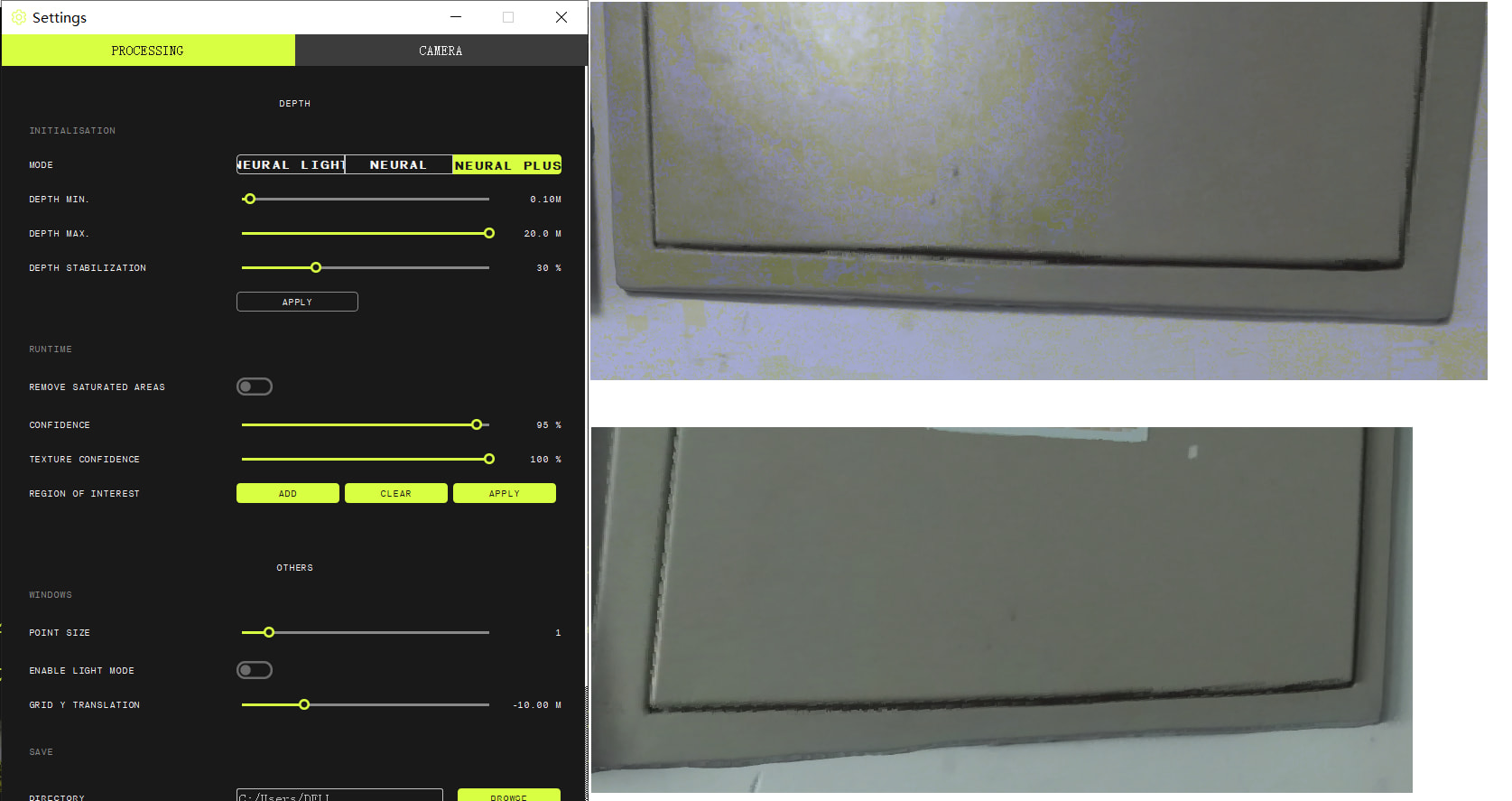
Additionally:
My InitParameters:
sl::InitParameters camparams;
camparams.camera_resolution = sl::RESOLUTION::HD1080;
camparams.depth_mode = sl::DEPTH_MODE::NEURAL_PLUS;
camparams.depth_minimum_distance = 100;
camparams.depth_maximum_distance = 20000;
camparams.coordinate_units = sl::UNIT::MILLIMETER;
Other parameters remain at default values.
My RuntimeParameters:
keep the default values.
sl::RuntimeParameters runtime_param;
runtime_param.enable_depth = true;
runtime_param.enable_fill_mode = false;
runtime_param.confidence_threshold = 95;
runtime_param.texture_confidence_threshold = 100;
runtime_param.measure3D_reference_frame = sl::REFERENCE_FRAME::CAMERA;
runtime_param.remove_saturated_areas = false;
My PCD write program(Corrected):
void savepointcloudpcd(const std::string& pointfilepath, const sl::Mat& pointclouds, const sl::Mat& normals) {
	std::ofstream fout(pointfilepath);
	int width = pointclouds.getWidth();
	int height = pointclouds.getHeight();
	int num_points = width * height;
	fout << "# .PCD v0.7 - Point Cloud Data file format\n";
	fout << "VERSION 0.7\n";
	fout << "FIELDS x y z rgb\n";
	fout << "SIZE 4 4 4 4\n";
	fout << "TYPE F F F F\n";
	fout << "COUNT 1 1 1 1\n";
	fout << "WIDTH " << width << "\n";
	fout << "HEIGHT " << height << "\n";
	fout << "VIEWPOINT 0 0 0 1 0 0 0\n";
	fout << "POINTS " << num_points << "\n";
	fout << "DATA ascii\n";

	// Block storage
	const size_t CHUNK_LINES = 200000;
	std::string buffer;
	buffer.reserve(CHUNK_LINES * 80);
	char line[128];

	size_t point_count = 0;
	for (int i = 0; i < width; ++i) {
		for (int j = 0; j < height; ++j) {
			sl::float4 pcValue;
			sl::float4 nlValue;
			pointclouds.getValue<sl::float4>(i, j, &pcValue);
			normals.getValue<sl::float4>(i, j, &nlValue);

			const uchar* color_bytes = reinterpret_cast<const uchar*>(&pcValue[3]);
			uint8_t b = color_bytes[0];
			uint8_t g = color_bytes[1];
			uint8_t r = color_bytes[2];
			uint32_t rgb = (r << 16) | (g << 8) | b;
			float rgb_as_float = *reinterpret_cast<float*>(&rgb);

			int len = std::snprintf(line, sizeof(line), "%g %g %g %g\n", pcValue.x, pcValue.y, pcValue.z, rgb_as_float);
			buffer.append(line, len);

			if (++point_count % CHUNK_LINES == 0 || point_count == num_points) {
				fout.write(buffer.data(), buffer.size());
				buffer.clear();
			}
		}
	}
}
Depth Viewer Settings(see image):
Resolution: HD1080
HI,
The yellow patches likely come from a precision loss when writing the color, not from retrieveMeasure.
You pack the RGB into a float32 (the PCL rgb field convention) and write it with %g, which uses only 6 significant digits — not enough to represent a float32 exactly (9 are required). The bits lost are the least-significant ones, which correspond to the blue channel, so colors shift toward yellow. It’s patchy because only certain color values are affected.
Fix: change the format specifier from %g to %.9g:
int len = std::snprintf(line, sizeof(line), "%g %g %g %.9g\n",
                        pcValue.x, pcValue.y, pcValue.z, rgb_as_float);
We tested your exact write→reparse path over 1536 colors: %g corrupted 1345 of them (mean blue error ~39), %.9gcorrupted none. Alternatively, write the rgb field as a uint32 (TYPE U, print the integer directly) or use binary PCD — both avoid the issue entirely.
One thing to double-check: your byte unpacking (b,g,r = bytes 0,1,2) is correct for MEASURE::XYZBGRA. If you retrieve MEASURE::XYZRGBA instead, R and B are swapped — confirm your retrieveMeasure call matches.
Thanks a lot, it really was an issue of precision loss. The problem has been solved, thanks again.