Dear Stereolabs-Team
We are currently using the following setup:
- NVIDIA Jetson Orin AGX Dev-Kit (running on 36.4.7)
- Zed Link Duo Capture Card
- 1 x ZED X One 4K
- 1 x ZED X Mini
When trying to connect both cameras, your documentation ( ZED Link Duo on AGX Orin - Stereolabs ) clearly specifies that the ZED X One 4k must only be connected to either the port #0 or #2 and that only 1 camera should be connected to 1 group.
These recommendations, however, did not work for us and we were able to only detect one of the two simultaneously connected cameras.
We then moved forward and acquired the following table, showing which port combinations actually did work out for us, meaning that we were able to detect and use both cameras at the same time, marked with “Yes”:
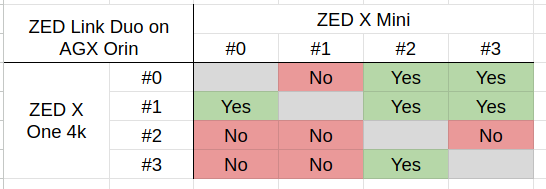
I now have the following two questions:
-
Is there a way to find out why we have this discrepancy between your documentation and what we are able to reproduce?
-
IF we don’t use either port #0 or port #2 for the ZED X One 4k, what is the following implication according to your specs? Like is there just an impairment, or do you expect the camera(s) to just not work at all?
Best regards and thank you in advance,