Hey everyone,
I’ve been building a ROS 2 state estimator called FusionCore and wanted to share how it integrates with ZED cameras for mobile robot setups. @Myzhar pointed me here after I opened an issue (#429) on the ZED ROS2 wrapper.
What FusionCore does?
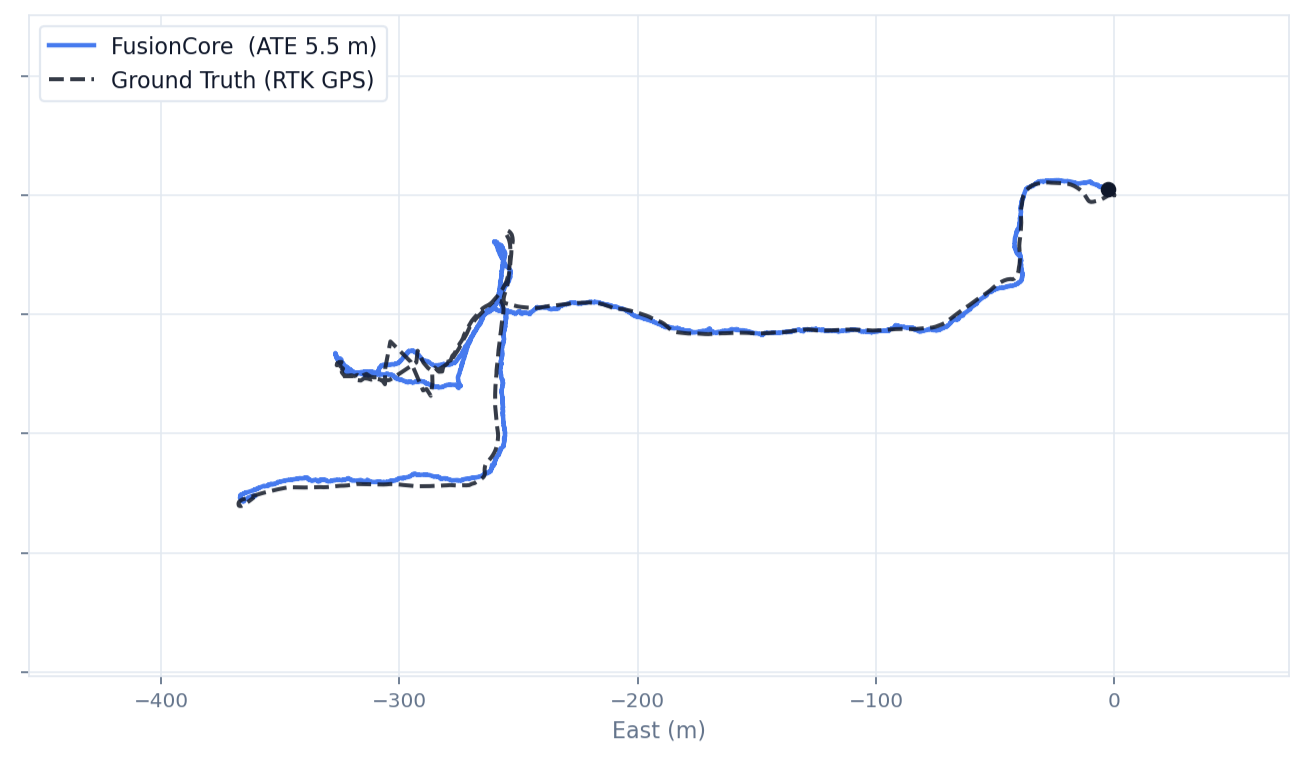
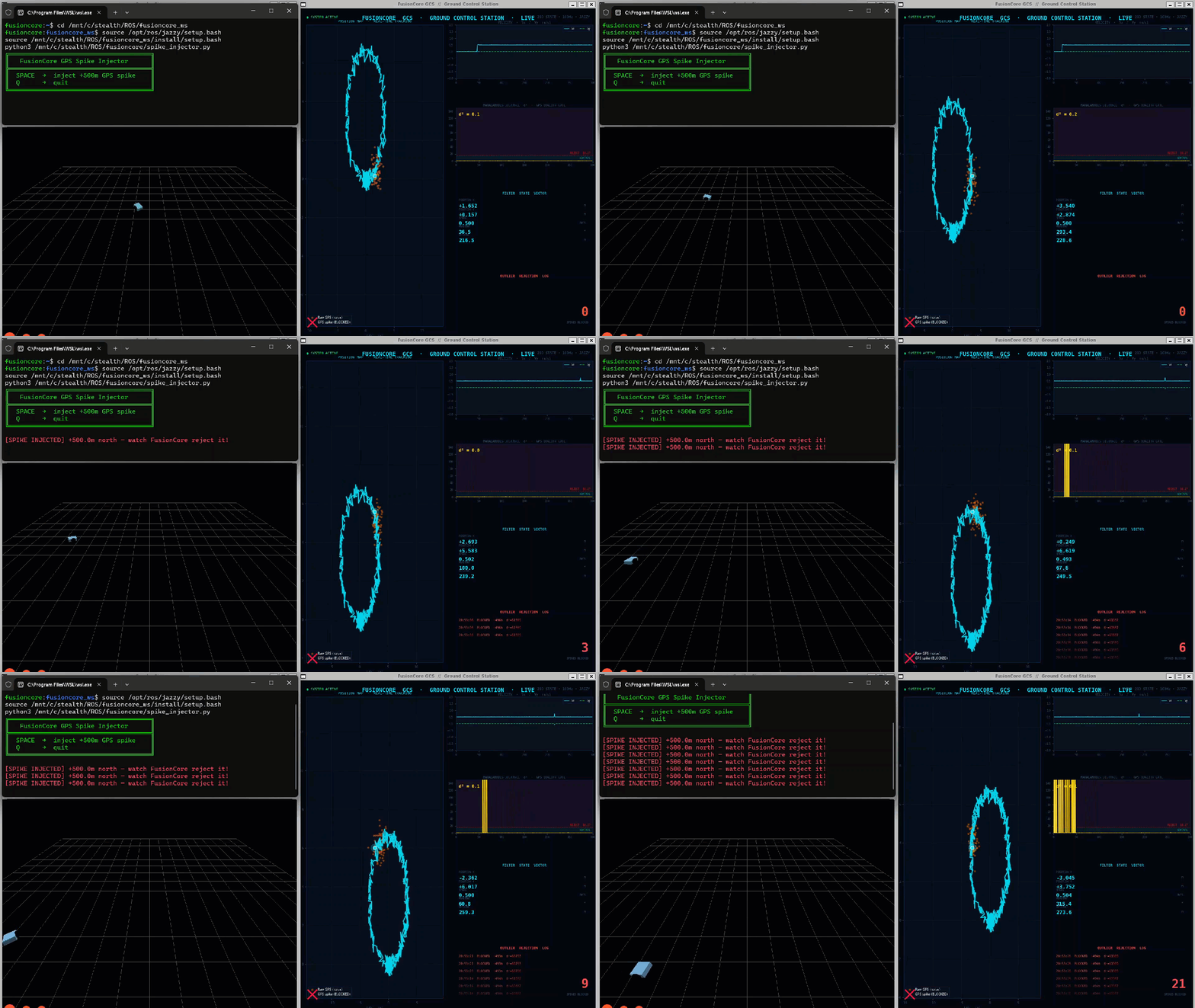
FusionCore is a 22-state UKF that fuses IMU, wheel odometry, visual odometry, and optional GPS into a single clean odom → base_link estimate. It runs gyro and accelerometer bias estimation in the filter state, adapts its noise covariance automatically, and gates outliers with a chi-squared test per sensor.
How it works with ZED
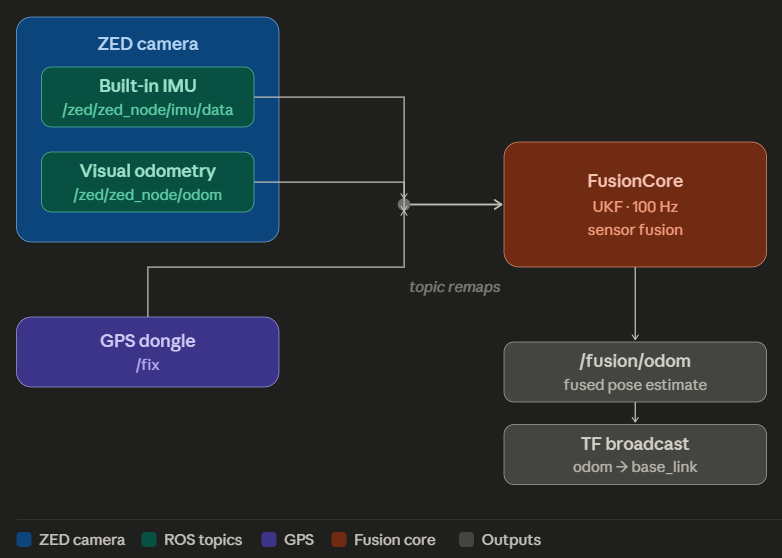
The ZED node publishes two things FusionCore can consume directly:
-
/zed/zed_node/imu/data→ FusionCore IMU input -
/zed/zed_node/odom→ FusionCore secondary odometry (encoder2.topic)
If you also have wheel encoders, those go in as the primary source and ZED visual odometry becomes the secondary. FusionCore outputs /fusion/odom (nav_msgs/Odometry) and broadcasts the odom → base_link TF at 100Hz.
Config for ZED + wheel encoders
fusioncore:
  ros__parameters:
    base_frame: base_link
    odom_frame: odom
    publish_rate: 100.0
    publish.force_2d: true

    imu.has_magnetometer: false
    imu.gyro_noise: 0.005
    imu.accel_noise: 0.1
    imu.frame_id: "zed_imu_link"

    encoder.vel_noise: 0.05
    encoder.yaw_noise: 0.02

    encoder2.topic: "/zed/zed_node/odom"

    outlier_rejection: true
    outlier_threshold_gnss: 16.27
    outlier_threshold_imu: 15.09
    outlier_threshold_enc: 11.34
    outlier_threshold_hdg: 10.83

    adaptive.imu: true
    adaptive.encoder: true
    adaptive.gnss: true

    reference.use_first_fix: false
    reference.x: 0.0
    reference.y: 0.0
    reference.z: 0.0
Starting FusionCore
FusionCore is a ROS 2 lifecycle node: it needs to go through configure → activate before it starts publishing. Two ways to handle this:
If you use Nav2:
ros2 launch fusioncore_ros fusioncore_nav2.launch.py
fusioncore_config:=/path/to/zed_robot.yaml
The launch file handles configure and activate automatically, then starts Nav2 once FusionCore is publishing. Update your Nav2 config to read from /fusion/odom instead of /odometry/filtered.
If you don’t use Nav2:
# Terminal 1 — start the node with remaps
ros2 run fusioncore_ros fusioncore_node --ros-args \
  --params-file /path/to/zed_robot.yaml \
  -r /odom/wheels:=/your/wheel/odom \
  -r /imu/data:=/zed/zed_node/imu/data

# Terminal 2 — trigger lifecycle transitions
ros2 lifecycle set /fusioncore configure
ros2 lifecycle set /fusioncore activate
After activating, /fusion/odom should be publishing and ros2 topic hz /fusion/odom should show ~100Hz.
Full lifecycle documentation: https://manankharwar.github.io/fusioncore/getting-started/
TF architecture
ZED → /zed/zed_node/imu/data  ─┐
ZED → /zed/zed_node/odom      ─┤→ FusionCore → odom → base_link TF
Wheels → /odom/wheels         ─┘              → /fusion/odom

SLAM (rtabmap, slam_toolbox)  → map → odom TF
FusionCore sits underneath your SLAM stack. They don’t conflict.
Adding GPS for outdoor robots
Add a GPS receiver and FusionCore fuses all three: ZED IMU, visual odometry, and GPS… into a global-frame estimate. No UTM projection, no separate navsat_transform node. Add to your config:
    input.gnss_crs: "EPSG:4326"
    output.crs: "EPSG:4978"
    output.convert_to_enu_at_reference: true
    reference.use_first_fix: true
Then remap /gnss/fix to your GPS topic. Full GPS configuration guide: https://manankharwar.github.io/fusioncore/configuration/
Where it helps most with ZED
ZED visual odometry is excellent but can drift briefly during fast rotation, low-texture scenes, or lighting transitions. FusionCore bridges those gaps using IMU dead-reckoning and wheel encoder velocity. The result is an odometry signal that doesn’t stutter when the camera loses tracking momentarily.
Happy to answer questions about specific ZED setups.