I am trying to Flash my Zed Box Orin NX 16GB.
I put the Zed Box Orin in recovery mode and tried to use the Jetbox 6.2 Flash script.
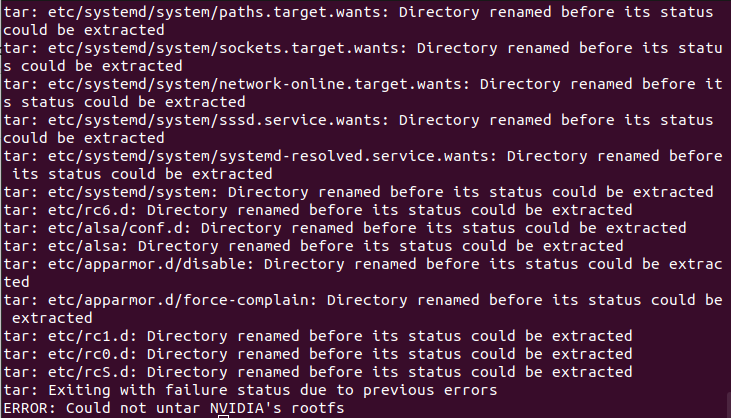
This error was printed. How can I solve it?
Hi @ethanharj
Please add more information regarding the procedure that you followed.
What’s your host type?
I am flashing my Zed Box Orin with a Windows Computer running Ubuntu 22.04.5 using a LiveUSB key.
My LiveUSB key has 150 GB in free storage.
I put the Zed Box Orin in recovery mode and double checked using the command
lsusb -d '0955:'
I used the Nvidia Jetpack 6.2 flash script from the Stereolabs Documentation.
I then ran
mkdir ~/zedbox
mv ~/Downloads/zedbox_all_usb_flash_6.2.sh ~/zedbox
chmod +wrx -R ~/zedbox
cd ~/zedbox
BSP_ROOT=./stereolabs_bsp/ ./zedbox_all_usb_flash_6.2.sh
Does the USB Key have persistence?
Is it a fast USB 3 key?
It looks like the script cannot create the required folder structure on the USB key.
It is a Samsung USB 3.1 Flash Drive.
The USB Key does have persistence.
Can you try with something less invasive, like:
mkdir ~/zedbox
mv ~/Downloads/zedbox_all_usb_flash_6.2.sh ~/zedbox
cd ~/zedbox
chmod +x zedbox_all_usb_flash_6.2.sh
BSP_ROOT=./stereolabs_bsp/ ./zedbox_all_usb_flash_6.2.sh
I realized my mistake. I forgot to assign a virtual drive to the zedbox folder. After assigning the virtual drive I managed to flash the zed box correctly.