the entry point script in the documentation of Setting up Isaac ros is wrong. I wasn’t able to use that.
What version of Isaac ROS are you using?
Please specify what’s wrong with the entrypoint and what fixes you applied. They could help other users.
Hey Myzhar, I in my case totally had to uncomment the whole entry point in the docker config that it is not used. Everything else which does user changes etc. does cause errors.
I just donwloaded the actuall Isaac ros version like in your description.
Have you tried to use Isaac ROS 3.2?
When the documentation was written, the current version v4.x had not been released yet.
I don’t know how and where to find the version. I just did run_dev.sh like in your description and the docker was pulled.
How can I elsewise reset this when you say that it is not supported?
If you used the correct command at step #5 here, then you are using Isaac ROS 3.2
Yes I have done it with Isaac Ros 3.2 where the entrypoint was false
But can you give me a hint how I can see the April Tags in Rviz in the way how you could see? It does not successfully show the result on my side.
Is it always mendatory that the april tags do have fixed positions? In real scenarios often the positions are not known due to differences.
It’s not. They can move.
Are you using the correct configuration? Are the April Tags detected?
Do you get something in the /tag_detections topic?
Im using this tutorial yes. I see the topic on command line but not on rviz. That is my greatest problem. Therefore I cannot for sure answer your question. I don’t know how I have to adjust rviz. There this topic is not shown. And what is then the reference frame when you want to drive with a robot? Somewhere must be the informations or even that not?
There’s nothing specific on rviz2, only the TF with the pose of the target if it has been detected.
Simply add a TF visualizer plugin:
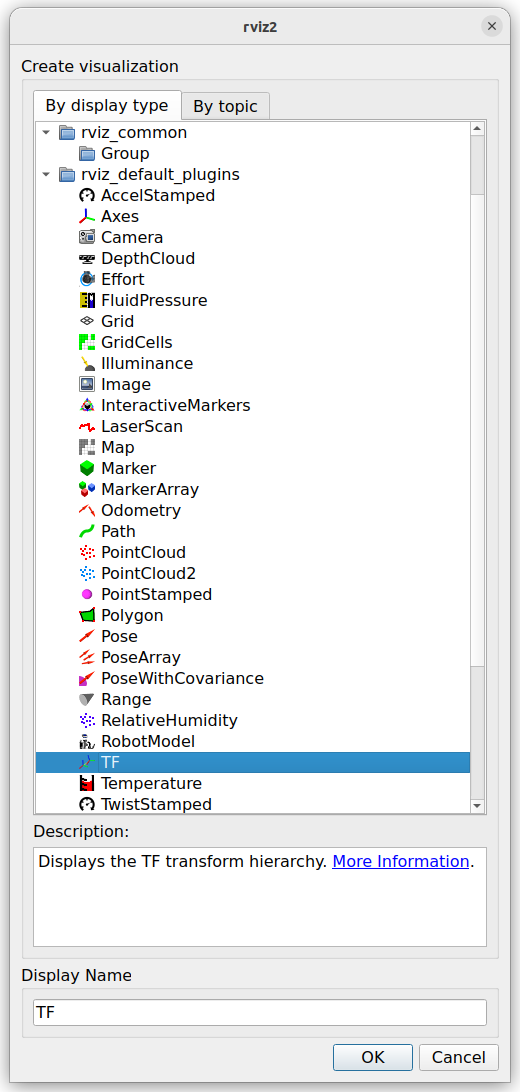
The name changes according to the type and ID of the tag that you are using.
Is the
message populated? You can get all the information in the content of the message.
I can’t see that on rviz on the command line it is /zed/zed/tag_detections yes but in rviz in tf no chance
Please post a screenshot showing all the frames available in the TF view.
Here are all the Frames availabe with the Rviz config of this project.
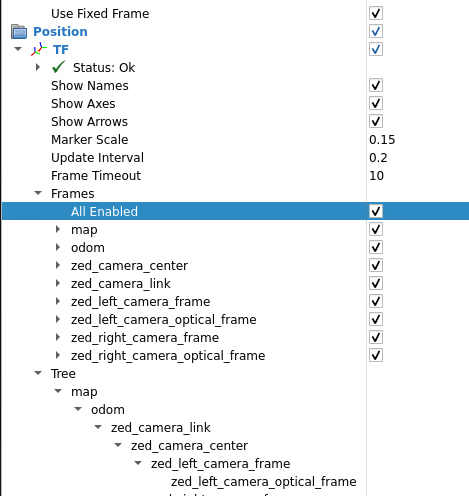
I had to install also the isaac ros april Tag folder.
ros2 topic list gives me that output with also tag detections.
/clicked_point
/diagnostics
/parameter_events
/rosout
/tf
/tf_static
/zed_isaac/joint_states
/zed_isaac/tag_detections
/zed_isaac/tf
/zed_isaac/zed/depth/camera_info
/zed_isaac/zed/depth/depth_registered
/zed_isaac/zed/depth/depth_registered/camera_info
/zed_isaac/zed/depth/depth_registered/nitros
/zed_isaac/zed/imu/data
/zed_isaac/zed/odom
/zed_isaac/zed/point_cloud/cloud_registered
/zed_isaac/zed/pose
/zed_isaac/zed/pose/status
/zed_isaac/zed/rgb/color/rect/camera_info
/zed_isaac/zed/rgb/color/rect/image
/zed_isaac/zed/rgb/color/rect/image/camera_info
/zed_isaac/zed/rgb/color/rect/image/nitros
/zed_isaac/zed/rgb/color/rect/image_bgr8
/zed_isaac/zed/rgb/color/rect/image_bgr8/nitros
/zed_isaac/zed/status/health
/zed_isaac/zed/status/heartbeat
/zed_isaac/zed_description
Also ros2 topic echo /zed/tag_detections
gives me
- family: tag36h11
id: 16
center:
x: 812.6939086914062
y: 171.85397338867188
z: 0.0
corners:- x: 825.0
y: 187.0
z: 0.0 - x: 797.0
y: 190.0
z: 0.0 - x: 799.0
y: 155.0
z: 0.0 - x: 829.0
y: 153.0
z: 0.0
pose:
header:
stamp:
sec: 0
nanosec: 0
frame_id: ‘’
pose:
pose:
position:
x: 0.20076219737529755
y: -0.060984112322330475
z: 0.33273744583129883
orientation:
x: -0.1586143970489502
y: -0.3782351016998291
z: 0.9007907509803772
w: 0.1426732987165451
covariance:- 0.0
- 0.0
- 0.0
- 0.0
- 0.0
- 0.0
- 0.0
- 0.0
- 0.0
- 0.0
- 0.0
- 0.0
- 0.0
- 0.0
- 0.0
- 0.0
- 0.0
- 0.0
- 0.0
- 0.0
- 0.0
- 0.0
- 0.0
- 0.0
- 0.0
- 0.0
- 0.0
- 0.0
- 0.0
- 0.0
- 0.0
- 0.0
- 0.0
- 0.0
- 0.0
- 0.0
- x: 825.0
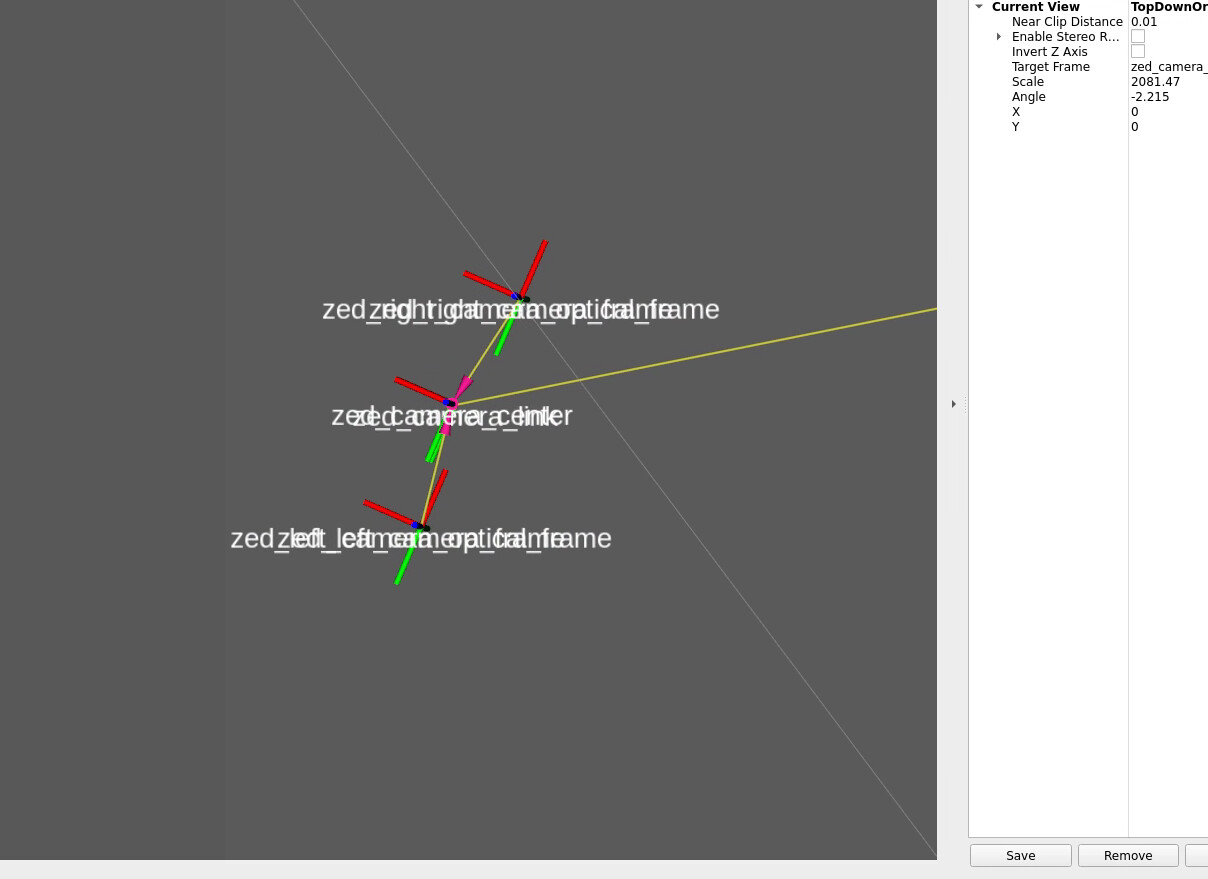
I can then see it now on rviz but as you can see here on the output this detections can’t be used because the frame is not set. Where an I change it? I think I do not need odom and map but the origin of the left eye frame to the camera I think when I am using a robot arm.
This means that you are using the original version of the isaac_ros_apriltag package, you have not patched it as described here: Tutorial - AprilTag Detection with ZED and Isaac™ ROS - Stereolabs
The problem and the fix are described in this pull request that I’ve submitted a few months ago:
Unfortunately, NVIDIA decided to merge the fix only into Isaac ROS v4.
I did all bugfixing which was standing on the ZED page with pulling the normal AprilTag version for TF. But that is still not enough for selecting the frame which is shown for echo /zed/tag_detections. How is that possible?
Is it with this possible that only relatively from the camera to the marker everything can be detected without fixed positions for the tags?
I can’t open the link unfortunatly,
It says to much request on that website. Do you also have the problem?
If this topic is advertised, it means that you are using the original version of the package.
Try to remove it (sudo apt remove ros-humble-isaac-ros-apriltag) and install the patched version as explained in the documentation.
I did this but as you see there there is normally no frame. That means the camera does not have any reference. Where do we adjust this?
I repeat:
As long as the topic /zed_isaac/tf is advertised, you are using the original version of the ros-humble-isaac-ros-apriltag.
If you do not use the patched version, you cannot get the correct TF frame.
Please verify the steps that you performed one by one to be sure that you have done everything correctly.
Only for understanding you right. You mean the fix for TF right? This doesn’t helped Tutorial - AprilTag Detection with ZED and Isaac™ ROS - Stereolabs
The frame is still not there. On the buttom of the page right? Or what does you mean with another patched version? That is already the original by Nvidia
With your patched version I do even not get an image therefore I had to to that. I would have done that when not necessary to switch to the original