Hello Myzhar,
I am facing the same issue.
Everything well installed on WSL2 Ubuntu 20.04.
I managed also to attached ZED USB with usbipd and got it detected on Ubuntu, but Zed SDK is still not able to detect it
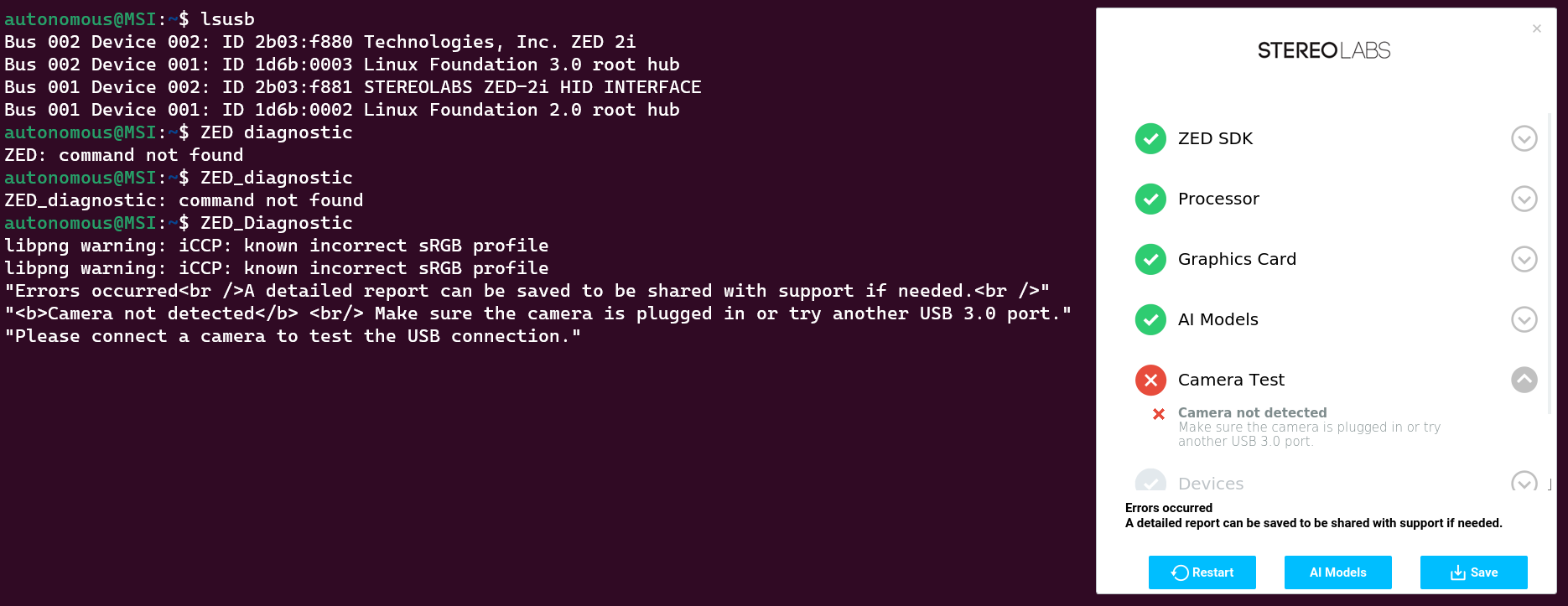
I got both 2b03:f880 ZED 2i and 2b03:f881 ZED 2i HID
Any idea ?
Thank you !
Here is below the report from ZED_Diagnostic:
{
    "AI Models": {
        "valid": [
            "MULTI CLASS DETECTION is optimized",
            "MULTI CLASS MEDIUM DETECTION is optimized",
            "MULTI CLASS ACCURATE DETECTION is optimized",
            "HUMAN BODY FAST DETECTION is optimized",
            "HUMAN BODY MEDIUM DETECTION is optimized",
            "HUMAN BODY ACCURATE DETECTION is optimized",
            "HUMAN BODY 38 FAST DETECTION is optimized",
            "HUMAN BODY 38 MEDIUM DETECTION is optimized",
            "HUMAN BODY 38 ACCURATE DETECTION is optimized",
            "PERSON HEAD DETECTION is optimized",
            "PERSON HEAD ACCURATE DETECTION is optimized",
            "REID ASSOCIATION is optimized",
            "NEURAL DEPTH is optimized"
        ]
    },
    "Camera Test": {
        "InternalDevicesCount": 2,
        "ZEDCount": 0,
        "error": [
            "<b>Camera not detected</b> <br/> Make sure the camera is plugged in or try another USB 3.0 port."
        ]
    },
    "Devices": {
        "CorruptedFirmware": false,
        "MCUDetected": true,
        "USBList": [
            {
                "USBMode": 3,
                "USB_path": "/1",
                "bDescriptorType": 1,
                "bDeviceProtocol": 1,
                "bLength": 18,
                "bMaxPacketSize0": 9,
                "bNumConfigurations": 1,
                "bcdDevice": "1.0",
                "bcdUSB": "3.0",
                "bcdUSBClass": 239,
                "bcdUSBSubClass": 2,
                "busNumber": 2,
                "device": "ZED2i",
                "iManufacturer": 1,
                "iProduct": 2,
                "iSerial": 4,
                "idProduct": "0xf880",
                "idVendor": "0x2b03"
            },
            {
                "USBMode": 2,
                "USB_path": "/1",
                "bDescriptorType": 1,
                "bDeviceProtocol": 0,
                "bLength": 18,
                "bMaxPacketSize0": 64,
                "bNumConfigurations": 1,
                "bcdDevice": "3.9",
                "bcdUSB": "2.0",
                "bcdUSBClass": 0,
                "bcdUSBSubClass": 0,
                "busNumber": 1,
                "device": "ZED2i MCU",
                "iManufacturer": 1,
                "iProduct": 2,
                "iSerial": 3,
                "idProduct": "0xf881",
                "idVendor": "0x2b03"
            }
        ],
        "USBMode": 3,
        "ZED Camera Module Detected": 63616,
        "ZED MCU Module Detected": 63617,
        "ZEDDetected": true,
        "notTested": [
            "Please connect a camera to test the USB connection."
        ]
    },
    "Graphics Card": {
        "deviceCount": 1,
        "deviceDriverVersion": 12030,
        "devices": [
            {
                "arch": "Ada Lovelace",
                "computeCapability": "8.9",
                "cores": 7424,
                "name": "NVIDIA GeForce RTX 4080 Laptop GPU",
                "totalMemoryBytes": "12878086144",
                "totalMemoryMB": 12281.5
            }
        ],
        "glx_info": "OpenGL vendor string: Microsoft Corporation\nOpenGL renderer string: D3D12 (NVIDIA GeForce RTX 4080 Laptop GPU)\nOpenGL core profile version string: 3.3 (Core Profile) Mesa 21.2.6\nOpenGL core profile shading language version string: 3.30\nOpenGL core profile context flags: (none)\nOpenGL core profile profile mask: core profile\nOpenGL core profile extensions:\nOpenGL version string: 3.1 Mesa 21.2.6\nOpenGL shading language version string: 1.40\nOpenGL context flags: (none)\nOpenGL extensions:\nOpenGL ES profile version string: OpenGL ES 3.0 Mesa 21.2.6\nOpenGL ES profile shading language version string: OpenGL ES GLSL ES 3.00\nOpenGL ES profile extensions:\n",
        "initResult": 0,
        "valid": [
            "<b>Graphics card: </b> NVIDIA GeForce RTX 4080 Laptop GPU"
        ]
    },
    "Processor": {
        "OS": "Ubuntu 20.04.6 LTS ",
        "avxSupported": true,
        "coreCount": "32",
        "cpu": " 13th Gen Intel(R) Core(TM) i9-13950HX",
        "datetime": "2023-12-22 12:16:21",
        "hyperThreading": "1",
        "motherboard": ", ",
        "ramCapacity": "8.170373",
        "ramUsage": "",
        "ramUsed": "1.812324",
        "threadCount": "64",
        "valid": [
            "<b>Processor: </b>  13th Gen Intel(R) Core(TM) i9-13950HX"
        ]
    },
    "ZED SDK": {
        "CUDA Toolkit version": "V12.1.105 -->located in /usr/local/cuda-12.1/bin/nvcc",
        "CUDA loading": false,
        "GPU Driver Version": "Driver Version                            : 546.01",
        "GPU Performance": "    Performance State                     : P8",
        "ZED SDK Version (Diag)": "4.0.8",
        "ZED SDK Version (RT)": "4.0.8",
        "ai": {
            "checkAI": true,
            "cudaVersion": 12010,
            "cudnnCudartVersion": 12000,
            "cudnnVersion": 8801,
            "cudnnVersionExpected": 8801,
            "tensorVersion": 8600
        },
        "binFiles": [
            "libsl_ai.so",
            "libsl_zed.so",
            "libsl_zed_static.a"
        ],
        "resourcesFiles": [
            "neural_depth_2.0.model",
            "objects_accurate_3.2.model",
            "objects_medium_3.2.model",
            "objects_performance_3.2.model",
            "person_head_accurate_2.4.model",
            "person_head_performance_2.4.model",
            "person_reid_1.4.model",
            "skeleton_body18_3.2.model",
            "skeleton_body38_3.5.model"
        ],
        "resourcesFilesExpected": [
            "objects_performance_3.2"
        ],
        "valid": [
            "<b>ZED SDK version:</b> 4.0.8",
            "<b>CUDA version:</b> V12.1.105"
        ]
    }
}