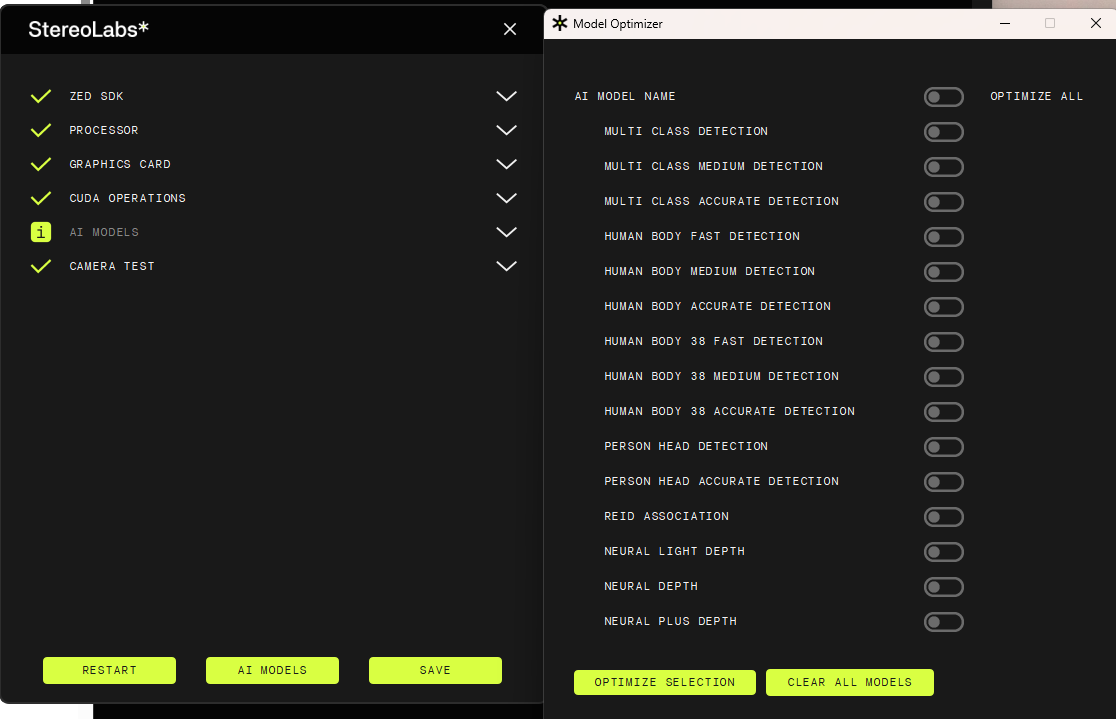
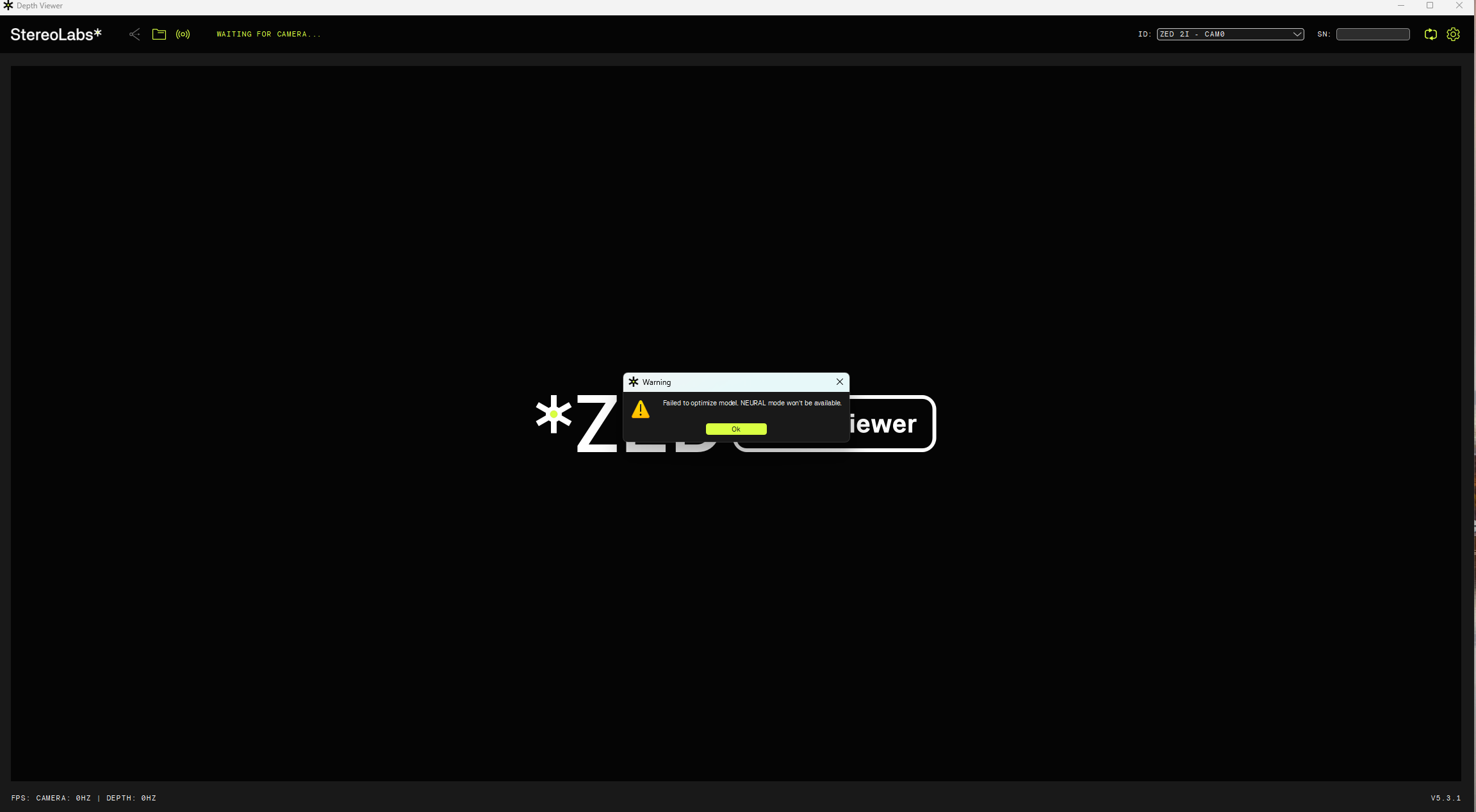
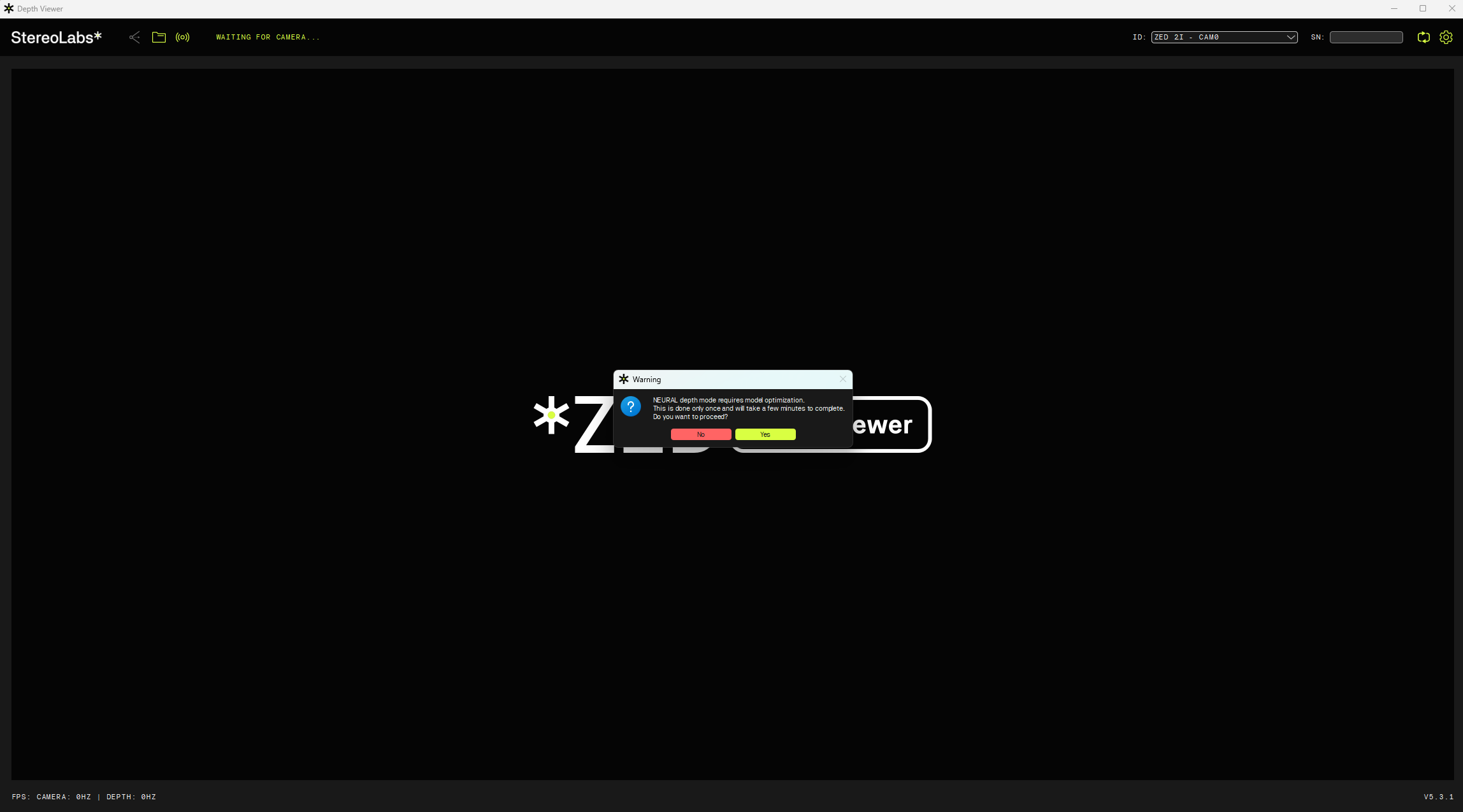
Hi there,After installing the ZED SDK on Windows, Explorer and Studio run normally, but the Depth Viewer keeps popping up this window indefinitely, and I can’t click any UI buttons. Diagnostic shows that the AI model cannot be installed.Furthermore, selecting to install all AI models on Diagnostic also results in a failure message.
Hi @EthanLee
Welcome to the StereoLabs community.
Please run ZED Diagnostic again, save the JSON report, and post here the content of the file.
hi @Myzhar
there is the content of JSON file
{
"AI Models": {

    "info": \[

        "MULTI CLASS DETECTION is not optimized",

        "MULTI CLASS MEDIUM DETECTION is not optimized",

        "MULTI CLASS ACCURATE DETECTION is not optimized",

        "HUMAN BODY FAST DETECTION is not optimized",

        "HUMAN BODY MEDIUM DETECTION is not optimized",

        "HUMAN BODY ACCURATE DETECTION is not optimized",

        "HUMAN BODY 38 FAST DETECTION is not optimized",

        "HUMAN BODY 38 MEDIUM DETECTION is not optimized",

        "HUMAN BODY 38 ACCURATE DETECTION is not optimized",

        "PERSON HEAD DETECTION is not optimized",

        "PERSON HEAD ACCURATE DETECTION is not optimized",

        "REID ASSOCIATION is not optimized",

        "NEURAL LIGHT DEPTH is not optimized",

        "NEURAL DEPTH is not optimized",

        "NEURAL PLUS DEPTH is not optimized"

    \]

},

"CUDA Operations": {

    "cudaDeviceCount": 1,

    "cudaDriverVersion": 13030,

    "cudaDriverVersionString": "13.3",

    "cudaGetDeviceCountResult": 0,

    "cudaRuntimeLoaded": true,

    "cudaRuntimeVersion": 13030,

    "cudaRuntimeVersionString": "13.3",

    "cudaTestVersion": "1.0",

    "gpuTests": \[

        {

            "computeCapability": "12.0",

            "computeCapabilityMajor": 12,

            "computeCapabilityMinor": 0,

            "freeResult": 0,

            "freeSuccess": true,

            "gpuId": 0,

            "gpuName": "NVIDIA GeForce RTX 5060 Laptop GPU",

            "mallocResult": 0,

            "mallocSuccess": true,

            "memcpyD2HResult": 0,

            "memcpyD2HSuccess": true,

            "memcpyH2DResult": 0,

            "memcpyH2DSuccess": true,

            "memoryBusWidthBits": 128,

            "memsetResult": 0,

            "memsetSuccess": true,

            "multiProcessorCount": 26,

            "pciBusId": 1,

            "pciDeviceId": 0,

            "pciDomainId": 0,

            "setDeviceResult": 0,

            "testElements": 1048576,

            "testPassed": true,

            "testSizeBytes": 4194304,

            "totalGlobalMemMB": 8150,

            "validationPassed": true

        }

    \],

    "testSizeMB": 1,

    "valid": \[

        "<b>GPU 0 (NVIDIA GeForce RTX 5060 Laptop GPU):</b> CUDA operations working correctly"

    \]

},

"Camera Test": {

    "ASMediaFound": \[

    \],

    "CorruptedFirmware": \[

    \],

    "InternalDevicesCount (GMSL)": \[

    \],

    "InternalDevicesCount (USB)": \[

    \],

    "MCUDetected": \[

    \],

    "OC_Cam_Detected": \[

    \],

    "OtherUSBDevices": \[

    \],

    "Serial Number": \[

    \],

    "USBList": \[

        {

            "USB_path": "/1",

            "idProduct": "0x2512",

            "idVendor": "0x0424"

        },

        {

            "USB_path": "/10",

            "idProduct": "0x0033",

            "idVendor": "0x8087"

        },

        {

            "USBMode": 2,

            "USB_path": "/1/2",

            "bDescriptorType": 1,

            "bDeviceProtocol": 0,

            "bLength": 18,

            "bMaxPacketSize0": 64,

            "bNumConfigurations": 1,

            "bcdDevice": "3.10",

            "bcdUSB": "2.0",

            "bcdUSBClass": 0,

            "bcdUSBSubClass": 0,

            "busNumber": 1,

            "device": "ZED2i MCU",

            "iManufacturer": 1,

            "iProduct": 2,

            "iSerial": 3,

            "idProduct": "0xf881",

            "idVendor": "0x2b03"

        },

        {

            "USB_path": "/6",

            "idProduct": "0x5482",

            "idVendor": "0x0408"

        },

        {

            "USB_path": "/2",

            "idProduct": "0x6216",

            "idVendor": "0x17ef"

        },

        {

            "USBMode": 3,

            "USB_path": "/13",

            "bDescriptorType": 1,

            "bDeviceProtocol": 1,

            "bLength": 18,

            "bMaxPacketSize0": 9,

            "bNumConfigurations": 1,

            "bcdDevice": "1.0",

            "bcdUSB": "3.0",

            "bcdUSBClass": 239,

            "bcdUSBSubClass": 2,

            "busNumber": 1,

            "device": "ZED2i",

            "iManufacturer": 1,

            "iProduct": 2,

            "iSerial": 4,

            "idProduct": "0xf880",

            "idVendor": "0x2b03"

        },

        {

            "USBMode": 3,

            "USB_path": "/13",

            "bDescriptorType": 1,

            "bDeviceProtocol": 1,

            "bLength": 18,

            "bMaxPacketSize0": 9,

            "bNumConfigurations": 1,

            "bcdDevice": "1.0",

            "bcdUSB": "3.0",

            "bcdUSBClass": 239,

            "bcdUSBSubClass": 2,

            "busNumber": 1,

            "device": "ZED2i",

            "iManufacturer": 1,

            "iProduct": 2,

            "iSerial": 4,

            "idProduct": "0xf880",

            "idVendor": "0x2b03"

        }

    \],

    "USBMode": \[

    \],

    "ZED Camera Module Detected": \[

    \],

    "ZED MCU Module Detected": \[

    \],

    "ZEDCount": \[

    \],

    "ZEDDetected": \[

    \],

    "ZEDs": \[

    \],

    "camera": \[

    \],

    "captureDevices": \[

    \],

    "controllers": \[

        {

            "CompatibleIDs": "USB\\\\USB20_HUB",

            "Description": "\\u001a( USB ƿh",

            "DeviceName": "",

            "Driver": "{36fc9e60-c465-11cf-8056-444553540000}\\\\0012",

            "Location": "Port\_#0001.Hub\_#0002",

            "Manufacturer": "(\\u0007� USB ƿh)",

            "Name": "USB",

            "PhysicalName": "\\\\Device\\\\USBPDO-2"

        },

        {

            "CompatibleIDs": "",

            "Description": "USB 9ƿh(USB 3.0)",

            "DeviceName": "",

            "Driver": "{36fc9e60-c465-11cf-8056-444553540000}\\\\0002",

            "Location": "",

            "Manufacturer": "(\\u0007� USB ƿh)",

            "Name": "USB",

            "PhysicalName": "\\\\Device\\\\USBPDO-0"

        },

        {

            "CompatibleIDs": "PCI\\\\VEN_8086&CC_0C0330",

            "Description": "&\\b USB xHCI �;:�6h",

            "DeviceName": "Intel(R) USB 3.20 �iU;:�6h - 1.20 (Microsoft)",

            "Driver": "{36fc9e60-c465-11cf-8056-444553540000}\\\\0000",

            "Location": "PCI ;� 0\\u0001�\\u0007 13\\u0001�� 0",

            "Manufacturer": "\\u001a( USB xHCI ;:�6h",

            "Name": "PCI",

            "PhysicalName": "\\\\Device\\\\NTPNP_PCI0006"

        },

        {

            "CompatibleIDs": "PCI\\\\VEN_8086&DEV_51ED&REV_01",

            "Description": "&\\b USB xHCI �;:�6h",

            "DeviceName": "Intel(R) USB 3.10 �iU;:�6h - 1.20 (Microsoft)",

            "Driver": "{36fc9e60-c465-11cf-8056-444553540000}\\\\0001",

            "Location": "PCI ;� 0\\u0001�\\u0007 20\\u0001�� 0",

            "Manufacturer": "\\u001a( USB xHCI ;:�6h",

            "Name": "PCI",

            "PhysicalName": "\\\\Device\\\\NTPNP_PCI0007"

        },

        {

            "CompatibleIDs": "",

            "Description": "USB 9ƿh(USB 3.0)",

            "DeviceName": "",

            "Driver": "{36fc9e60-c465-11cf-8056-444553540000}\\\\0003",

            "Location": "",

            "Manufacturer": "(\\u0007� USB ƿh)",

            "Name": "USB",

            "PhysicalName": "\\\\Device\\\\USBPDO-1"

        }

    \],

    "resolutions": \[

    \],

    "sensors": \[

    \],

    "valid": \[

        "<b>Camera: </b>ZED 2i",

        "<b>USB Bandwidth: </b> OK",

        "<b>USB Bandwidth: </b> OK"

    \]

},

"Graphics Card": {

    "deviceCount": 1,

    "deviceDriverVersion": 13030,

    "devices": \[

        {

            "arch": "Unknown Future Architecture",

            "computeCapability": "12.0",

            "cores": 0,

            "name": "NVIDIA GeForce RTX 5060 Laptop GPU",

            "totalMemoryBytes": "8546484224",

            "totalMemoryMB": 8150.5625

        }

    \],

    "initResult": 0,

    "valid": \[

        "<b>Graphics card: </b> NVIDIA GeForce RTX 5060 Laptop GPU"

    \]

},

"Processor": {

    "OS": "Windows 10 FallCreators",

    "avxSupported": true,

    "coreCount": "10",

    "cpu": "13th Gen Intel(R) Core(TM) i7-13620H",

    "datetime": "2026-06-22 10:02:42",

    "hyperThreading": "1",

    "motherboard": ", ",

    "ramCapacity": "31.6377",

    "ramUsage": "0",

    "ramUsed": "15.5882",

    "threadCount": "16",

    "valid": \[

        "<b>Processor: </b> 13th Gen Intel(R) Core(TM) i7-13620H"

    \]

},

"ZED SDK": {

    "CUDA Toolkit version": "V13.3.33 -->located in C:/Program Files/NVIDIA GPU Computing Toolkit/CUDA/v13.3/bin/nvcc.exe",

    "CUDA loading": false,

    "ZED SDK Version (Diag)": "5.3.1",

    "ZED SDK Version (RT)": "5.3.1",

    "ai": {

        "checkAI": true,

        "cudaVersion": 13030,

        "tensorVersion": 100400

    },

    "binFiles": \[

        "nvinfer_10.dll",

        "nvinfer_builder_resource_10.dll",

        "nvinfer_plugin_10.dll",

        "nvonnxparser_10.dll",

        "sl_ai64.dll",

        "sl_zed64.dll",

        "zlibwapi.dll"

    \],

    "driverVersion": "610.47",

    "drivervDllVersion": "32.0.16.1047",

    "resourcesFiles": \[

        "neural_depth_5.3.model"

    \],

    "resourcesFilesExpected": \[

        "objects_performance_3.2"

    \],

    "runtimeDllVersion": 13030,

    "valid": \[

        "<b>ZED SDK version:</b> 5.3.1",

        "<b>CUDA version:</b> V13.3.33"

    \]

}
}
Also, I downloaded the Windows version of the SDK on my company computer. Could it be due to the company firewall? After all, I initiated the software installation approval process when I downloaded the SDK. If so, how do I apply for the software?
Hi @EthanLee
Welcome to the StereoLabs community.
Can you please try using ZED Diagnostic to optimize the AI models for your GPU?
You can find the procedure here:
If the problem persists, please try to disable any antivirus or firewall that could block the ZED SDK operations. The AI models are downloaded from our servers; if a firewall blocks this operation, it’s not possible to proceed with the required processing.